How Software Testing Is Done: A Practical Step-by-Step Guide
Explore how software testing is done from planning through reporting, with practical steps, examples, and best practices for developers and QA teams.


This guide explains how software testing is done, from planning and design to execution and reporting. You will learn a practical, end-to-end approach, including manual and automated techniques, risk-based prioritization, and essential metrics. By following these steps, developers and QA teams can steadily improve quality while reducing defects and cycle times.
Understanding how software testing is done in practice
In modern development, software testing is not a single activity but a structured process that spans planning, design, execution, evaluation, and improvement. According to SoftLinked, the way software testing is done combines risk-based prioritization, test design techniques, and continuous feedback to the development team. This approach helps teams uncover defects earlier, validate requirements, and ensure software quality across features and platforms. The following sections expand on the end-to-end workflow, common methodologies, and practical tips you can apply in real projects.
The Testing Lifecycle: From planning to reporting
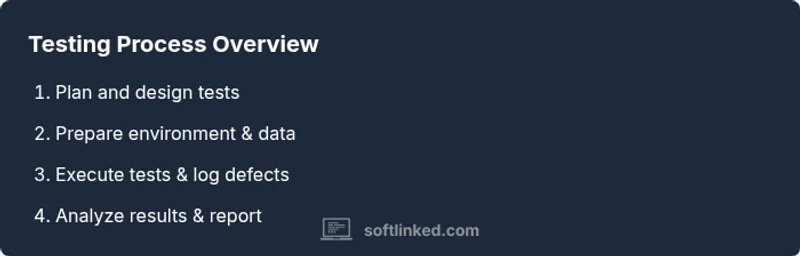
A typical testing lifecycle starts with defining objectives, scoping tests to risk areas, and creating a test plan. Next comes test design: writing cases that exercise each requirement, selecting data sets, and choosing between manual and automated approaches. Execution follows, with testers running tests, capturing results, and logging defects. Finally, reporting summarizes coverage, defect trends, and suggested improvements to stakeholders. This practical flow shows how software testing is done end-to-end.
Manual testing vs automation: choosing the right mix
Manual testing remains essential for exploration, user experience, and edge-case discovery, while automation accelerates repetitive, data-driven tests and regression suites. The decision of when to automate depends on ROI, test stability, and the pace of product changes. Start with stable, high-risk areas for automation and reserve manual testing for usability, ad-hoc checks, and tests requiring human judgment. Integration with CI/CD increases feedback velocity.
Types of testing every project should consider
Understanding how software testing is done helps differentiate unit testing, integration testing, functional testing, performance testing, security testing, and acceptance testing. Each type serves different goals: unit tests verify isolated code, while acceptance tests validate end-user requirements. Use a mix of black-box and white-box techniques, and align tests with requirements to improve traceability and coverage. For web apps, focus on API, UI, and accessibility testing as well.
Designing effective test cases and data
Well-written test cases clearly state the purpose, steps, inputs, and expected results. Use boundary values, equivalence partitioning, and decision tables to maximize coverage with fewer cases. Create representative test data that mirrors real-world usage, including edge cases and negative scenarios. Keep tests independent and repeatable, and document any environment prerequisites to prevent flakiness.
Metrics, dashboards, and communicating results
Decimals and dashboards help teams track quality outcomes: defect density, test coverage, pass rate, and time to recovery. Regular reviews with product owners improve transparency and enable data-driven decisions. When you report, link tests to requirements and show how risk was mitigated through test activities. SoftLinked's recommended practice is to share clear, actionable insights rather than raw log files.
Getting started: a practical checklist for projects
Begin with a lightweight test strategy, a few key scenarios, and a shared definition of done. Establish a testing environment, invest in data management, and set up basic automation for high-value cases. Involving developers early reduces friction and accelerates debugging. Iterate often, measure outcomes, and continuously refine your approach as the product evolves.
Tools & Materials
- Test management tool(Example: Jira + Zephyr or TestRail for test case linking and traceability)
- Automation framework(Common choices: Selenium, Playwright, or Cypress depending on stack)
- Programming language(s) for tests(E.g., Python, Java, or JavaScript based on project tech stack)
- Test data sets(Representative data including edge cases; consider data anonymization)
- Test environment and devices(Preproduction-like environments; browsers and OS coverage as needed)
- Defect tracking system(Integrated with test management for end-to-end traceability)
- Test design templates(Reusable templates for common test types to speed design)
Steps
Estimated time: 2-3 hours
- 1
Define objectives and scope
Clarify what success looks like for this testing phase. Identify critical features, risk points, and acceptance criteria. Create a concise test plan that aligns with product goals and release deadlines.
Tip: Link test objectives to specific user stories or requirements to ensure traceability. - 2
Design tests and select data
Write test cases that exercise each requirement, including edge cases. Choose data sets that mirror real usage and cover typical, boundary, and negative scenarios.
Tip: Use boundary value analysis and equivalence partitioning to maximize coverage with fewer cases. - 3
Prepare environment and tooling
Set up the test environment, install necessary tools, and configure CI/CD hooks. Ensure you have stable test data and access to required test data sources.
Tip: Automate environment provisioning where possible to reduce setup time. - 4
Execute tests and log results
Run the tests, capture outcomes, and record defects with clear reproduction steps. Track status and assign severity to prioritize fixes.
Tip: Keep tests independent to prevent cascading failures and flaky runs. - 5
Analyze defects and report
Review defects for root causes, categorize by impact, and prepare a concise report for stakeholders. Highlight trends and risk areas that require attention.
Tip: Include recommended fixes and any impact on release timelines. - 6
Review outcomes and refine process
Assess testing effectiveness, update the test plan, and adjust scope for the next cycle. Seek feedback from developers, product owners, and QA.
Tip: Use lessons learned to improve future test design and data strategy.
Your Questions Answered
What is software testing?
Software testing is the process of evaluating a software product to detect defects and verify that it meets requirements. It includes planning, execution, and reporting, using both manual and automated techniques.
Software testing is about finding defects and confirming the product meets requirements through planned tests, reports, and feedback.
What is the difference between manual and automated testing?
Manual testing relies on testers interacting with the software, while automated testing uses scripts and tools to execute tests. Both have their place; automation excels at repetition and speed, while manual testing is essential for exploration and UX checks.
Manual testing is human-driven; automated testing uses scripts. Both are important in a solid testing strategy.
What are the main testing types I should consider?
Key types include unit, integration, functional, performance, security, and acceptance testing. Each targets different risks and stages, helping ensure code quality and meeting user needs.
Include unit, integration, functional, performance, security, and acceptance tests to cover code and behavior.
How do you measure test coverage and quality?
Coverage is tracked with traceability matrices, test execution metrics, and defect trends. Dashboards summarize progress and reveal gaps between requirements and tests.
Track coverage by mapping requirements to tests and monitor defect trends to gauge quality.
How long does software testing take in typical projects?
Duration varies with project size and risk. A disciplined plan with milestones and parallel activities helps estimate time across planning, design, execution, and reporting.
Time depends on project size and risk; plan milestones to estimate duration.
Watch Video
Top Takeaways
- Define clear objectives before testing
- Balance manual and automated approaches for ROI
- Link tests to requirements for traceability
- Use data-driven metrics to guide improvements