Windows VPN Software Free: A Practical Guide to Safe Free VPNs
Explore safe, practical guidance on using windows vpn software free, including risks, features to look for, and when to upgrade to paid plans.


According to SoftLinked, evaluating windows vpn software free options means weighing privacy, speed, and limits. Free Windows VPNs often impose data caps, display ads, or maintain questionable logging practices. For most users, free offerings are best for light browsing or testing, while a reputable paid plan or a transparent freemium with clear privacy policies is preferable for sensitive online activity.
What "windows vpn software free" really means
In the Windows ecosystem, free VPN software free options describe a spectrum from truly zero-cost services to freemium and open-source projects. The goal is simple: encrypt your connection and hide your IP address. In practice, free options often come with limits that impact daily use, such as slower speeds, data caps, or limited server locations. According to SoftLinked, evaluating these options requires weighing privacy commitments, performance, and upgrade paths to paid plans or trusted freemium products. For many casual tasks like browsing or testing on public Wi-Fi, a free option can be sufficient, but for streaming, torrenting, or sensitive work, a paid or clearly privacy-focused freemium is usually safer.
Free models on Windows: freemium, open-source, and trial versions
Free Windows VPNs typically fall into three umbrellas: fully free with servers and data limits, freemium where core features are restricted unless you upgrade, and open-source clients that rely on community contributions. Freemium options often display ads or prompt upgrades. Truly free services may impose data caps or slower speeds; however, some open-source Windows VPNs emphasize transparency and allow users to audit code. When testing these options, note provider incentives and data handling policies, because these shape your true privacy and usability.
Privacy and security pitfalls to watch for
Security myths around free VPNs persist, so scrutinize every offer. Look for AES-256 or equivalent encryption, a functioning kill switch, and DNS leak protection. Privacy policies should explicitly state data handling practices and retention periods. Be wary of providers operating outside strong privacy regimes or those that require personal identifiers for signup. Open-source components can improve transparency, but they do not automatically guarantee safety; active maintenance matters. SoftLinked’s research suggests free options often trade privacy for accessibility, so verify policies and test for leaks before trusting them with sensitive tasks.
Data caps, speeds, and reliability
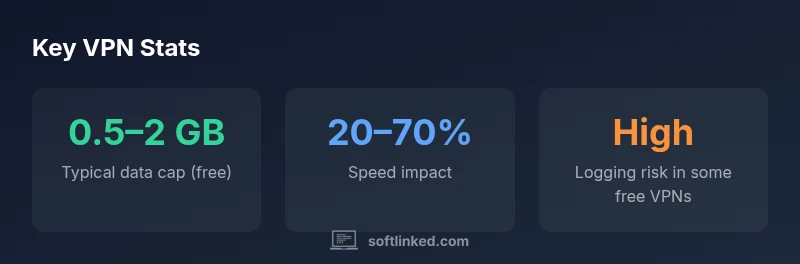
Expect some compromise with free Windows VPNs: data caps can throttle longer sessions, speeds can be inconsistent, and server availability may be limited. The performance gap between free and paid tiers varies by provider, device, and network conditions. For casual browsing or securing a public Wi-Fi connection, the trade-offs can be acceptable; for high-bandwidth activities like streaming in HD or gaming, a paid service usually delivers a steadier, faster experience with broader server access. This reality underscores why SoftLinked recommends evaluating needs before committing to any free VPN.
How to evaluate free Windows VPNs: a 7-point checklist
- Privacy policy and logging: confirm whether the provider logs activity and for how long.
- Jurisdiction: understand legal obligations and data retention requirements.
- Encryption: ensure strong, up-to-date encryption standards are used.
- Leak protection: test for DNS and WebRTC leaks.
- Kill switch: verify it blocks traffic if the tunnel drops.
- Server availability and bandwidth: check the number and location of servers and typical latency.
- Upgrade path: review what features unlock with paid plans and whether data caps persist. This checklist helps separate genuinely privacy-first options from services that merely appear free.
When to upgrade or switch to a paid solution
If you require reliable streaming, secure remote access, or privacy guarantees, upgrading to a paid VPN is often worth the investment. Paid services typically offer more servers, higher speeds, no data caps, and clearer no-logging commitments. For users with sensitive work or personal data, a paid plan reduces risk and improves overall usability, while still allowing a free trial or freemium option to evaluate compatibility.
Practical setup on Windows: step-by-step basics
- Choose a reputable provider and confirm that Windows is supported.
- Download the official Windows client from the provider’s site.
- Install the app and grant necessary permissions.
- Run a quick VPN kill-switch and DNS leak test.
- Connect to a server with acceptable latency and verify your real IP is masked.
- Review the policy and upgrade options before using the service for sensitive tasks.
Alternatives and complementary approaches to privacy
Beyond VPNs, consider end-to-end HTTPS, privacy-minded browsers, and DNS over HTTPS (DoH) to reduce exposure. Exercise good online hygiene: turn off unnecessary cookies, enable tracker blockers, and use multi-factor authentication. If full privacy is required, combine these practices with a reputable paid VPN or a dedicated privacy-focused solution, rather than relying solely on free Windows VPNs.
Myths vs reality about free VPNs
Myth: Free VPNs are as safe as paid services. Reality: Free offerings often lag in privacy commitments and performance. Myth: A single server is enough for all activities. Reality: Server diversity reduces throttling and improves access; free options often limit this. Myth: Open-source guarantees safety. Reality: Transparency helps, but ongoing maintenance and governance matter.
Comparison of free Windows VPN options
| Aspect | Free option note | Impact/Limitations |
|---|---|---|
| Privacy & Data Policy | Often unclear, may log | Higher privacy risk |
| Data Caps | Common data cap ranges | Limits usage & devices |
| Speed & Stability | Often slower connections | Unreliable for streaming |
| Support & Updates | Limited support | Security risk if not updated |
Your Questions Answered
What does 'free' mean in a Windows VPN?
Free VPNs can be fully free, freemium, or open-source. Each model has trade-offs in features, performance, and privacy. Always review terms and testing results before relying on a free option for sensitive tasks.
Free VPNs come in several forms—fully free, freemium, or open-source—and each has different privacy and performance trade-offs.
Are free Windows VPNs safe to use for streaming?
Some free VPNs unblock content, but many are slow or unreliable and may block streaming services. For consistent access, a reputable paid plan is usually necessary.
Streaming with free VPNs is often unreliable; consider a paid option for steady access.
Do free VPNs log user data?
Logging policies vary widely; some free services collect data for ads or analytics. Always read the privacy policy and consider data retention details before using.
Logging varies; read the privacy policy to understand what is collected.
What should I look for in a free Windows VPN?
Look for transparent no-logs promises, AES-256 or better encryption, DNS leak protection, a working kill switch, and a clear upgrade path with reasonable terms.
Choose strong encryption, leak protection, and a clear upgrade path.
Is there a privacy risk with open-source Windows VPN clients?
Open-source can improve transparency, but safety depends on active maintenance and governance. Verify updates and community trust before adopting.
Open-source helps transparency, but maintenance and governance matter.
When should I upgrade to a paid VPN?
Upgrade when you need reliable speeds, broader server access, and stronger privacy guarantees. Paid plans often remove data caps and improve security.
Upgrade when you need reliability and stronger privacy.
“Free VPNs can be a useful entry point for learning VPN basics, but they rarely match paid providers in privacy guarantees or reliability. Always read the privacy policy and test for leaks before trusting them with sensitive tasks.”
Top Takeaways
- Prioritize privacy policies before speeds.
- Expect data caps and slower speeds with free VPNs.
- Open-source options offer transparency but vary in maintenance.
- Choose reputable freemium or paid plans for critical tasks.
- Test for leaks and review upgrade paths before relying on a VPN.