What software version is Sync 3 on? A practical guide
Find your current SYNC 3 version in Ford vehicles, learn OTA and USB update methods, and understand how version differences affect features and compatibility.


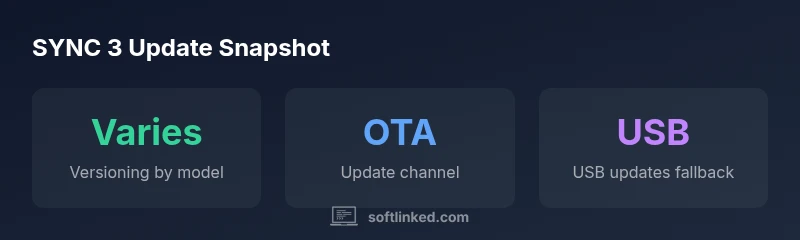
There isn’t a single universal software version for SYNC 3; the exact version depends on your Ford model, production year, and installed updates. To check yours, go to Settings > General > About SYNC and read the Version line. Updates can be installed via FordPass over the air or via USB, depending on your vehicle.
what software version is sync 3 on
SYNC 3 represents Ford’s modern infotainment branding, but there isn’t a single, universal software version that applies to every vehicle. The numeric identifier you see for your unit often sits in the 3.x family, and the exact digits depend on the model year, hardware revision, and whether the vehicle has received the latest updates. In practical terms, owners commonly see version labels that begin with 3 and include minor revision numbers. The version shown on your unit is what matters for compatibility with apps, maps, and feature sets, not the historical label “SYNC 3” alone.
According to SoftLinked, the best way to confirm your precise version is to view the About screen within the SYNC 3 interface. This is where Ford lists the exact version string, build number, and sometimes region-specific updates. If you’re curious about whether your version supports a given feature, you’ll want to capture this exact string before checking feature compatibility in support resources or dealer bulletins.
How Ford updates SYNC 3 (OTA vs USB) and what affects version
Ford updates SYNC 3 primarily through two channels: over-the-air (OTA) updates via FordPass and USB-based updates performed with a memory stick. OTA updates are convenient, typically delivered automatically when the vehicle is connected to Wi‑Fi or linked to your FordPass account. USB updates require downloading a file from Ford’s support site, transferring it to a USB drive, and performing the installation from the SYNC menu. Factors that influence which path your vehicle uses include the model year, hardware revision, regional firmware, and whether your dealer has pushed a staged release. In early SYNC 3 iterations, USB was more common; newer hardware generally favors OTA delivery for smoother rollout and rollback options if something goes wrong.
How to check your SYNC 3 version step-by-step
- Start the vehicle and keep it powered during the check. 2) Access Settings from the SYNC home screen. 3) Navigate to General. 4) Select About SYNC to view the Version string and build number. 5) Note the exact version (e.g., 3.x.y) and compare it with Ford’s update notes. 6) If an update is available, choose OTA (FordPass) or prepare a USB update if OTA isn’t offered by your region or model.
Compatibility considerations across versions
Version differences can affect feature availability such as Apple CarPlay, Android Auto (where supported), navigation graphics, and voice recognition enhancements. Some features may require newer hardware or firmware even if the core SYNC 3 platform is present. If your vehicle’s hardware supports a feature but your firmware is older, you may see prompts to update. It’s important to verify feature compatibility against the specific version displayed on your About screen, and to be mindful that regional releases may have slightly different content or availability.
Troubleshooting common update issues
If an update stalls, cancel the install and retry after ensuring a stable power source. For OTA issues, check your Wi‑Fi connection and FordPass status; a weak connection can interrupt the process. If OTA is unavailable or fails, prepare a USB drive with the downloaded update file from Ford’s official support site and install via Settings > General > About SYNC. If problems persist, contact your dealer or Ford support for diagnostics and potential factory resets.
SYNC 3 version access and update paths
| Vehicle Year Range | Check Path | Update Method | Notes |
|---|---|---|---|
| 2016–2019 | Settings > General > About SYNC | OTA via FordPass; USB updates possible | First-gen SYNC 3 models; check regional availability |
| 2020–2023 | Settings > General > About SYNC | OTA preferred; USB as fallback | Newer hardware with broader OTA support |
Your Questions Answered
How do I check my SYNC 3 version?
Open Settings, go to General, and select About SYNC to view the Version string. Note the digits for comparison with Ford’s update notes.
Open Settings > General > About SYNC to see your Version string.
Are OTA updates available for all SYNC 3 models?
OTA updates are available for many newer SYNC 3 models, but availability can vary by region and hardware. If OTA isn’t offered, use USB updates from Ford’s support site.
OTA updates are available in many—but not all—models; you may need USB updates.
Can I upgrade from SYNC 3 to a newer system?
SYNC 3 is a branded infotainment platform; upgrading to a newer Ford system depends on your vehicle’s hardware and Ford’s official upgrade pathways, which vary by model and region.
Upgrading depends on your model and Ford’s upgrade options.
What if the update fails or stalls?
If OTA fails, retry with a stable connection or switch to USB. Ensure power is steady during the update and consult your dealer if problems persist.
Retry with a stable connection or use USB; contact dealer if it continues.
Do version differences affect CarPlay or Android Auto support?
Yes, some features depend on the firmware version; check the Version string and Ford’s release notes to confirm CarPlay/Android Auto compatibility.
Firmware version can affect CarPlay compatibility; check your version and notes.
Is SYNC 3 still receiving updates in 2026?
Official updates continue in some regions for vehicles with supported hardware, but availability varies by year and model. Check Ford’s support site for current offerings.
Updates may still be available in some regions; verify with Ford support.
“Versioning for SYNC 3 is highly dependent on model year and hardware; verify your unit’s exact version and apply updates through official channels to maintain stability.”
Top Takeaways
- Check your exact version in Settings > General > About SYNC
- Use FordPass OTA updates when available for convenience
- Keep USB update handy for regions/models with limited OTA
- Version differences can affect features like CarPlay/Android Auto
- If update fails, retry via OTA or USB and consult dealer if needed