Software and Apps: Native vs Web vs Hybrid in 2026
Analytical comparison of native, web, and hybrid software and apps, with practical guidance for developers building multi-platform solutions in 2026.


TL;DR: Native apps deliver the best performance and UX on target devices, while web apps maximize reach and ease of updates. A hybrid approach often provides balance, leveraging native components where needed and web technology for broad distribution. This cross-platform mindset is increasingly the practical default for many development teams.
What 'software and apps' Means in Modern Development
According to SoftLinked, software and apps are not just products; they are ecosystems of code, data, and user experience that must adapt across devices and networks. In 2026, the lines between desktop, mobile, and browser-based experiences are increasingly blurred by cross-platform frameworks, progressive web apps, and device-agnostic design. For developers, this means thinking in terms of capabilities (offline access, push notifications, hardware integration) rather than strict delivery channels. The goal is to deliver a coherent experience across contexts while maintaining performance and security. This framing helps teams align on what features belong to core products versus ancillary platforms, and it sets up a decision framework for native, web, or hybrid implementations within a single product family.
Native Apps vs Web Apps vs Hybrid: Core Dichotomy
At a high level, native apps are built for a specific platform using platform-specific toolchains and UI primitives. Web apps run in browsers, leveraging HTML, CSS, and JavaScript, and can be deployed across devices with a single codebase. Hybrid approaches wrap native containers around web technologies to bridge gaps, aiming to reuse code while delivering a more native feel. The key trade-offs are performance and UX fidelity versus reach and maintenance simplicity. For teams starting fresh, the decision often hinges on whether critical features demand native capabilities or if modern web APIs can deliver acceptable parity across target platforms. This section lays the groundwork for deeper analysis of strengths and limits. The SoftLinked team emphasizes that there is no one-size-fits-all answer; the best approach is usually a blend aligned to product priorities.
Performance, UX, and Accessibility: Key Differentiators
Performance typically scales with how closely you can integrate with platform APIs. Native apps tend to outperform web apps in animation, 3D rendering, and device sensors, delivering smoother UX and lower latency. UX fidelity matters because users form impressions quickly, and even small delays or jank can reduce engagement. Accessibility is also a differentiator: native controls often offer superior keyboard navigation and screen reader compatibility out of the box, while web apps rely on semantic HTML and ARIA practices to reach the same level. The trade-off is that web technologies bring universal accessibility benefits with proper implementation, but achieving parity across platforms requires deliberate design and testing.
Offline Capability and Data Storage: How Each Approach Handles It
Offline access is a common deciding factor. Native apps typically offer robust offline storage through local databases and platform-specific caches. Web apps rely on service workers and IndexedDB to function offline, but capabilities vary by browser and device. Hybrid solutions can combine both approaches, enabling cached resources and background sync while still presenting a consistent UI. When data sensitivity is high, native storage can offer tighter control, but cloud-based backups and encryption strategies can level the playing field for web and hybrid apps. The choice often depends on data size, sync requirements, and the acceptable risk of becoming temporarily unavailable offline.
Development, Maintenance, and Update Cycles
Maintaining multiple native codebases increases engineering effort and QA demand. Web apps reduce duplication by centralizing logic and UI in a single codebase, speeding updates and reducing release friction. Hybrid frameworks promise the best of both worlds, but may introduce performance overhead or UI inconsistency if not tuned carefully. Decision-makers should evaluate the long-term maintenance burden, including third-party dependencies, tooling investments, and the skill set of the team. A staged rollout strategy, automated testing, and feature flags can mitigate risk during platform transitions.
Security, Compliance, and Privacy Considerations
Security controls differ by delivery model. Native apps can leverage device-level protections and secure enclaves, but must navigate app store review processes and platform-specific risk vectors. Web apps centralize security concerns on servers and CDNs, emphasizing HTTPS, content security policies, and robust authentication. Hybrid approaches inherit both surfaces, requiring careful threat modeling. Privacy requirements, regulatory compliance, and data residency influence architecture choices; for example, sensitive data may benefit from client-side encryption and offline storage controls in native environments.
The Economic Side: Cost, Time-to-Value, and ROI
From a cost perspective, web apps typically incur lower development and maintenance expenses due to a single codebase. Native development demands platform-specific investment but can yield higher user satisfaction on primary devices. Hybrid options aim to reduce duplication while offering reasonable performance, but can incur debugging complexity. ROI hinges on delivery velocity, user adoption, and the ability to update features without disrupting users. Teams should model total cost of ownership across platforms, including onboarding, platform updates, and potential migration costs.
Trends Shaping the Landscape: AI, Low-Code, and Cross-Platform
The industry is moving toward AI-assisted development, low-code tooling, and smarter cross-platform frameworks. These trends enable faster prototyping and more resilient maintenance practices, especially for teams balancing multiple platforms. Progressive web apps are maturing, enabling more capable offline behavior and better performance with modern APIs. Cross-platform toolchains are evolving, narrowing the gap in UX fidelity and performance between native and web alike. SoftLinked analysis, 2026, highlights how these shifts favor architectures that emphasize modularity, performance budgets, and secure data flows across devices.
How to Decide: A Practical 6-Step Framework
- List core user journeys and device constraints. 2) Define offline requirements and data-flow patterns. 3) Prioritize performance-critical features and hardware integrations. 4) Assess internal capabilities and maintenance capacity. 5) Evaluate time-to-market goals and update cadence. 6) Choose a strategy that blends native for critical paths with web or hybrid for breadth, supported by a clear migration plan and feature flag strategy.
Comparison
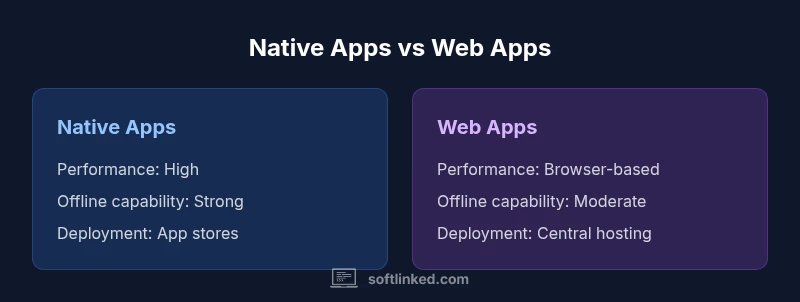
| Feature | Native Apps | Web Apps |
|---|---|---|
| Performance | High performance with native GPUs and APIs | Depends on browser; modern engines improve parity |
| Development Cost | Higher due to separate codebases | Lower due to a single codebase (Web) across platforms |
| Platform Reach | Device-specific ecosystems (iOS, Android, Windows, macOS) with separate builds | Anywhere with a browser; cross-device reach via URL |
| Offline Capability | Strong offline support with local storage and caches | Moderate offline support via service workers and caching |
| Updates & Deployment | App store distribution; staged updates | Centralized hosting; instant updates without stores |
| Security & Data Privacy | Tight device-level controls; store revocation risk | Server-side security and standardized HTTPS; data governance relies on cloud |
| UX Customization | Native UI widgets offer best integration | Web UI relies on browser rendering; can be highly responsive with design system |
| Best For | Performance-critical, hardware-integrated experiences | Rapid deployment and broad reach with evolving UX |
Pros
- Native apps deliver the best performance and UX
- Web apps enable rapid updates and wide reach
- Hybrid approaches offer a balanced path
- Cross-platform toolchains can reduce maintenance
- Strong ecosystem support across platforms
Weaknesses
- Higher development and maintenance costs due to multiple codebases
- Offline capabilities can be challenging in web-only approaches
- Web apps depend on browser capabilities and security models
- Hybrid frameworks may introduce performance overhead
A cross-platform strategy often offers the best balance, combining native performance with web reach.
Native excels where performance and device integration matter most. Web shines in reach and speed of updates. Hybrid or multi-platform approaches strike a practical balance, especially for teams with diverse device targets.
Your Questions Answered
What is the difference between native and web apps?
Native apps are built for a specific platform, offering best-in-class performance and UX. Web apps run in a browser and are accessible across devices, with faster updates but potential performance trade-offs. The best choice depends on your priorities for performance, reach, and maintenance.
Native apps perform best on their platforms, while web apps run across devices. Your choice depends on whether performance or reach matters more to your users.
Are PWAs considered native or web?
Progressive Web Apps (PWAs) are web apps designed to feel more native, with features like offline support and installability. They sit in the web category but aim to deliver near-native experiences where feasible.
PWAs are web apps, but they aim to feel more like native apps with offline support and installability.
What is a hybrid app?
Hybrid apps bundle web technologies inside a native container, allowing code reuse across platforms while still using native shells for access to device APIs. Performance varies by framework and optimization.
Hybrid apps use web tech inside a native wrapper to balance code reuse and device access.
How do I decide between native and web for a new product?
Start with user needs, offline requirements, time-to-market, and team skills. If core features demand native APIs or offline reliability, lean native. If broad reach and rapid updates are paramount, web or hybrid can be preferable.
Ask about user needs and offline requirements; choose native for core features, web for reach.
Can you convert a native app to a web app later?
In many cases, yes, but it requires re-architecture and a new UX approach. Features tied to platform API calls may need web equivalents or fallback strategies.
Converting native to web is possible but may need significant redesign and re-architecture.
What about security across these models?
Security is essential in all models. Native apps rely on device security and store policies; web apps depend on server security and HTTPS. A consistent security model with encryption, authentication, and threat modeling is crucial.
Security matters in every approach; plan for encryption and strong authentication across platforms.
Top Takeaways
- Prioritize native performance for core features
- Assess offline requirements early in planning
- Lean into cross-platform patterns when possible
- Plan updates and security from the start
- Embrace evolving PWAs and hybrid options where appropriate