How to Put Software in Resume: A Practical Guide
Learn a clear, step-by-step method for adding software skills to your resume. This guide covers where to place skills, how to describe proficiency, and how to tailor content for tech roles while passing ATS checks.


This guide shows you how to put software in resume effectively, including where to list tools, how to describe proficiency, and how to tailor examples for target roles. You’ll learn practical wording, ATS-friendly formatting, and how to demonstrate impact with concrete evidence.
Why software proficiency on your resume matters
According to SoftLinked, clear evidence of software skills helps recruiters gauge relevant capability quickly and reduces ramp-up time for new hires. When you ask yourself how to put software in resume, you’re answering two questions: what you can do with software, and how well you did it in real work. Hiring managers scan for recognizable tools, environments, and workflows that align with the role. Explicitly listing software proficiency also supports applicant tracking systems (ATS) by inserting keywords the job description prioritizes. In this section you’ll see how to categorize, present, and contextualize software skills so they add measurable value rather than taking up space. The goal is to demonstrate practical ability, not just familiarity. By the end, you’ll have a framework for presenting software, from basic productivity tools to complex development stacks, in a way that makes sense to humans and machines alike.
Core vs auxiliary software skills
Not all software tools carry the same weight for every role. Core tools are the ones you expect a hiring manager to require for the job (for example, Git for developers, SQL for data roles, or Docker for cloud-native positions). Auxiliary tools are useful in some contexts but aren’t primary requirements (for instance, advanced Excel features for data analysts who also code, or project-management apps for engineers). Distinguish these categories in your resume so readers quickly see confidence in the essentials while still signaling breadth. When you describe core tools, pair them with a concrete outcome to prove your competency. For auxiliary tools, mention context (team size, project type) to show relevance without overloading the reader.
Where to place software skills on a resume
Placement matters as much as content. The most common strategy is to include a dedicated Skills section listing tools and platforms, followed by a brief Projects or Experience section where you showcase hands-on use. For highly technical roles, consider a Core Skills subsection at the top of the resume to ensure the most relevant software is visible within the first screen. You can also weave software mentions into bullet points under Experience, emphasizing measurable outcomes achieved with those tools. When tailoring for a specific job description, align the tools you list with the keywords in the posting, then back each tool with context and impact to avoid textureless lists.
Describing proficiency: levels, evidence, and examples
Use clear, standardized descriptors like Beginner, Intermediate, Advanced, or Expert to communicate your level of mastery. Always tie a level to concrete evidence: a project, a milestone, or a measurable outcome. For instance, instead of saying I am proficient in Python, write: "Advanced Python, used to automate data pipelines processing 2M records weekly". Include years of experience when relevant, but avoid arbitrary numbers that don’t reflect actual capability. In addition to self-assessment, reflect endorsements from peers or supervisors when possible, and mention how you kept skills current (courses, certifications, or hands-on practice).
Tailoring software details to target roles
Different roles demand different toolsets. A software engineer might highlight Git, Docker, Kubernetes, and CI/CD pipelines; a data scientist will emphasize SQL, Python, Jupyter, and visualization tools; a front-end developer could feature React, TypeScript, and webpack. For DevOps, focus on cloud platforms, orchestration, and monitoring tools. The key is to map tools to job requirements and illustrate their impact in concrete terms. When crafting bullets, start with a verb (Built, Automated, Implemented, Optimized), name the tool, and quantify the result when possible. This targeted approach increases relevance and helps recruiters quickly see fit.
Quantifying impact with software use
Numbers speak loudly on resumes. Instead of listing tools, show what you achieved with them: percentage improvements, time savings, or quality gains. For example: "Reduced deployment time by 40% through automated CI/CD pipelines using GitHub Actions and Docker." Or, "Cut data processing time from 4 hours to 90 minutes by implementing SQL-based ETL with Apache Airflow." If you lack exact metrics, cite leading indicators like % improvement, error rate reductions, or user adoption growth. Quantification is a powerful differentiator.
ATS optimization and readability
ATS-friendly resumes use explicit keyword matches; avoid excessive synonyms and implicit claims. Mirror the job description’s phrasing for software names and roles, but maintain natural language and human readability. Use bullet lists with concise lines and avoid dense paragraphs. Group related tools, and separate core from optional tools. Finally, keep formatting clean: consistent capitalization, no unnecessary abbreviations, and a uniform bullet style. The aim is to ensure ATS parsing accuracy while delivering a compelling story to human readers.
Common mistakes to avoid
Common errors include overloading the Skills section with tools unrelated to the job, exaggerating proficiency, or listing tools you haven't actually used in a meaningful way. Another pitfall is failing to tie tools to outcomes, which makes any skill feel abstract. Beware inconsistent terminology (e.g., listing Docker as both Docker and docker). Lastly, avoid cluttering the resume with every tool you’ve touched; curate a focused, job-relevant set and replace items as you target different roles.
Real-world resume examples for different roles
Here are quick real-world style bullets for distinct roles. For a Software Engineer: "Advanced Python and Git experience; built automation that reduced release cycle time by 30% using Jenkins and Docker." For a Data Analyst: "SQL, Python, and Tableau used to deliver weekly dashboards affecting decision-making for the marketing team; automated data pulls reducing manual effort by 60%." For a Front-end Developer: "React, TypeScript, and Webpack to deliver responsive UI components; performance improvements reduced load time by 25% across key pages." These examples show formatting consistency, action verbs, and outcomes that resonate with hiring managers.
Next steps: review, feedback, and ongoing updates
Resume writing is iterative. After drafting your software-related bullets, seek feedback from peers or mentors in your target field. Compare against multiple job descriptions and systematically tailor each resume version to the roles you pursue. Maintain a running log of tools you’ve used, the projects they supported, and the measurable outcomes, so you can quickly refresh your resume for new opportunities.
Tools & Materials
- Laptop or computer(For drafting and formatting; ensure spell-check and export options)
- Word processor or resume editor(Prefer ATS-friendly formats like .docx or .pdf; avoid heavy styling)
- Job description or target postings(To tailor keywords and tool names to the role)
- ATS-friendly keywords list(Compile common software/tool terms for your target domain)
- Feedback from peers or mentors(Helpful for realism and clarity; not strictly required)
Steps
Estimated time: 1-2 hours
- 1
Define scope of software skills
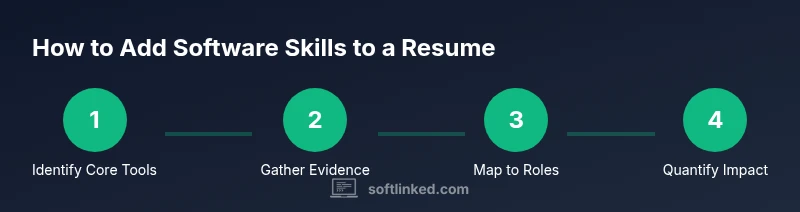
Identify core tools essential to the role and any domain-specific software that adds value. This helps you avoid overloading the resume with irrelevant items and ensures alignment with the job description.
Tip: Start with 5–7 core tools; add up to 2–3 secondary tools if highly relevant. - 2
Gather evidence of use
Collect project artifacts, dashboards, scripts, or deployment records that demonstrate practical use. This evidence will back up your bullets and show real-world impact.
Tip: Link projects or include brief citations to show context. - 3
Map tools to job requirements
Cross-reference the job description with your tool set. Prioritize tools that appear in the posting and tailor bullets to highlight those capabilities.
Tip: Reorder bullets so the most relevant tools appear first. - 4
Draft results-focused bullets
Write bullets that start with action verbs and include tool names, outcomes, and, when possible, numbers. Avoid generic statements.
Tip: Use the format: Verb + Tool + Outcome + Metric (where available). - 5
Quantify impact where possible
Add metrics like time saved, efficiency gains, error reductions, or user adoption. If you don’t have exact numbers, use ranges or leading indicators.
Tip: If you can’t quantify, quantify the effort or scope instead. - 6
Ensure ATS readability
Structure bullets for quick scanning: one bullet per tool or per outcome; use standard tool names and avoid abbreviations that ATS may misread.
Tip: Use consistent capitalization for tool names. - 7
Seek feedback and revise
Have a colleague review your resume to catch blind spots and ensure clarity. Update the document for each role you target.
Tip: Take notes on suggested changes and re-run them across all role-targeted versions.
Your Questions Answered
Should I list every software tool I know?
No. Focus on tools that are relevant to the target role and that you can demonstrate with evidence. Irrelevant tools clutter the resume and dilute impact.
Only include tools that match the job and you can prove you’ve used effectively.
How should I describe my proficiency levels?
Use standard levels like Beginner, Intermediate, Advanced, or Expert. Pair each level with concrete examples or outcomes so the reader understands what the level means in practice.
Describe levels clearly, with real-world examples.
Where is the best place to put software skills?
Place core tools in a Skills or Core Skills section at the top of the resume, and integrate project-related tool usage within Experience or Projects bullets.
Put core tools at the top, and show usage in projects.
Can I quantify the impact of software usage?
Yes. Include metrics like time saved, throughput, or error reductions to demonstrate value. If exact numbers aren’t available, use ranges or relative improvements.
Quantify impact with numbers whenever you can.
What are common ATS mistakes to avoid?
Avoid generic phrasing, inconsistent tool names, and overcrowded sections. Use job-description keywords and ensure exact tool names appear as in the posting.
Stick to exact tool names and keywords that appear in the posting.
How often should I update software skills on my resume?
Review and refresh your resume whenever you learn a new tool or complete a notable project. Periodic updates help you stay ready for opportunities.
Update your resume whenever you gain new tools or complete notable projects.
Watch Video
Top Takeaways
- Define core vs. auxiliary tools.
- Anchor each tool with outcome-driven bullets.
- Tailor content to each job description.
- Use ATS-friendly keywords and consistent formatting.
- Quantify impact to enhance credibility.