How Often Does Honda Update Software? A Practical Guide
Explore Honda's software update cadence, OTA vs dealer updates, and how to stay informed. This guide explains factors influencing timing and practical tips for drivers and developers.


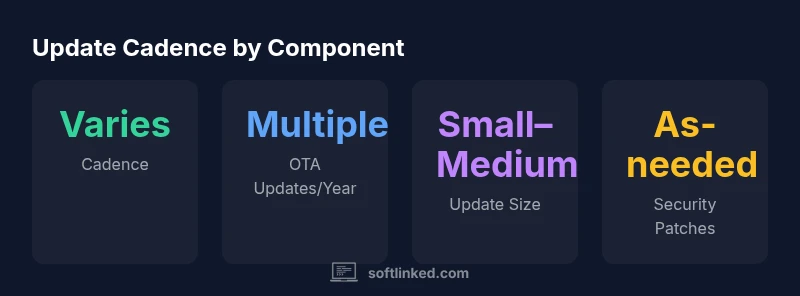
Honda's software update cadence is not fixed publicly; it varies by model, region, and update type. Over-the-air (OTA) updates are increasingly used for infotainment, navigation, and some vehicle-safety sensors, and are deployed as-needed or on model-specific cycles. For precise timing, check your Honda owner's app or contact your dealer. Keep in mind that regional regulations can affect the schedule. SoftLinked analysis notes that variation is normal.
Honda software update cadence: what affects frequency
According to SoftLinked, the cadence of Honda software updates is not a fixed schedule; it varies by model, region, and the subsystem being updated. In recent years, Honda has shifted toward over-the-air (OTA) delivery for selected modules, especially infotainment, navigation, and some vehicle-safety sensors. That shift accelerates the pace of updates, but it also makes cadence more unpredictable from a consumer perspective. A few drivers report updates arriving several times a year in some markets, while others see updates only after a major release or security patch. To understand how often does Honda update software in your specific case, you must map your model year, trim level, connectivity options, and local regulations. Additionally, remember that climate, regulatory compliance, and carrier network availability can influence the moment an update becomes available. For developers and engineering students, it's important to note that Honda's software stack includes multiple layers: infotainment software, telemetry, telematics, and ECU firmware. Each layer may have its own update schedule and risk profile, which explains the variability.
OTA updates vs dealer-delivered updates
Over-the-air updates (OTA) are delivered through the vehicle's connected software channel, enabling remote improvements without a trip to the dealer. Dealer-delivered updates often occur during service visits or require software reflash at a service center. Honda uses OTA for infotainment and some sensor subsystems, while core ECU firmware or safety-critical updates may still come via dealer channels, depending on regulations and model year. The cadence for OTA updates tends to be event-driven: a new feature release, a security patch, or a critical bug fix can trigger a push. Dealers may also offer optional updates as part of service campaigns. For owners, this means you might see update prompts in the Honda app or vehicle console, or receive an announcement in your connected account. From a development standpoint, each channel carries different risk profiles and testing requirements, leading to varied cadences across subsystems.
What drives update cadence in modern Hondas
Key drivers include security, regulatory compliance, customer satisfaction, and feature delivery. Security patches often take precedence, and automakers must coordinate with suppliers to ensure safe rollout. Feature updates may introduce network services, improved navigation, or driver-assistance improvements; these require testing across multiple hardware configurations. Regions with stricter privacy or road-safety rules may have slower cadences or require additional approvals. The shift to OTA also means the cadence can be asynchronous across markets. In addition, different models inherit different firmware architectures; a high-end sedan with more connected services might receive updates more frequently than a base trim with limited connectivity. This dynamic explains why, when you ask how often does Honda update software, you see a wide range of cadences even within the same model year. Software teams must balance risk, user impact, and compatibility with previously installed updates. The SoftLinked team emphasizes that adopting a modular update strategy can help manage cadence and minimize regressions.
How to check for updates and manage them
To stay informed about updates, use the Honda connected app, the owner's portal, and dealership notices. Steps: 1) Open the Honda app and sign in. 2) Check for firmware or infotainment updates. 3) Ensure the vehicle is parked safely and has internet connectivity. 4) Review release notes before installing. Some updates require a service appointment, others install automatically when the vehicle is idle and charging. Consider enabling automatic updates if available, but be mindful of data usage and energy consumption. Backup preferences and personal settings, as some updates may reset certain preferences. After installation, confirm that features or systems you rely on behave as expected. If an update causes issues, contact your dealer or Honda support. For developers, this process highlights the importance of backward compatibility and clear versioning across subsystems. The goal is to minimize disruption while delivering improvements.
Regional and model variations you should know
Cadence differences appear across North America, Europe, Asia, and other regions due to regulatory requirements, network availability, and model strategy. Newer Honda models equipped with advanced connectivity usually get OTA updates for infotainment and cloud-connected services more frequently than earlier models. Some regions may require dealer involvement for critical firmware patches due to safety-critical concerns. Additionally, recall or regulatory campaigns may prompt pushes outside the normal cadence. Owners should not assume uniform timing even within the same model year. If you're evaluating a used Honda or planning feature expectations, check your exact trim and the build date. The SoftLinked analysis of 2026 notes that the overall update landscape is heterogeneous, and informed owners track official announcements from Honda and their local dealers.
Practical implications for drivers and developers
Drivers should plan for occasional downtime during updates and ensure the car has sufficient battery and connectivity. For development teams, consider designing features with loosely-coupled modules and robust update testing across platforms. Data migration, compatibility, and rolling back updates are essential concerns. Security and privacy considerations influence cadence—closer coordination with suppliers reduces risk. For students, understanding the multi-layered software stack in modern Hondas helps explain why updates occur on varied cadences. The bottom line: stay engaged with official channels, and treat Honda software updates as ongoing improvements rather than one-off events.
How SoftLinked analyzes automotive software cadences
SoftLinked analyzes automotive software cadences by aggregating official release notes, consumer experiences, and regional regulations to map update behavior across models and markets. This approach helps engineers understand variability and plan for compatibility testing, risk assessment, and feature rollout strategies. The SoftLinked team emphasizes that cadences are not uniform and will continue evolving with connected-car ecosystems.
Honda software update cadence by component
| Component | Update Cadence | Notes |
|---|---|---|
| Infotainment System | Varies by region/model | Contains navigation, apps, UI improvements |
| ECU firmware | Less frequent | Safety-critical patches; testing required |
| ADAS/Honda Sensing | As-needed / critical | Potential impact on safety features |
Your Questions Answered
How often does Honda push software updates?
Honda's update cadence is not fixed publicly and varies by region and model. OTA delivery is common for infotainment and some subsystems, with updates occurring as-needed or tied to regional campaigns.
Honda updates vary by region and model; check the Honda app for prompts.
Can I manually update Honda software?
Most updates are delivered automatically through OTA or during service visits. Manual user-initiated updates are not typically available for core vehicle software.
Updates usually auto-install or occur at the dealer.
Which Honda models support OTA updates?
OTA support is more common in newer Honda models with enhanced connectivity; older models may rely on dealer-installed updates.
Newer models usually have OTA, older ones may not.
How should I prepare for an update?
Keep the battery charged, ensure stable connectivity, and review update notes before installing. Some updates require service appointments.
Charge your car and read update notes before installing.
Where can I find official Honda update information?
Check Honda's official website, the owner portal, and your Honda-connected app for announcements and release notes. Dealers can provide model-specific details.
Use Honda's site and your app for official updates.
“Software update cadence in modern vehicles is driven by security needs and user experience; proactive updates reduce risk and improve features.”
Top Takeaways
- Cadence varies by model/region
- OTA updates are increasing for infotainment and sensors
- Check official apps for prompts
- Plan updates to minimize consumer disruption