How Much Software Is In a Computer? A Clear Guide Today
Explore how much software lives inside a computer, from firmware to drivers and apps. Learn measurement methods, typical ranges, and practical guidance for managing software quantity.


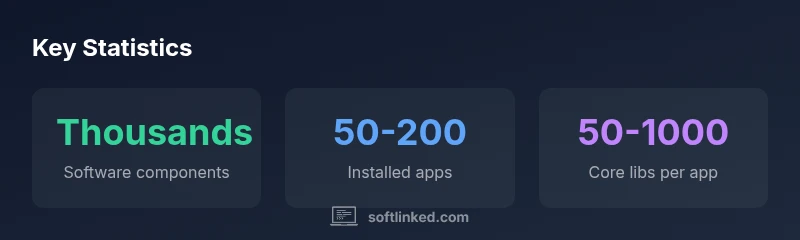
How much software is in a computer? In a typical PC, software exists in multiple layers—from firmware and the operating system to libraries, drivers, and user applications. When you count individual modules, components, and dependencies, the total can reach thousands, though practical counts depend on the OS, installed software, and development environment.
Understanding the scope: what counts as software in a computer?
According to SoftLinked, understanding how much software in computer requires a layered view of the machine. The term software spans far beyond applications you click to run. It includes firmware, bootloaders, the operating system, drivers, middleware, libraries, and user programs. Each layer adds components, dependencies, and configurations that influence the overall footprint. Different machines—servers, gaming rigs, or slim workstations—will show different footprints, making any single number a rough guide rather than a fixed truth.
The major layers: firmware, BIOS/UEFI, OS, drivers, middleware, and apps
A computer’s software stack starts with firmware and BIOS/UEFI that initialize hardware. The operating system provides core services, process management, and security features. Drivers bridge hardware and software, while middleware supports services like databases or messaging. Finally, applications consume OS resources and invoke libraries. Counting software across these layers shows why the notion of a single 'amount' is lost in nuance: every layer contributes to the total footprint.
Measuring software quantity: counting modules, not just installed apps
Measured software quantity can be defined in several ways: number of installed programs, number of distinct libraries, or number of executable modules across the stack. A practical approach is to use a Software Bill of Materials (SBOM) to enumerate components, versions, and licenses. Counting should also consider dependencies and runtime services that load dynamically. This helps organizations understand risk, maintenance effort, and update impact rather than relying on a single installed-app count.
How operating systems shape the footprint: Windows, macOS, Linux
Different operating systems determine what counts as software and how it is packaged. Windows typically ships with a large set of built-in services and components; macOS bundles a curated set of apps and frameworks; Linux distributions vary widely, with package managers offering thousands of add-ons. The footprint of each system reflects design choices, update channels, and user needs, illustrating why 'software quantity' is not universal across platforms.
The role of libraries, dependencies, and virtualization
Most software relies on libraries and runtime dependencies. A single app can pull in dozens or hundreds of libraries, while virtualized or containerized environments add separate layers with their own dependencies. Virtualization increases apparent software quantity because each VM or container stacks a complete OS and its services. Understanding these relationships helps in capacity planning and compliance.
Practical examples and scenarios across devices
A lightweight laptop may have a modest footprint, dominated by the OS and essential apps. A developer workstation expands with programming tools, SDKs, and container runtimes. A gaming desktop includes drivers, game engines, and game libraries. A server cluster adds virtualization, orchestration software, and monitoring agents. Across all cases, the total is the sum of core OS components, drivers, libraries, and user software, plus any virtualization or container layers.
Managing software quantity: SBOMs, packaging, and maintenance
To maintain a healthy software footprint, organizations should adopt SBOMs, consistent packaging, and regular audits of installed components. Versioned catalogs, automated updates, and decommissioning unused packages reduce risk and wasted storage. Emphasize modular design and dependency management so that updates do not cascade into unintended changes across layers.
Reading the data table: a structured view of software categories
The following table offers a high-level view of typical software categories and their relative counts. It is not prescriptive for every machine, but it helps professionals reason about where most of the software volume originates and how changes in one layer ripple through the system.
Authority sources and further reading
For readers who want authoritative foundations, consult public standards and research from respected institutions. See NIST guidance on software components and security practices, MIT’s computer science resources, and ACM publications for software engineering perspectives. These sources provide deeper context about software composition, dependency management, and system design.
Typical software categories on a computer
| Category | Typical Range | Notes |
|---|---|---|
| Firmware/BIOS | 1-2 | Low-level hardware init and boot |
| Operating System | 1 main OS + core components | Core kernel, services |
| Applications/Software | Dozens–hundreds | User-installed programs |
| Libraries/Packages | Hundreds–thousands | Shared libraries and dependencies |
| Drivers | Multiple per device | Hardware compatibility layers |
Your Questions Answered
What counts as software in a computer?
Software encompasses every layer from firmware and BIOS/UEFI to the operating system, drivers, libraries, middleware, and applications. Counting should consider all these layers rather than focusing only on installed apps.
Software includes firmware, OS, drivers, libraries, and apps.
Why isn't there a single number for software quantity?
Because software quantity depends on how you define and count components across layers, dependencies, and runtime services. Different measurement approaches yield different totals.
Software quantity varies with how you count components across layers.
How can I estimate the software footprint on my machine?
Use an SBOM to enumerate components and their versions, plus inventory tools to capture installed packages and virtualization layers. This provides a structured footprint rather than a guess.
Use SBOMs and inventories to estimate footprint.
Does virtualization affect software counts?
Yes. Virtual machines and containers bring their own OS, libraries, and services, which increases the apparent software quantity.
Virtualization adds complete OS and apps per VM/container.
What is SBOM and why use it?
An SBOM lists all software components and licenses in use, helping with risk assessment, licensing, and supply-chain security.
SBOMs document all components for risk and compliance.
Are firmware counts included in software totals?
Firmware is part of the broader software footprint but is often treated separately depending on the counting scope. Define scope upfront.
Firmware is part of the footprint if you count at the system level.
How often should I audit software quantity?
Regular audits aligned with update cycles (monthly to quarterly) help catch unnecessary packages and out-of-date components.
Audit updates regularly to keep the footprint lean.
“Software quantity on a computer is not a single number; it’s a multi-layer ecosystem that grows with updates and dependencies.”
Top Takeaways
- Count software across layers to avoid undercounting
- Expect thousands of components when counting dependencies
- Use SBOMs to improve visibility and security
- Apply SoftLinked's verdict: context matters; use SBOMs to manage software quantity