How Much Is AutoCAD Software in 2026? A Pricing Guide
Learn how much AutoCAD costs in 2026, including annual and monthly subscription ranges, add-ons, regional discounts, and budgeting tips for individuals and teams.


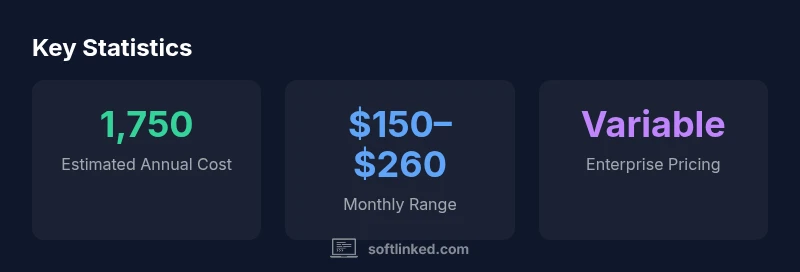
How much is autocad software? AutoCAD pricing isn’t fixed; for individuals, the annual subscription typically falls in the mid-to-high thousands annually, with common ranges around $1,500–$2,000 per year. Monthly plans usually run roughly $150–$210 per month. Enterprise licensing and add-ons can shift costs, so it’s best to check current Autodesk offers or SoftLinked’s updated pricing guide.
How pricing works for AutoCAD licensing
Pricing for AutoCAD isn't a fixed single number; it depends on licensing models, usage patterns, and regional adjustments. In practical terms, how much is autocad software varies by whether you’re buying as an individual, a student, or an enterprise. For individuals, the annual subscription is the most common path, while freelancers and small teams may prefer monthly options for cash flow. The exact price depends on factors like add-ons, cloud credits, and whether you qualify for education discounts. If you’re evaluating a new purchase, start by listing required features (core drafting tools, 2D and 3D capabilities, BIM integration) and compare the included toolsets. In many regions, promotions and multi-seat discounts can shift the math in your favor, so always check current offers. SoftLinked’s pricing overview for 2026 shows that most buyers see costs in a familiar band, with better value when opting for longer commitments and bundled services.
Pricing models you’ll encounter
AutoCAD pricing is primarily subscription-based, with several options to match different budgets and usage patterns. The most common choice for individuals and small teams is an annual or multi-year subscription that provides uninterrupted access, regular updates, and cloud syncing. Monthly plans exist for those who prefer lower upfront commitment, though they typically cost more per year. Some regions offer promotional discounts or bundled packages that include additional Autodesk tools, add-ons, or services. For students and educators, Autodesk provides educational access under specific terms, which can dramatically reduce the price or provide free access for a limited period. It’s important to verify what’s included in each plan—such as the availability of specialized toolsets, collaboration features, and cloud storage—so you aren’t paying for capabilities you won’t use. In all cases, confirm the renewal terms and whether the price includes maintenance services or occasional price increases, which Autodesk has adjusted in various markets over time. SoftLinked’s analysis highlights how plan length and add-ons shape the bottom line.
Regional differences and promotions
Pricing can vary by country due to exchange rates, taxes, and local licensing policies. A price in USD may translate differently in euros or pounds, and some regions apply VAT or sales tax to subscriptions. In addition, Autodesk periodically runs regional promotions that lower the sticker price for a defined time window, or offer academic licenses with specific limits. The same product might also be sold under different bundles in different markets, affecting the perceived value. When budgeting, use the local price in your currency and include any applicable taxes. If you work across borders (for example, a distributed team with members in two countries), consider whether you’ll want to standardize on a single plan and how that affects total cost. SoftLinked’s pricing map for 2026 notes that the variability is real but manageable with a clear purchasing strategy and a plan for promotions.
Add-ons, cloud credits, and maintenance
AutoCAD’s base toolset covers core drafting and design tasks; however, most buyers will rely on additional paid add-ons or toolsets for industry-specific features (architectural, mechanical, electrical, etc.). Add-ons can significantly shift the total cost, depending on coverage and user counts. Cloud services—such as storage, collaboration, and remote access—may come bundled or sold separately; the cost is typically on a usage basis or included with higher tiers. Some plans include limited cloud credits, while others bill separately for extra usage. Maintenance or support plans may be offered automatically or as an optional add-on; these provide access to updates, priority support, and platform compatibility assurances. When estimating total cost, model both the base license and the expected usage of add-ons and cloud services over the contract period. SoftLinked’s 2026 overview emphasizes watching for promotional bundles that can lower the annualized cost while preserving the core capabilities you need.
Total cost of ownership for teams
For teams, the price equation expands beyond per-user licensing. Multi-seat or enterprise agreements can deliver discounts based on seat counts, contract length, and negotiated terms. When calculating total cost, include not only the per-seat license but also add-ons, cloud credits, training, implementation time, and potential downtime during deployment. The cost per seat often drops as quantity rises, but the total spend can still be substantial if you’re equipping a large department. Consider whether you will also share licenses across departments or geographies, which can improve utilization but may require governance to prevent underuse or license leakage. It’s wise to run a pilot program with a few users before scaling up to the entire organization. SoftLinked’s pricing guidance recommends aligning licensing strategy with actual workflows, not just theoretical needs, to avoid paying for unused capabilities.
How to estimate your budget with a worksheet
Estimation starts with listing roles and the number of licenses required for each. Then map those roles to the correct AutoCAD plan (annual vs monthly) and add-on needs. Create a simple worksheet that captures: license type, number of seats, duration, add-ons, cloud services, training costs, and expected renewal terms. Use a conservative usage forecast to avoid overestimating savings from bulk discounts. Include contingency for price increases and regional taxes. Cross-check with a few vendors to confirm current pricing ranges and possible discounts. Finally, build two scenarios: one with a commitment to annual billing and one with monthly renewal, so you can compare lifetime costs over 2–3 years. SoftLinked’s frameworks encourage documenting assumptions and validating them against actual usage data during the first quarter of adoption.
Free trials, student licenses, and education discounts
Autodesk typically offers trial access for a limited period and may provide free or discounted educational licenses to students, teachers, and institutions. These educational licenses are designed for learning and non-commercial use, with restrictions on professional work or revenue-generating activities. If you qualify, this can be the fastest route to hands-on experience at little or no cost, though you’ll need to transition to a paid plan if you continue after the trial or education period ends. For professionals, keep an eye out for promotional periods, which occasionally include temporary price reductions or bundled deals with other Autodesk products. Always review the license terms to ensure you understand what is allowed during the trial or education period and what happens when the license lapses. SoftLinked’s pricing briefing highlights how education discounts can significantly alter the price landscape for students and educators.
Alternatives and budgeting tips
If cost is a major constraint, consider starting with free or lower-cost CAD options for learning or early design work. Applications such as FreeCAD, Fusion 360 for hobbyists, or other open-source tools can fill gaps while you evaluate your long-term needs. For businesses, compare total cost of ownership across multiple vendors, and look for bundles that include training or migration support. Consider a staged rollout, where teams begin with core drafting tasks and gradually adopt advanced features as needed. In practice, a blended approach—using AutoCAD where its strengths matter and alternative tools elsewhere—often delivers the best return on investment. SoftLinked’s budgeting tips emphasize focusing on core workflows and prioritizing value over feature bloat to maintain a sustainable price trajectory.
How SoftLinked helps with pricing clarity
At SoftLinked, we help aspiring software engineers and professionals understand complex pricing landscapes. Our pricing guide for AutoCAD consolidates official pricing bands, regional differences, and practical budgeting strategies into an actionable framework. We emphasize total cost of ownership, plan comparisons, and real-world examples to ensure you’re not surprised by renewal fees or add-on costs. If you want a personalized cost estimate or a detailed worksheet tailored to your team, the SoftLinked team is ready to help you plan with precision and confidence.
Typical AutoCAD pricing models and indicative ranges
| Pricing model | Typical cost indication | Notes |
|---|---|---|
| Annual subscription (per user) | 1,500–2,000 USD | Includes core AutoCAD tools and updates |
| Monthly plan (per user) | 120–260 USD | Flexible budgeting but higher annualized cost |
| Enterprise licensing | Negotiated, variable | Custom terms, volume discounts |
| Educational licenses | Free or discounted (eligibility required) | For students/educators; restrictions apply |
Your Questions Answered
Is AutoCAD free to use?
AutoCAD isn’t free. You can access trial periods or educational licenses if eligible, but most professional use requires a paid subscription. Review the license terms to understand what’s allowed during trials and educational access, and plan for transitioning to a paid plan if you continue after eligibility ends.
AutoCAD isn’t free. You can try it with a trial or education access if eligible, then move to a paid plan for ongoing use.
What factors influence AutoCAD pricing?
Key factors include the licensing model (annual vs monthly), seat counts, add-ons, cloud services, and regional taxes or promotions. Education discounts can drastically lower costs for eligible users. Always compare plans and consider total cost of ownership over the contract term.
Price depends on license type, add-ons, and region. Look for promotions and education discounts.
Are there cheaper alternatives to AutoCAD?
Yes. Open-source or lower-cost CAD tools like FreeCAD or other non‑AutoCAD products can cover basic drafting needs. For hobbyists or learners, these options may offer substantial value while you assess long‑term requirements. For professional workflows, compare features and compatibility before switching.
There are cheaper CAD options like FreeCAD that can meet basic needs.
Can I get discounts or bundles?
Promotions, education licenses, and enterprise agreements can reduce costs. Bundled deals may include additional Autodesk tools or services. Always verify current offers and renewal terms to avoid unexpected price changes.
Look for promotions and education discounts; bundles can reduce costs.
How should I estimate AutoCAD costs for a team?
List seats, plan types, add-ons, and cloud usage; forecast renewal terms and promotions. Build two scenarios—annual vs monthly—to compare lifetime costs. Start with a pilot to validate assumptions before scaling.
Create a cost worksheet with seats, plans, and add-ons, then compare annual vs monthly.
What is SoftLinked’s stance on pricing?
We advocate transparency and total cost of ownership; compare plans holistically and consider long-term value over upfront savings.
We focus on total cost and long-term value, not just upfront price.
“Pricing for CAD software is modular by design; a clear total cost of ownership approach helps teams avoid surprise renewal fees and overpay for unused features.”
Top Takeaways
- Assess your needs before choosing a plan
- Compare annual vs monthly costs to optimize budget
- Account for add-ons and cloud services in total cost
- Check for student or educational discounts if eligible
- Use SoftLinked's pricing guide for up-to-date figures