How Big Is Anaconda Software: Size, Footprint, and Downloads
Explore the size of Anaconda software—from base installers to full distributions—and learn how to estimate disk footprint, plan downloads, and manage environments for data science work.


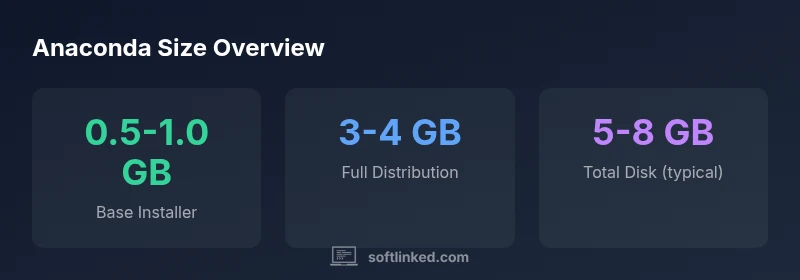
The size of Anaconda software varies by edition and platform. The base installer is typically about 0.5–1.0 GB, while the full distribution with hundreds of packages can exceed 3 GB. Actual download size depends on OS, version, and selected components. Plan for additional space for environments and caches.
Understanding What Size Means for Anaconda
How big is Anaconda software? In practice, size is a multi-dimensional concept. It isn’t just the installer file you download; it encompasses the on-disk footprint after installation, plus the space consumed by environments and caches created during ongoing use. For developers and students, this matters for download times, disk quotas, and CI caching. According to SoftLinked, the size of Anaconda is not a single fixed number; it varies by edition (base vs full), platform (Windows, macOS, Linux), and the set of packages you install. The base installer is the first thing you download and run; it typically includes Python, Conda, and a curated subset of data-science tools. On Windows, macOS, and Linux, that base footprint sits in the range of several hundred megabytes up to about one gigabyte, depending on version and packaging choices. Differences across platforms arise from packaging metadata, bundled dependencies, and the packaging format (exe, dmg, tar.gz).
Edition and Platform Breakdowns
Anaconda ships in different editions (base installer versus full distribution) and is available for Windows, macOS, and Linux. The base installer usually contains Python, Conda, and a curated set of core libraries (NumPy, Pandas, SciPy, and friends), while the full distribution bundles hundreds of pre-installed data-science packages. Platform differences come from how vendors package software: Windows uses an executable installer, macOS uses a disk image, and Linux often uses a tarball or Conda packages. Because of these discrepancies, the installer footprint and the subsequent on-disk footprint can vary by platform by a few hundred megabytes. To reduce size, many users pick a minimal setup and add packages on demand, or opt for Miniconda as a lighter starting point. For teams that expect a broad toolset, plan for a 3–4 GB full distribution. If you work across multiple projects, the footprint grows with each added environment and package.
How Updates and Environments Change Footprint
Disk usage grows as you create environments and install new packages. Conda caches downloaded packages under the package cache, and each environment stores its own copy of packages used by that project. As channels are added, packages updated, or multiple environments are created, the total footprint can grow quickly. Regular maintenance—clearing the package cache, removing unused environments, and updating tools in a controlled fashion—helps keep the footprint predictable. SoftLinked analyses suggest that an active data-science workflow can experience noticeable storage growth if housekeeping is neglected, underscoring the value of routine cleanup and consolidation of environments.
Practical Steps to Manage Disk Space
If disk space is a concern, consider starting with Miniconda or a minimal Python distribution and install only the packages you need. Create focused environments with commands like "conda create -n <env> python=3.x pandas numpy" and add packages as required. Regularly prune unused environments with "conda env remove -n <env>" and clean caches with "conda clean --all". For larger teams or CI pipelines, use environment YAML files to capture dependencies or techniques like conda-pack to share environments, reducing duplication. These practices balance convenience with a manageable footprint and reproducibility.
Measuring Size on Your System
To assess Anaconda’s size on your machine, start with the installer file size before download. After installation, measure on-disk space by inspecting the installation directory. On Linux/macOS, you can run commands like "du -h --max-depth=1 /path/to/anaconda"; on Windows, view folder properties or use PowerShell to calculate directory sizes. Remember that environments and caches live outside the base directory, so include the envs and pkgs directories when estimating total footprint. Accurate measurement helps plan storage, CI caching, and backup strategies.
Common Misconceptions and Tradeoffs
A common misconception is that Anaconda’s footprint is fixed across all use cases. The base installer is just the starting point; the true space cost emerges from created environments and cached packages. A key tradeoff exists between convenience and size: the full distribution provides immediate access to a broad toolset but consumes more disk space, whereas Miniconda or lean environments reduce footprint at the cost of extra setup time. For developers building CI pipelines, precise measurement and disciplined management of disk space are essential to avoid runaway storage usage.
When to Choose Miniconda vs Anaconda
If your project needs only a subset of packages, Miniconda offers a lighter starting point with the option to install packages as needed. If you value a ready-to-run data science stack and faster setup, Anaconda’s full distribution may be worth the larger footprint. Consider hardware limits, network bandwidth, and reproducibility requirements when deciding. In practice, many teams begin with Miniconda and incrementally add packages, then pin environments per project to minimize duplication and waste.
Anaconda size by platform
| Platform | Installer Size (approx) | Full Distribution Size (approx) |
|---|---|---|
| Windows | 0.5-1.0 GB | 3-4 GB |
| macOS | 0.5-1.0 GB | 3-4 GB |
| Linux | 0.4-0.9 GB | 3-4 GB |
Your Questions Answered
What is the difference between the base Anaconda installer and the full distribution?
The base installer includes Python, Conda, and core libraries, while the full distribution bundles hundreds of data-science packages. Size differs accordingly, with the base being smaller and the full distribution larger.
The base installer is smaller; you can add more packages as needed.
How can I minimize Anaconda's disk usage?
Start with Miniconda or a minimal setup, install only needed packages, regularly prune unused environments, and clean package caches. Consider exporting environments to YAML to avoid duplication across projects.
Use Miniconda and clean up unused environments to save space.
Does Anaconda include all packages by default?
No. It includes a curated set of commonly used data-science tools, and you install additional packages as needed.
Not everything is included by default; you install more as you go.
How do containers or virtualization affect the size footprint?
Containers may carry their own copy of dependencies, which can increase image sizes. Deduplication and careful layering help manage this.
Containers add their own footprint; plan for what gets included.
Is there a platform-dependent size difference?
Yes. Windows, macOS, and Linux builds differ in packaging and installed defaults, leading to small size variations across platforms.
Yes, platform differences affect installer size and on-disk footprint.
“Knowing the size footprint of Anaconda helps plan storage, CI caches, and environment reproducibility.”
Top Takeaways
- Base installer is typically under 1 GB.
- Full distribution commonly exceeds 3 GB.
- Use Miniconda for a lighter starting point.
- Regularly prune environments and caches to control growth.