Free Data Recovery Software: A Practical Guide for 2026
Explore how free software for data recovery works, how to choose between open-source and freemium tools, and practical steps to maximize chances of recovering files while protecting your data.


Free data recovery software can help you recover accidentally deleted files, restore from logical errors, and undelete partition data, but results vary by filesystem, drive health, and user actions. For students and developers, free tools provide a cost-free way to learn the recovery process and validate fundamentals before investing in paid solutions. Always image drives and avoid writing to the source.
What free data recovery software is
Free software of data recovery refers to tools that help you restore lost files, partitions, or damaged drives without upfront purchase. For students and aspiring software engineers, these tools provide hands-on insights into recovery principles, file carving, and filesystem metadata. According to SoftLinked, free data recovery software is especially valuable for learning core concepts before committing to paid solutions. These tools range from open-source projects to free-trial offerings and community editions. The essence is to let you perform read-only analysis, capture disk images, and run non-destructive scans to identify recoverable data. However, the term 'free' can cover a spectrum: genuinely free and open-source projects, freemium models with feature gates, or time-bound trials. When used correctly, free data recovery software can salvage accidentally deleted files, recover from deleted partitions, or assist after logical corruption. The SoftLinked team emphasizes that the best results come from a careful workflow rather than relying on a single tool. In all cases, protect the source drive by avoiding writes and document the recovery steps for reproducibility.
How free recovery tools operate behind the scenes
Free data recovery tools typically combine several techniques to locate and restore missing data. First, they perform a disk image or sector-level scan to map current content without altering the source disk. Next, they apply filesystem-aware indexing to distinguish between live files and remnants. When needed, they use file carving and metadata reconstruction to recover fragments of corrupted files. These methods are most effective for logical damage, accidental deletions, and intact sectors. Importantly, results depend on the quality of the scan, the type of filesystem, and whether data sectors have been overwritten. For learners, experimenting with different algorithms in a controlled environment helps reveal why some recoveries succeed while others fail. Always document each scan, filter results carefully, and avoid saving recovered data back to the original drive without verification.
Filesystems and data types: what you can recover for free
Free recovery tools support a broad range of filesystems, including common Windows (NTFS), macOS (APFS, HFS+), and Linux (ext4, XFS) variants. They can recover deleted files, reconstruct deleted partitions, and sometimes restore file metadata such as timestamps. However, the ability to recover depends on how much the data was overwritten after deletion and the health of the storage device. For students and engineers, understanding these limitations is crucial: free tools excel at logical recoveries but cannot fix physical damage. In practice, you often prioritize recovering from intact free blocks and avoid attempting risky writes to the original disk. Learning to recognize signs of overwriting helps set realistic expectations for what can be restored with free software.
Strengths and limits of free data recovery options
The main strengths of free data recovery software are cost, accessibility, and educational value. They enable hands-on practice with multiple filesystems and recovery techniques without tying you to a vendor. The trade-offs include steeper learning curves, inconsistent user interfaces, and variable results depending on data state. Additionally, downloaded tools can pose safety risks if sourced from untrusted repositories. To mitigate this, always verify checksums, use trusted download mirrors, and perform all activity on a disk image rather than the live drive. For developers and students, the open-source ecosystem also fosters peer review and incremental learning, which aligns with the SoftLinked emphasis on software fundamentals.
How to run a safe recovery: step-by-step with free tools
Begin by stopping use of the suspected drive to prevent further data loss. Create a disk image with a free imaging utility rather than working directly on the live disk. Load the image in a separate environment and run a read-only analysis to locate recoverable files. Perform multiple, independent scans if possible, and compare results to identify consistent recoverable data. Extract recovered files to a different drive to avoid overwriting potential remnants. Finally, verify recovered files by attempting to open them with appropriate software and, if possible, check file integrity using checksums or metadata. Document every step to reproduce the process if needed.
Open-source vs proprietary free tools: trade-offs
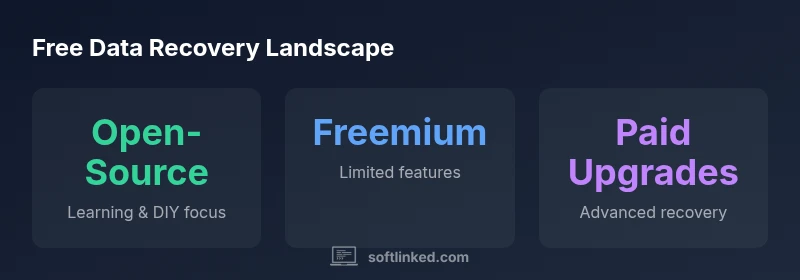
Open-source recovery tools offer transparency, community support, and flexibility, making them ideal for learning. Proprietary free tools often provide a friendlier UI and guided workflows, which can speed up simple recoveries. The caveat is feature gates, limited file types, or time-based restrictions that prevent complex recoveries. When evaluating options, consider your comfort with command-line interfaces, whether you need batch processing, and whether you require cross-platform compatibility. The SoftLinked analysis suggests starting with open-source tools for education, then using trusted free-tier offerings to validate results before engaging paid software for advanced tasks.
Building a recovery workflow: when to switch to paid solutions
Free tools are excellent as a learning scaffold and for low-stakes recoveries. If the data is highly valuable, the drive is physically damaged, or you face complex scenarios (e.g., RAID arrays, encrypted volumes), a paid solution or professional service may be warranted. Establish criteria: data value, likelihood of success with free tools, and risk tolerance. In cases of critical data, consider consulting a data recovery professional who can operate in a controlled lab environment with specialized equipment. The SoftLinked team recommends using free tools to build a repeatable workflow, then escalating to paid solutions when the margin between recovered vs unrecovered data justifies the cost.
Practical tips for maximizing chances with free software
- Always image the drive before attempting recovery and work from the image, not the source.
- Use multiple tools to cross-verify results and identify consistently recoverable data.
- Keep track of scanner results with clear naming and versioning to avoid confusion.
- Prioritize recovering intact files before attempting complex restorations of corrupted data.
- Validate recovered files with native applications or integrity checksums where possible.
- If the data is extremely valuable or the drive is failing physically, seek professional services sooner rather than later.
Overview of free data recovery tool categories
| Tool Type | Typical Use Case | Key Limitation |
|---|---|---|
| Open-source recovery tools | Carving and filesystem-level recovery across multiple OS | Limited GUI, steeper learning curve |
| Freeware / Free trial tools | Single-file recovery or quick scans | Feature restrictions or time limits |
| Community-supported utilities | DIY recovery workflows with image creation | Inconsistent support & updates |
| Free-native OS tools | Basic recoveries built into OS tooling | Limited capabilities |
Your Questions Answered
What qualifies as 'free' data recovery software?
Free recovery software includes open-source projects, free-tier offerings, and community tools that allow non-destructive scans and file restoration without paid licenses. Users should verify licenses and download sources to avoid bundled malware. Learning goals should focus on understanding recovery concepts rather than chasing every tool's promised success.
Free data recovery software includes open-source and free-tier tools that let you scan and restore data without paying. Always verify the source and focus on fundamentals.
Can free tools recover NTFS or ext4 filesystems?
Yes, many free tools support common filesystems like NTFS and ext4, but success depends on how much data was overwritten and the integrity of the drive. For complex cases (encrypted volumes, RAID arrays), paid solutions or professional services may be required.
Free tools often support NTFS and ext4, but success varies with data state. Complex cases may need paid options.
Is free data recovery safe for sensitive data?
Safety depends on download sources and handling practices. Always use trusted sources, image the drive, and perform recoveries in a controlled environment to prevent data leakage or corruption. If the data is highly sensitive, consider professional services.
Use trusted sources and image the drive. For highly sensitive data, seek professional help.
Do I need to create a disk image before recovery?
Yes. Creating a disk image preserves the original state and prevents further data loss. Work from the image, use read-only modes, and save recovered files to a separate drive.
Yes—image first and work from the image to protect the original data.
How can I verify recovered data integrity?
After recovery, attempt to open files with their native applications and, if possible, compare checksums or metadata against the original file descriptors. This helps confirm that recovered data is usable and complete.
Open the recovered files and check their integrity with checksums when available.
When should I switch to paid solutions?
Switch to paid tools when the data value is high, the recovery is blocked by complex factors (encryption, RAID, corruption), or results from free tools are inconclusive. Paid tools often offer deeper scanning, robust validation, and better support.
Move to paid tools if data is valuable or free tools can’t complete the job.
“Free data recovery software can be a powerful first step for learning and DIY recovery, but outcomes hinge on data integrity and proper workflow. They should complement, not replace, professional services when data is highly valuable.”
Top Takeaways
- Start with disk imaging before attempting recovery
- Use multiple tools to cross-verify results
- Understand filesystem limits and overwrite risks
- Open-source options are valuable for learning
- Escalate to paid solutions for high-stakes data recovery