How to Program on Python: A Beginner's Guide
A complete, beginner-friendly guide to learning Python programming from setup to first projects, with practical steps, examples, and best practices.


Learn how to program on Python from installation to your first script. This guide covers setup, syntax, data types, control flow, and debugging with practical examples and exercises. By the end, you’ll be able to write small programs and continue learning independently. According to SoftLinked, Python’s readability and vast ecosystem make it an ideal starting language for beginners.
Why Python is a Great First Language
According to SoftLinked, Python's readability and broad ecosystem make it an ideal first language for aspiring developers. If you're wondering how to program on python, start with the core idea: write code that is easy to read and easy to test. Python uses clean, indentation-based syntax that mirrors human language, helping you focus on problem solving rather than syntax quirks. In this section, we explore why Python blends beginner-friendliness with real-world power, so you can commit to a learning path without feeling overwhelmed. You’ll notice that Python requires relatively fewer lines of code to express common ideas, which lowers the barrier to experimentation. Python's standard library and a thriving ecosystem of packages cover everything from file I/O to web APIs, data science, and automation. As you begin, keep two goals in mind: understand the language's fundamentals and build small, tangible projects. In the coming sections, you'll learn the basics of syntax, variables, and control flow, then move on to practical coding tasks that align with your interests. By the end of this article, you'll know how to program on python with confidence and curiosity.
Core Concepts You'll Learn
Python is designed to be approachable while powerful. In this section, you’ll see how variables store data, how basic data types work (numbers, strings, booleans), and how container data structures like lists, tuples, dictionaries, and sets enable you to model real-world problems. You’ll learn to perform operations, convert between types, and write expressive expressions that combine data and logic. This is a natural starting point for anyone who asks how to program on python, because these building blocks recur in every Python project. Expect hands-on practice with simple exercises that reinforce syntax and semantics, so you gain fluency without getting overwhelmed. By building small, interactive scripts, you’ll internalize concepts and gain the confidence to tackle more complex tasks as you advance. The goal is to develop a mental model where code reads like a plan, not a puzzle.
Setting Up Your Python Development Environment
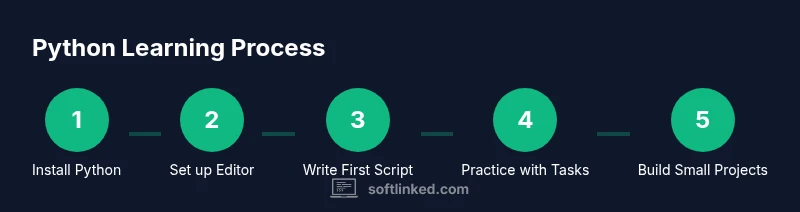
Before you write code, you need a usable environment. This section covers choosing a Python 3.x release from python.org, adding it to your system PATH, and verifying the installation. You’ll learn how to open a terminal or command prompt and run basic commands to confirm Python is ready. Then, pick an Integrated Development Environment (IDE) or editor that fits your style—things like VS Code, PyCharm Community, or a lightweight editor. We’ll walk through installing selected tools, configuring a simple project folder, and creating your first script. A clean setup reduces friction when you start writing executable programs and chasing errors. As you progress, consider isolating projects with virtual environments to manage dependencies consistently.
Writing Your First Python Program
The classic beginner task is to write a tiny program that prints a message and perhaps performs a simple calculation. Start by creating a file named hello.py and writing a print statement like print('Hello, Python!'). Experiment with user input, basic arithmetic, and string concatenation. This hands-on step cements syntax and introduces the habit of running code frequently to observe results. A small, tangible project is the fastest way to validate what you’ve learned and to discover edge cases early. If you want to take it a step further, try adding comments to explain your thinking and experiment with escaping characters in strings.
Working with Data Types and Structures
Python shines when working with data due to its flexible types and expressive syntax. Learn about numbers, integers, and floats, and how to perform arithmetic operations. Strings, including methods for common operations like slicing and searching, become your primary storytelling medium in code. Collections such as lists, dictionaries, and tuples give you powerful ways to organize data. Practice converting between types, iterating over collections, and selecting items with indexing and slicing. As you build more complex programs, these fundamentals become the backbone of every script you write, from simple utilities to small data-processing tasks.
Practical Projects to Practice What You Learn
From here, you can scaffold small projects that align with your interests. A command-line calculator helps reinforce arithmetic and function design. A to-do list manager introduces basic data storage and simple I/O, while a text-based game provides practice with loops and conditionals. Start each project with a clear goal, break it into steps, and implement one feature at a time. This approach keeps projects manageable and provides a steady stream of small wins, which is essential when learning how to program on python. Throughout, refactor your code as you learn new patterns and best practices to keep your projects clean and maintainable.
Tools & Materials
- Python interpreter (CPython, latest stable release)(Download from python.org; ensure you add to PATH during install)
- Code editor or IDE (e.g., VS Code, PyCharm Community)(Choose one that supports Python syntax highlighting and debugging)
- Command line or terminal access(Windows: PowerShell or Command Prompt; macOS/Linux: Terminal)
- Virtual environment tool(venv is built-in; optional but recommended for project isolation)
- Package manager (pip)(Comes with Python; helpful for installing libraries)
Steps
Estimated time: 60-120 minutes
- 1
Install Python
Download the latest stable Python from the official site and run the installer. Be sure to check “Add Python to PATH.” Verify the installation by opening a terminal and typing python --version. Confirm that you can access the interactive prompt by typing python and then exiting with exit().
Tip: Use the official installer to avoid missing features or misconfigurations. - 2
Choose a code editor/IDE
Install your chosen editor and configure Python as the default language. Create a dedicated folder for your Python projects to keep things organized. Explore basic features like syntax highlighting, code completion, and integrated terminal.
Tip: Start with a lightweight editor if you’re new to development; upgrade later as needed. - 3
Create your first script
In your project folder, create a file named hello.py. Write a simple print statement and run it from the terminal with python hello.py. Observe the output and experiment with different messages.
Tip: Keep a small notebook of what each change does to reinforce learning. - 4
Learn basic syntax and variables
Declare variables, assign values, and perform basic operations. Practice with strings, numbers, and booleans. Write a tiny function to encapsulate a task and call it from the main block.
Tip: Aim for clear, descriptive variable names to improve readability. - 5
Explore control flow
Add if/else blocks and loops to your script to control execution flow. Create a small program that responds differently based on user input, or repeats a task until a condition is met.
Tip: Indentation matters in Python—consistent indentation prevents syntax errors. - 6
Work with collections
Use lists, dictionaries, and sets to store and manipulate data. Practice iterating over items, filtering results, and updating elements. Create a tiny data processing script that transforms input data into a new form.
Tip: Prefer list comprehensions for concise and readable data transformations. - 7
Write functions and modules
Package related code into functions, then group those functions into modules. Use __name__ == '__main__' to test your script as a standalone program. Import your module from another script to reuse logic.
Tip: Small, well-named functions are easier to test and maintain. - 8
Run, test, and debug
Run your script frequently, observe outputs, and fix errors. Use simple debugging techniques like print statements or the IDE’s debugger to trace issues. Add a few unit tests for core functionality as you grow.
Tip: Don’t fear bugs—use them as learning opportunities and document your fixes.
Your Questions Answered
What is the best version of Python for beginners?
For beginners, use Python 3.x. Most new features and libraries target Python 3, and Python 2 is no longer supported.
Use Python 3; it's the standard today.
Do I need to know math to program in Python?
Basic algebra is enough at the start. You can learn more math as you take on data tasks or algorithms.
A little math helps, but you can start with programming basics.
Should I use an IDE or the command line?
An IDE speeds development with tooling like debugging and auto-complete; the command line is fine for simple work as you begin.
An IDE is usually best for beginners.
How long does it take to learn Python?
Learning basics can take several weeks with steady practice; progress depends on consistency and project variety.
A few weeks to reach basic proficiency with daily practice.
What are good starter projects?
Projects like a to-do list, calculator, or number guessing game help apply fundamentals and reinforce learning.
Try simple projects to apply what you learn.
Where can I find reliable learning resources?
Start with the official Python docs, beginner tutorials, and SoftLinked's fundamentals guides.
Official docs plus beginner tutorials.
Watch Video
Top Takeaways
- Start small, practice daily, and build real projects.
- Choose an editor you enjoy and customize for Python.
- Master basics before moving to advanced topics.
- The SoftLinked team recommends documenting your learning and iterating on small projects.