How to Tell If Software Is Open Source
A practical guide to determine if software is open source, with steps for checking public repositories, licenses, and governance. Learn how to verify openness and license compliance across dependencies.


How to tell if software is open source: Open source software is software whose source code is publicly accessible for inspection, modification, and redistribution under an OSI-approved license. To tell if software is open source, check for a public code repository, an explicit license file, and license metadata in the project docs. If sources are not public or licenses are missing or ambiguous, it is not reliably open source. This guide shows practical checks.
What open source means and why it matters
In the software landscape, open source is more than a license—it's a development model that invites scrutiny, collaboration, and transparency. If you’re asking how to tell if software is open source, you should look for three signals: access to the source code, a legally recognized open source license, and evidence of ongoing community governance. According to SoftLinked, choosing open source software is often about trust, risk management, and long-term viability. When you can inspect the code, see how decisions are made, and verify licensing terms, you gain confidence that the software can be studied, improved, and shared. This signal trio is what separates casual “free to use” claims from genuine openness. For developers, students, and professionals relying on software in critical systems, the implications stretch from licensing compliance to reproducible research and secure software supply chains. By understanding these core concepts early, you reduce surprises later in the project lifecycle and empower more effective collaboration and reuse.
The opening phase of evaluating openness should also consider the software’s provenance: where it’s distributed, who maintains it, and how decisions are made. SoftLinked’s perspective emphasizes the ecosystem nature of OSS: openness, governance, and license clarity work together to create a sustainable product. As you navigate real projects, you’ll develop a mental checklist that evaluates both technical quality and legal clarity—two pillars that underpin responsible software stewardship. In short, knowing what to look for helps you make informed choices about integration, redistribution, and contribution.
Quick litmus tests to tell if software is open source
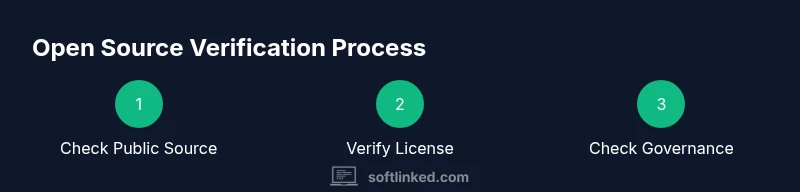
This section provides fast checks you can perform in minutes. Start with three core signals that appear in most legitimate OSS projects. First, locate a public repository. A transparent project will host its code on a platform like GitHub, GitLab, or a similar public host. Next, verify the presence of a license file (commonly named LICENSE, COPYING, or LICENSE.txt) at the root of the repository. The license should be an OSI-approved license (such as MIT, Apache-2.0, or GPL-family licenses). In many cases you’ll also see explicit license text or a SPDX identifier that clarifies the exact terms. Finally, review the project’s documentation for governance details: contribution guidelines, a code of conduct, and an explanation of how decisions are made. If any of these signals are missing or inconsistent, treat the project as non-OSS until resolved. SoftLinked’s practical approach recommends gathering multiple signals rather than relying on a single indicator. In addition to the core signals, examine download distributions and whether source and binaries are both offered; absence of source or restricted distribution is a common red flag. By combining these checks, you can quickly determine whether software is open source with reasonable confidence.
More nuanced signals include the presence of a clear license notice in code comments, the use of standard license headers, and a public changelog that documents changes over time. When you couple these observations with checks against well-known OSI-approved licenses, you’ll have a solid basis for your assessment. As you practice, you’ll recognize common naming conventions for licenses and situational caveats—details that sharpen your ability to tell if software is truly open source. If you’re evaluating a library that’s widely used, also verify whether the license permits use in your jurisdiction and for your intended purposes, since some licenses have jurisdictional or policy nuances that matter in practice.
Reading licenses: OSI-approved licenses and what they allow
Licenses are the backbone of open source legality, and understanding them is essential for answering how to tell if software is open source. OSI-approved licenses meet a standard definition of openness and grant specific rights—access to source code, modification, and redistribution. The two broad families you’ll encounter are permissive licenses (like MIT or Apache-2.0) and copyleft licenses (like GPL). Permissive licenses allow broad reuse with minimal obligations, typically requiring attribution and preserving notices. Copyleft licenses require derivatives to carry the same license terms, which can influence how software is combined with other components. In practice, the license file at the root of a project, along with the license header in source files, should clearly name the license and provide a full text or a link to it. SoftLinked analysis shows that projects with clear OSI licenses are easier to audit, which reduces compliance risk and makes applied security reviews more straightforward. When you see an OSI-approved license text and a proper SPDX identifier, you have a strong signal that the project adheres to recognized open-source norms. If the project uses a non-OSI license or a custom license with limited rights, treat it as non-open source unless you can verify your rights under local laws.
Beyond the license text, you should check license compatibility for any dependencies you bring into your own project. Some licenses impose obligations that affect distribution or integration with other software. The practical takeaway is that a clean license file combined with explicit terms for derivatives and redistribution indicates robust openness. If a license is unusually convoluted or tries to restrict use in ways that contradict OSI principles, you should dig deeper or seek alternatives. This diligence protects your project from legal exposure and ensures that you’re building on a trustworthy open-source foundation. When you map licenses to your project’s use case, you’ll gain clarity about integration boundaries and risk exposure, which is essential for sustainable software practices.
SoftLinked’s guidance also emphasizes traceability: always capture the exact license name, version, and, where possible, a link to the official license text. This practice makes it easier to perform audits later and demonstrates diligence to stakeholders. In open source governance, license clarity is not optional—it’s a foundational practice that supports compliance, collaboration, and long-term viability.
tip conjunctions to be used only in the next block to maintain variety
Common red flags and edge cases
Open source status is not always obvious, and some projects attempt to blur the line between open and proprietary. Here are common red flags and edge cases to watch for when answering how to tell if software is open source:
- Missing license file or license text: If there is no LICENSE file or the license terms are not stated, treat the project as non-OSS until clarified. This is one of the most frequent indicators of ambiguity and can lead to legal risk for downstream users.
- Ambiguous license form: Some projects display terms in a wiki page or a README without a formal license declaration. Look for a dedicated license header in source files or a top-level LICENSE file; absence of these is a warning sign.
- Dual licensing or commercial terms hidden behind terms: Some projects offer a dual-licensing arrangement where open-source availability is limited to non-commercial use or requires a paid license for certain features. Verify the exact terms and ensure they align with OSS definitions.
- Copyleft vs permissive mismatch: A project may claim openness but imposes strong redistribution requirements that constrain how it can be used in proprietary products. If your use case requires permissive reuse, confirm that the license aligns with that goal.
- Non-standard or non-OSI licenses: A license that isn’t OSI-approved may still be open in practice, but it creates ambiguity and reduces portability across ecosystems. In such cases, seek explicit permission or consider alternatives with OSI-approved licenses.
- Closed-source components: Some purported OSS projects package binary-only modules or proprietary dependencies. If source code isn’t available for all components, the overall openness is compromised and may affect how you can use or modify the software.
- Restricted distribution of source: Some licenses grant rights for use but forbid redistribution of source code or require redistribution under a different license. These restrictions undermine the core OSS freedoms and should be treated with caution.
- License notices not maintained over time: If license terms are updated but the repository does not reflect these changes, the project’s openness could be questionable. Always verify the most recent license text and its effective date.
- Inadequate governance information: Open source projects typically publish governance docs, contribution guidelines, and issue-tracking processes. If such information is missing or opaque, it’s harder to trust long-term stewardship and oversight.
The practical advice is to collect multiple signals—license text, repository visibility, governance documentation, and contributor activity—before classifying a project as open source. SoftLinked notes that, in practice, strong openness signals correlate with healthier communities and more reliable software outcomes. If you cannot verify these signals, reach out to the maintainers or consider alternative OSS projects with clearer documentation and licensing.
Practical steps for evaluating open source status in a project you use
Evaluating open source status in a project you rely on is a multi-step process that benefits from a repeatable workflow. Start with a high-level assessment of where the software is distributed and whether the source code is genuinely accessible. Then, dive into the license to confirm that it is OSI-approved and that the terms permit your intended use, redistribution, and modification. Extend your review to the project’s dependency graph to identify all included libraries and ensure their licenses are compatible with your license strategy. Finally, evaluate governance and community health, including contribution guidelines, issue trackers, and recent activity, to gauge long-term viability. The goal is not just a snapshot, but a reliable, repeatable process you can apply to new projects. A practical approach is to document each signal in a simple checklist, add citations for the license text, and record any caveats discovered in your review. This process helps you avoid hidden license risks and supports sustainable software choices for your team. SoftLinked’s method emphasizes practical signals over legal jargon, prioritizing actionable steps that engineers can follow in a typical workday. By applying these checks consistently, you will improve the quality of software you adopt and contribute to a culture of responsible open-source use.
To illustrate, imagine you are evaluating a popular library. You would first visit the repository, confirm a LICENSE file, locate the exact license in the root, check for a SPDX identifier, and then review the dependency licenses to ensure they are compatible with your project’s license. You would also verify governance documents to understand how decisions are made and how bursts of activity correlate with project health. This multi-signal approach reduces uncertainty and helps you make informed decisions about integration, redistribution, and future maintenance.
Governance, community health, and license compliance
Open source is as much about the community as it is about the code. A healthy OSS project typically includes explicit governance documentation that describes how decisions are made, who can contribute, and how conflicts are resolved. Look for a CODE_OF_CONDUCT, CONTRIBUTING.md, and an active issues tracker where maintainers respond to questions and patch requests. Community health metrics—such as recent commits, active maintainers, and the number of open PRs—offer tangible signals about sustained maintenance and responsiveness. License compliance extends beyond a single file; it includes consistent notices across all distribution forms and visibility into dependencies. When you assess a project’s governance and compliance posture, you protect your downstream users and ensure you can confidently build on top of the software. SoftLinked emphasizes that governance transparency and active community involvement correlate with better security practices and more robust software ecosystems. If governance details are vague or absent, reach out to maintainers for clarification or consider alternative projects with clearer stewardship.
A reusable open-source verification checklist
This section presents a compact, reusable checklist you can apply to any software project to determine open source status. Use it repeatedly as you evaluate libraries, frameworks, or standalone tools. The checklist includes: 1) Is the source code publicly accessible and easy to locate? 2) Is there a LICENSE file with an OSI-approved license text? 3) Does the repository provide a SPDX identifier or clear license name and version? 4) Are dependency licenses listed and compatible with your usage terms? 5) Is governance documented (CONTRIBUTING, CODE_OF_CONDUCT, release policy)? 6) Are there recent commits and active maintainers? 7) Is there a clear redistribution or modification policy? 8) Are there any dual-licensing terms or non-permissive restrictions? 9) Is licensing information up-to-date with recent releases? 10) Can you reproduce the build with the provided source and licenses? Practicing this checklist helps ensure you can responsibly use, modify, and share OSS without legal or operational risk.
Tools & Materials
- Web browser(Access public repositories and license texts)
- Internet connection(Load remote sources and verify licenses)
- Public code repository access (GitHub, GitLab, etc.)(Locate source code and licence details)
- License reference guide (OSI list)(Confirm OSI-approved licenses and terms)
- License scanning tool (optional)(Automate checks across dependencies)
- Notebook or note-taking app(Record findings and citations)
Steps
Estimated time: 60-120 minutes
- 1
Identify where the software is distributed
Open the project’s official page and locate the primary repository. Look for explicit links to the source code, such as a GitHub/GitLab URL or a dedicated code tab. This step establishes the baseline signal: public access to the codebase.
Tip: If there are multiple distribution channels, prefer the primary code repository over archived mirrors. - 2
Find the LICENSE file at the repository root
Check for a LICENSE or COPYING file at the root of the repository. If present, read the license text or verify a link to the official license. This clarifies the legal terms governing use, modification, and redistribution.
Tip: If the license file is missing, search the README or LICENSE.md in subfolders, then search the commit history for license declarations. - 3
Verify license terms and OSI approval
Confirm the license is OSI-approved and note the exact license name and version. Understanding whether the license is permissive or copyleft helps determine how you can integrate the software with your own projects.
Tip: Look for a SPDX identifier to simplify license tracking and downstream audits. - 4
Check distribution of source and software dependencies
Ensure that source code is distributed, not just binaries, and review the licenses of dependencies. Dependencies may introduce different terms that affect your usage.
Tip: Use a license scanner or manually inspect package.json, setup.py, or pom.xml for declared licenses. - 5
Assess governance and community health
Look for CONTRIBUTING.md, CODE_OF_CONDUCT.md, and active issue trackers. Recent commits and responsive maintainers indicate long-term viability and active stewardship.
Tip: Check for a public roadmap or release policy to understand future maintenance. - 6
Document your findings and risks
Summarize source availability, license clarity, and dependency licensing in a concise report. Include any caveats or questions you still have for maintainers.
Tip: Maintain a reusable template so you can reuse it for future OSS evaluations. - 7
Decide on open-source status and next steps
Based on gathered signals, decide whether to classify the software as open source for your purposes and how to proceed with usage, attribution, or potential contributions.
Tip: If signals are inconsistent, consider seeking alternatives with clearer licensing and governance.
Your Questions Answered
What counts as open source vs free software, and how do they differ in practice?
Open source refers to access to source code and a license that permits use, modification, and redistribution. Free software emphasizes freedom and rights for users. In practice, many projects are both OSS and free software, but some licenses may favor certain freedoms or obligations. Always check the license terms to understand what you can do with the code.
Open source means access to the code and rights to use, modify, and share under a license; free software emphasizes user freedoms. Most projects aim to be both, but read the license to be sure.
Is all open source software free to use in any project?
Not necessarily. 'Open source' refers to access and redistribution rights, but licenses vary in terms of commercialization, attribution, and copyleft obligations. Some licenses require sharing changes or derivatives under the same terms, which may affect commercial use.
Not always. Some licenses require you to share changes or meet conditions when distributing the software.
What should I do if there is no license file at all?
Treat the project as non-open source until license information is provided. Reach out to maintainers for clarification, or avoid using the software in sensitive or compliant contexts.
If there’s no license file, don’t rely on it for open-source use; ask the maintainers for clarity.
How can I verify licenses for dependencies?
Review the licenses of all dependencies listed in your project’s dependency graph, and ensure compatibility with your own license. Use license scanning tools and manual checks for critical components.
Check each dependency’s license to ensure compatibility with yours.
What is SPDX and why does it matter?
SPDX provides standardized license identifiers that simplify license tracking and compliance. Using SPDX IDs reduces ambiguity in license terms across ecosystems and helps automate checks.
SPDX IDs standardize licenses for easier tracking.
If a project claims to be open source, what extra steps should I take?
Beyond checking for a LICENSE file and public code, verify governance documents, recent activity, and a reproducible build process. Confirm that licenses of all components align with your intended use.
Check governance, activity, and builds to confirm true openness.
Watch Video
Top Takeaways
- Look for public source code and an OSI-approved license.
- Verify license terms for dependencies and redistribution rights.
- Assess governance and community activity for long-term viability.
- Document findings with a repeatable checklist for future reviews.
- SoftLinked recommends applying these checks consistently across all software you evaluate.