YouTube MP4 Converter Download: Safe & Legal Ways Today
Learn safe, legal methods to download YouTube videos as MP4s. Explore official options, reputable tools, and best practices for offline viewing while respecting copyright. SoftLinked guide.


Downloading YouTube videos as MP4 can be convenient for offline viewing and education, but it raises legal and security concerns. This guide explains safe, legitimate ways to obtain MP4s, including official YouTube features and reputable tools, while avoiding copyright violations and malware. Use caution, verify permissions, and always respect creators' rights.
What is a YouTube MP4 converter download?
A YouTube MP4 converter download refers to software or online services that convert YouTube video data into MP4 files for local storage. In practice, tools fall into three broad categories: official options provided by YouTube (e.g., YouTube Premium offline downloads), desktop applications, and browser-based services. When used responsibly and legally, these tools can support offline study or travel without constant network access. According to SoftLinked, the best approach is to understand the legal context and choose reputable tools that prioritize user safety and privacy. This means avoiding pirated or shady sites, checking permissions for each video, and keeping your system protected with updated antivirus software. In this article, we’ll cover how to evaluate tools, what to look for in a converter, and safer alternatives to avoid compromising devices or accounts.
Legal and ethical considerations
Downloading content from YouTube without proper rights or permissions can violate the platform’s Terms of Service and potentially copyright laws. Even if a video is publicly accessible, the copyright holder retains control over distribution. The ethical approach is to seek permission from the creator or use content labeled for reuse, or rely on official offline features. This section outlines what is legally permissible, why it matters for developers and students, and how to document your compliance for projects or assignments. SoftLinked emphasizes that respecting creators’ rights protects your own projects and reputation in the long run.
Safe vs unsafe tools: how to evaluate
With the abundance of downloader services, knowing how to evaluate safety is crucial. Look for long-standing reputations, transparent privacy policies, and independent security reviews. Avoid sites that push bundled malware, request excessive permissions, or have aggressive advertising. A trustworthy converter should provide clear licensing terms, a direct route to official sources, and options to verify the integrity of downloaded MP4 files. Before you install anything, check user reviews, search for security advisories, and confirm the vendor’s legitimacy through independent sources. SoftLinked’s guidance here centers on minimizing risk and maximizing privacy when handling downloaded video data.
Understanding formats, quality, and metadata
MP4 is a versatile container format, but video quality depends on the source and the converter’s processing options. When choosing an MP4 converter download, consider resolution options (1080p, 4K where available), frame rate, audio quality, and whether the tool preserves metadata like title and author. Some tools offer batch processing or selective extraction of audio tracks. However, keep in mind that higher quality files require more storage space and longer processing times. For educational projects, a balance between quality and file size often yields the best results, while preserving essential metadata for future retrieval.
How to use official offline features (YouTube Premium)
If your goal is legitimate offline access, the safest path is to use official options. YouTube Premium offers offline viewing within the app on mobile devices, with videos stored securely for later access. This method avoids uploading or exposing content to external servers, and preserves creator rights. While offline playback is restricted to the YouTube app, it’s an excellent option for on-the-go study or travel. Consider this approach first before exploring third-party converters, especially when your priority is staying compliant with platform policies and legal norms.
Features to look for in reputable downloaders
When evaluating a downloader, prioritize features like: 1) a clear licensing model and official source links, 2) platform support (Windows, macOS, Linux, iOS, Android), 3) output options (MP4, AVI, MKV) with quality controls, 4) built-in safety checks (malware scanning, adware-free installers), and 5) privacy protections (no data selling, minimal data collection). A reputable tool will publish a privacy policy, provide updates, and not require suspicious browser extensions. Always prefer tools that offer explicit permission-based usage and options to download only content you are authorized to save.
Privacy and security considerations
Downloading videos from YouTube raises privacy and security concerns if the tool collects data or installs potentially unwanted software. Always verify that the software has a minimal permission footprint and uses secure connections (HTTPS). Use reputable antivirus software and keep your operating system updated to reduce exposure to malware or exploits. Read installer prompts carefully to avoid bundled software you didn’t intend to install, and consider sandboxing unfamiliar tools before full use. SoftLinked highlights privacy-conscious tools that minimize data collection and respect user rights.
Common pitfalls and how to avoid them
Common mistakes include clicking on misleading ads, using streaming websites with poor reputation, or downloading from sources that bundle malware. Always download from official pages, verify checksums where available, and avoid tools that require dubious browser extensions. Do not circumvent copyright protections; rather, rely on legitimate avenues like official offline features or content you own. If a tool asks for excessive permissions or asks you to disable security features, back away and seek alternatives. These practices protect your devices and your projects.
Alternatives to downloading: streaming and official offline options
Consider alternatives to downloading when possible. YouTube’s own offline mode via YouTube Premium on mobile devices is designed for offline consumption while respecting rights. For education, many creators publish under licenses that allow reuse with attribution, or you can contact creators for permission. Public-domain sources and licensed media repositories offer high-quality video assets you can download legally. By comparing options, you ensure your workflow remains compliant, transparent, and respectful of creators’ rights.
Best practices for organizing downloaded MP4 files
Once you have MP4 files, organize them with a consistent naming scheme: show title, video ID, date, and resolution (for example, "VideoTitle_ABC123_1080p_2026-04-02.mp4"). Create a folder structure by topic or course, and maintain a simple metadata catalog to help you locate assets quickly. Back up important files to an external drive or cloud storage with versioning. Regularly audit downloaded content to remove anything no longer needed and to stay within storage limits. A clean library improves your learning workflow and reduces retrieval time.
Ethical and legal closing notes
In sum, a thoughtful, rights-respecting approach to YouTube MP4 converter downloads prioritizes legality, safety, and creator rights. Use official offline options whenever possible and choose reputable tools when you must download content with permission. Document your sources and respect licensing terms in all projects. The SoftLinked team’s perspective is to empower learners with safe, ethical, and practical methods that support ongoing software education and development.
Community tips and resources
Join developer communities and forums to stay updated on safe practices and new official features. Look for security-focused reviews and curated lists of reputable tools. Bookmark primary sources such as official YouTube support pages and trusted tech education outlets for ongoing guidance. SoftLinked suggests subscribing to reputable security bulletins and following best practices for software tools to maintain a resilient learning environment.
Tools & Materials
- Desktop or mobile device(Windows/Mac/Linux or iOS/Android compatible)
- Stable internet connection(Prefer broadband or fiber; 5 Mbps+ for HD)
- Reputable software/tool(Download from official sources; verify publisher)
- Storage space(Ensure sufficient disk space for high-quality MP4s)
- Security software(Keep OS and antivirus up to date)
Steps
Estimated time: 15-30 minutes
- 1
Define purpose and legality
Identify why you need the MP4 and confirm you have rights or permission to download the video. This aligns with platform policies and local laws before choosing any tool.
Tip: Document permission or license terms if using content for projects. - 2
Choose a reputable tool
Research tools from official sources, read reviews, and avoid questionable sites. Prefer tools with clear licensing and safety disclosures.
Tip: Check for recent updates and active support channels. - 3
Prepare output settings
Decide on MP4 as the container, select the desired resolution, and determine whether to keep audio and metadata.
Tip: Higher resolution increases file size; balance quality with storage. - 4
Perform the download
Run the tool on the target video with your chosen settings, then monitor for any warnings or unexpected prompts.
Tip: If prompted to install extra software, cancel and use a trusted source. - 5
Verify and organize
Play the downloaded MP4 to verify playback and metadata. Move the file to your organized library and back up as needed.
Tip: Use a consistent naming scheme to simplify retrieval later.
Your Questions Answered
Is it legal to download YouTube videos for offline viewing?
In general, downloading YouTube videos is against YouTube's Terms of Service unless you use official offline features or have explicit permission from the copyright holder. Always verify permissions before downloading content.
Generally, you should not download videos without permission or official features. Use allowed offline options and respect rights.
What formats can MP4 converters produce besides MP4?
Many converters offer alternative formats like AVI or MKV, and some provide audio-only extractions. However, MP4 remains the most widely supported for compatibility.
Most tools offer MP4 plus a few other formats; MP4 is the most universal choice.
Are free options safe to use?
Free tools can be safe if sourced from reputable providers, but many come with bundled software, ads, or limited features. Evaluate safety, permissions, and reviews before use.
Free can be safe, but check for legitimacy and avoid shady installers.
How can I protect my device from malware during downloads?
Use reputable sources, keep antivirus up to date, and avoid installers that request unusual permissions. Always run downloads in a controlled environment and scan files before opening.
Stick to trusted sources, keep security software updated, and scan downloaded files.
What are legitimate alternatives to downloading content?
Use official offline features such as YouTube Premium when available, or access content with permission through licensed platforms. Streaming with proper rights is another safe path.
Consider official offline options or licensed sources instead of downloading.
Watch Video
Top Takeaways
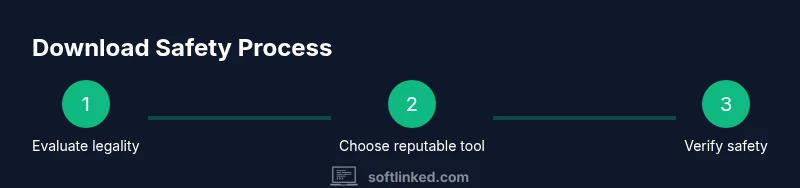
- Assess legality before downloading any content
- Choose reputable tools from official sources
- Prioritize safety and privacy in the download process
- Use official offline options whenever possible
- Organize and back up your downloaded MP4 files