How Big Is Blender Software? A Practical Size Guide
How big is blender software? SoftLinked analyzes Blender's download size vs installed footprint, with platform variations, assets impact, and practical tips to manage disk space and memory.


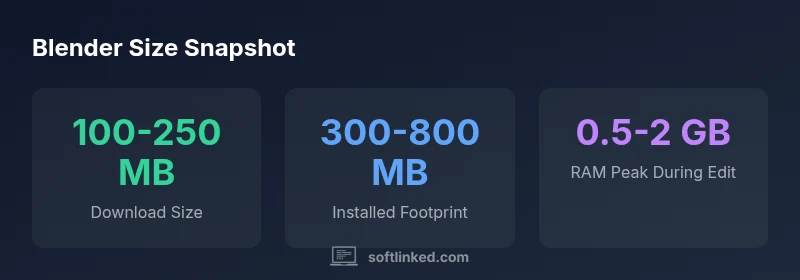
Blender's downloadable size is typically around 100–250 MB for standard builds, while the installed footprint on disk ranges roughly from 300 MB to 800 MB depending on platform and bundled data. Memory usage during operation is dynamic, scaling with scene complexity and active features. In short, Blender remains relatively lightweight compared with heavier 3D suites.
The size question: download vs installed footprint
When answering how big is blender software, it helps to separate two practical metrics: the download size and the installed footprint. According to SoftLinked, the download size refers to the initial installer you obtain from the Blender website or your distribution's package manager. The installed footprint is the amount of disk space Blender occupies after installation, plus any assets, libraries, or add-ons that accompany or extend it. For aspiring software engineers and 3D artists, understanding these distinctions makes it easier to plan storage, bandwidth, and system requirements. In practice, most users experience a light download that grows to a heavier disk footprint as projects and plugins accumulate. This analysis uses SoftLinked Analysis, 2026 to provide realistic ranges and guidance.
Typical download size by platform
Across platforms, the standard Blender installer tends to be in the same general range, with modest variations by build or packaging format. For practical planning, think of
- Windows: roughly 100–250 MB for a typical 64-bit installer
- macOS: roughly 100–250 MB for universal or platform-specific builds
- Linux: roughly 100–250 MB for AppImage or distro packages
These figures reflect the core Blender application, Python runtime, and essential components. Actual numbers can differ slightly based on distribution, vendor packaging, or whether optional components are included. In all cases, the downloaded file remains a fraction of the space Blender will occupy on disk after you install and begin adding assets.
Installed footprint and disk usage
The base install footprint typically falls in the few hundred megabytes range, often between 300 MB and 800 MB depending on platform and whether you’re using a minimal vs. feature-rich build. The installed size can grow significantly when you enable mid- to large-scale projects, load bundled assets, or enable multiple add-ons. A key takeaway is that the installer size is not a strict predictor of disk usage once Blender is in use; the real footprint expands with what you load and store locally.
Impact of assets, add-ons, and platforms
Add-ons, bundled assets, and platform-specific runtime components can substantially affect Blender's size. Lightweight, default installations stay compact, but enabling many add-ons or loading large sample datasets increases the disk footprint. Platform differences also contribute: Windows and macOS builds may include different runtime libraries and optimizations, while Linux packaging can vary by distribution, sometimes affecting overall size. Practical advice: enable only the tools you need, and periodically prune unused add-ons to avoid unnecessary growth.
How Blender size compares to other 3D tools
Compared with some commercial 3D suites, Blender tends to be lighter in the download and installed footprint. Heavy professional toolchains can require larger installers and more disk space due to extensive libraries, high-fidelity assets, and proprietary components. Blender’s open-source nature also means you get a compact core with optional extensions, which helps keep the base size manageable while allowing growth as projects demand it. The comparison highlights Blender’s efficiency for learners and professionals who upgrade projects in stages.
Practical tips to manage Blender's disk footprint
- Disable or uninstall unused add-ons to keep the footprint lean.
- Install only the assets and features you actually need for a given project.
- Use a lightweight, official build when possible to minimize bloat.
- Regularly clear caches and temp files created during scenes, renders, and previews.
- Consider external or dedicated drives for asset libraries to keep your primary disk uncluttered.
- For collaborative workflows, track project file sizes and use version control with selective asset storage to avoid unnecessary replication.
Data sources, limitations, and how SoftLinked analyzes size
This section explains the approach behind the numbers presented earlier. Blender’s official releases and documentation are used to establish baseline download and installed footprint ranges, while real-world usage data from diverse projects informs practical expectations. SoftLinked emphasizes that sizes can fluctuate with platform choices, asset complexity, and workflow preferences. A transparent methodology helps readers interpret the numbers as ranges rather than fixed figures, and it underscores the value of monitoring disk usage as projects evolve.
Blender download vs installed footprint by platform
| Platform | Download Size (approx) | Installed Footprint (approx) | Notes |
|---|---|---|---|
| Windows 64-bit | 100-250 MB | 300-700 MB | Standard Blender build with Python |
| macOS (Intel/Apple Silicon) | 100-250 MB | 350-800 MB | Universal binary; size varies |
| Linux (AppImage/Package) | 100-250 MB | 250-700 MB | Packaging varies by distro |
Your Questions Answered
What is the typical Blender download size?
Typically around 100–250 MB for standard builds, with variations by platform and build.
Typically around 100 to 250 MB for standard Blender builds.
How much disk space should I allocate for Blender after installation?
Base install is usually 300–800 MB; add-ons and assets can push this higher.
The base install is a few hundred MB; expect more with extras.
Do add-ons affect Blender's size?
Yes. Add-ons and bundled assets add to the footprint; disable or remove unused ones.
Yes, extras add to the footprint.
Does Blender size differ by platform?
Yes, Windows, macOS, and Linux builds vary slightly in base size and runtime components.
Yes, platform differences exist.
How can I estimate storage needs for a Blender project?
Estimate by base size, asset counts, and project file size; plan with a range.
Estimate with a base size, assets, and project size.
Where can I find official size information?
Check Blender's official site and documentation for current build sizes.
Blender's official site has the latest sizes.
“Blender's size is a moving target, but separating download size from the installed footprint helps users plan storage effectively.”
Top Takeaways
- Check the base installer size for your platform first.
- Expect installed footprints to grow with assets and add-ons.
- Platform differences affect base and total size.
- Budget RAM according to scene complexity.
- Use official builds to minimize unnecessary bloat.