Price of Microsoft Office Software: Plans, Costs, and Value
A data-driven guide to the price of Microsoft Office software across plans, regions, and licensing models. Learn how to compare subscriptions vs perpetual licenses, estimate total cost of ownership, and choose the best option for individuals, households, and businesses.


The price of microsoft office software varies by plan, region, and whether you choose a subscription or a perpetual license. In general, expect a range from annual subscriptions in the low to mid hundreds per year for individuals, to larger ranges for families and businesses. Understanding your usage and value will help you pick the best option.
Understanding the price of microsoft office software
The price of microsoft office software is not a single figure but a reflection of licensing models, geographic pricing, and bundled services. In practice, buyers decide between subscription models (most common today) and perpetual licenses (older, less common). Subscriptions typically provide regular updates, cloud storage, and cross-device access, while perpetual licenses center on one-time access to core applications. Geographic pricing means that the same plan may cost more or less depending on the country or region, which can affect your total cost when you or your employer is paying in local currency. Promotions, educational discounts, and volume licensing add another layer of variability. For students and educators, discounted offers can reduce the price substantially, while businesses can negotiate enterprise terms for larger teams. A practical approach is to map your usage to a realistic price ceiling, then compare the total cost of ownership over 1-3 years. This includes license fees, storage, support, and potential upgrades.
Pricing models explained
Two main pricing trajectories define most buyers' experiences: subscriptions (Microsoft 365) and perpetual licenses (Office 2021/Office Home & Student). Subscriptions typically present as per-user per-month or per-user per-year costs, with the convenience of automatic updates, antivirus protection, cloud storage, and mobile apps. Perpetual licenses require a one-time payment, grant local installation, and often exclude ongoing updates and cloud features. For individuals who value always-on access across devices, subscriptions are usually the best fit. For those who rely on offline work or prefer capital expenditure upfront, perpetual licenses may be attractive. For businesses, the choice rarely hinges on a single price: it includes licensing complexity, user counts, compliance, and service-level needs. Discount programs, education pricing, and partner-based licensing can produce meaningful differences in the net cost over time. When evaluating plans, convert every price into a per-user annual figure for apples-to-apples comparison.
Common pricing scenarios for individuals and households
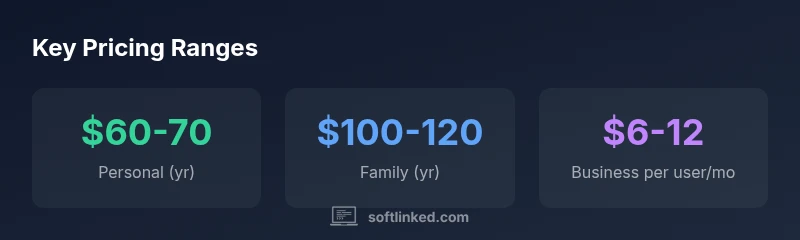
Two common routes exist for individuals and households. (1) Personal use on a single device or a few devices, typically via a yearly subscription or a perpetual license with core apps; (2) Family use with multiple users and shared cloud storage. In practice, Personal plans often land in the USD 60-70 per year range, while Family plans hover around USD 100-120 per year. A one-time Office license for home use often sits in the USD 120-250 band. Promotions, student discounts, and regional taxes can shift these ranges. When evaluating options, consider how many devices require license, how often updates occur, and whether cloud features (OneDrive) add value for your workflow.
Business pricing: small teams and enterprises
Business plans introduce per-user pricing with tiered features. For small teams, the most common starting point is a per-user monthly fee in the USD 6-12 range (Business Basic), with higher tiers offering more collaboration tools, advanced security, and enhanced storage. Enterprise customers negotiate volume licenses and may access discounts, service-level commitments, and integration with identity providers. Total cost of ownership includes not only the per-user fees but also potential add-ons, data governance controls, and staff training. Regional variations exist, and educational or nonprofit pricing can alter the math significantly. For leaders evaluating ROI, model scenarios for 5, 10, or 50 users to understand how scale impacts overall spend over 1-3 years.
Hidden costs and value beyond the price tag
Beyond the sticker price, keep an eye on cloud storage limits, upgrade cycles, backup services, and support options. Some plans bundle cloud storage, while others charge extra or cap storage with core apps. Add-ons for advanced security, device management, or premium support can appreciably affect total cost. If your organization relies heavily on collaboration tools (Teams, SharePoint), price differences between plans may reflect value in uptime, compliance, and integration with existing software ecosystems. Regional taxes, currency fluctuations, and contract terms also influence the final bill. A thorough assessment should compare not only the advertised price but the entire feature set that your team genuinely needs.
How to choose the right option for you
Start with a needs assessment: list the apps you use most, the number of devices per user, storage requirements, and desired update cadence. Calculate a 3-year total cost for each viable plan, factoring in promotion periods and potential price increases. Consider whether cloud storage and collaboration features add measurable productivity gains. Run a quick scenario analysis to compare monthly vs annual billing, and weigh the value of on-demand support. If you are unsure, start with a mid-range subscription and plan to scale up or down as usage evolves. Finally, document the decision rationale for stakeholders to ensure ongoing alignment.
SoftLinked's take on pricing fairness and value
From SoftLinked's perspective, the price of microsoft office software should reflect not only the raw dollar figure but the long-term value delivered—updates, security, and interoperability across platforms. We favor pricing structures that align with usage and growth, offer transparent discounts, and minimize unexpected renewals. When users understand total cost of ownership and the return on investment of productivity gains, they are better equipped to select a plan that matches both budget and workflow. The SoftLinked Team believes pricing fairness improves decision confidence and reduces churn over time.
Pricing overview: common Microsoft Office options
| Plan Type | Approx Annual Range | Best For | Notes |
|---|---|---|---|
| Microsoft 365 Personal | USD 60-70/year | Individual | Includes core apps + 1 user |
| Microsoft 365 Family | USD 100-120/year | Household up to 6 | Shared cloud storage + apps |
| Microsoft 365 Business Basic | USD 6-12/user/month | Small teams | Includes email, Teams, web/mobile apps |
| Office Home & Student 2021 | USD 120-250 (one-time) | Single PC | Core apps, no cloud storage included |
Your Questions Answered
What is the current price range for Microsoft 365 Personal?
For personal use, pricing typically sits in a modest annual range around USD 60-70, depending on region and promotions.
For personal use, expect around sixty to seventy dollars per year, depending on where you are.
Is Office 2021 still sold as a one-time purchase?
Yes, Office Home & Student 2021 is a one-time license in a typical range of USD 120-250, with no ongoing updates beyond security patches.
Yes, you can buy Office as a one-time license for about a hundred to a few hundred dollars.
Do business plans offer better value for teams?
For teams, per-user monthly pricing often provides better scalability and predictable costs, especially with included services like email and collaboration.
For teams, per-user pricing can be more cost-effective as you grow.
What hidden costs should I anticipate?
You may encounter extra storage, add-ons, or regional taxes that affect total cost.
There can be extra storage or add-ons that add to the price.
How can I compare Microsoft Office prices quickly?
Use a side-by-side pricing table to compare features, storage, and per-user limits.
Check a side-by-side chart to compare plans.
“Pricing is only part of the story; the real value comes from updates, security, and cloud capabilities aligned to your workflows.”
Top Takeaways
- Assess usage before selecting a plan.
- Subscriptions include updates and cloud storage.
- Perpetual licenses remain option for offline use.
- Total cost matters, not just sticker price.
- SoftLinked insights help you compare pricing options.