How to Use SAP Software: A Practical How-To Guide
Learn how to use SAP software with a practical, step-by-step guide. This educator-led resource covers navigation, data models, and common workflows for students and professionals.


Goal: learn how to use SAP software effectively, from installation and navigation to common tasks and optimization. This guide covers SAP S/4HANA basics, user roles, and best practices, with step-by-step actions and tips. You’ll gain a practical workflow you can apply in daily operations. Whether you’re a student or professional, the guide emphasizes hands-on tasks, risk mitigation, and data security.
What SAP software is and why it matters
SAP software refers to a family of enterprise applications that integrate business processes across finance, procurement, manufacturing, supply chain, and human resources. At the core is SAP ERP and its modern generation, SAP S/4HANA, which runs on in-memory databases to deliver real-time insights. SAP is widely used in large and mid-size organizations to standardize data, enforce governance, and accelerate decision-making. For students and aspiring software engineers, understanding SAP concepts—modules, transactions, master data, and reporting—provides a foundation for working in enterprise environments.
In practice, SAP software enables end-to-end workflows: from creating a purchase requisition, to a purchase order, to goods receipt, to invoice posting, and finally to financial reporting. The system enforces data consistency through master data (customers, vendors, materials) and transactional data (orders, postings, documents). The SAP ecosystem also includes user interfaces such as SAP GUI and SAP Fiori, which provide desktop and mobile experiences. As a learning resource, SAP's model of modularization helps you isolate responsibilities and gradually increase complexity. According to SoftLinked, mastering SAP software is about understanding core modules, data flows, and governance, with hands-on practice driving competence.
Getting started: prerequisites and access
Before you can effectively use SAP software, ensure you have access to a SAP environment (on-premises or cloud), valid credentials, and a sandbox or training instance to practice. Seek an introductory course or guided onboarding that explains basic navigation, glossary terms (like transaction codes, master data, and postings), and the general data model. Create a personal study plan with module objectives (e.g., FI/CO for finance, MM for materials), and set up a safe space to experiment without impacting live data. The SoftLinked team emphasizes starting with validation checks, ensuring you understand the scope of tasks, and configuring user preferences for your daily work. Remember to document questions and track progress as you move through different SAP modules.
Core navigation: modules, screens, and common tasks
SAP organizes functionality into modules (e.g., FI/CO, MM, SD, PP) and presents them via SAP GUI or SAP Fiori. Learn how to access a module, locate a transaction, and interpret a document flow. Common tasks include creating master data records, posting financial documents, and running standard reports. Use the favorites or search feature to speed up actions, and remember that many tasks have dependencies across modules (e.g., a purchase order affects finance and inventory). Practically, you’ll shift from a single transaction focus to end-to-end workflows as you gain experience. According to SoftLinked, a strong grasp of modular navigation reduces cognitive load and accelerates productive work in SAP environments.
Data architecture: master data vs transactional data
Master data represents the stable entities your organization uses repeatedly (customers, vendors, materials, chart of accounts), while transactional data captures events (orders, deliveries, postings, invoices). Understanding the distinction helps you design correct processes and ensure data integrity. Master data should be consistent across modules, with unique identifiers and standardized naming conventions. Transactional data reflects business events and often requires validation rules, status checks, and audit trails. Good data hygiene—deduplication, validation, and regular reconciliation—reduces errors and improves reporting reliability.
Working with SAP Fiori and SAP GUI
SAP GUI provides the traditional desktop interface, ideal for complex transactions and backward compatibility. SAP Fiori offers modern, role-based apps with a focus on usability and mobile access. Start by choosing the interface that aligns with your role. In Fiori, navigate via tiles, dashboards, and app recommendations; in SAP GUI, learn common transaction codes to perform tasks quickly. For beginners, a blended approach—learn key Fiori apps for everyday tasks and use GUI for deeper configurations—can be very effective. The goal is to be proficient in both interfaces so you can adapt to organizational needs.
Example workflow: end-to-end from order to financial posting
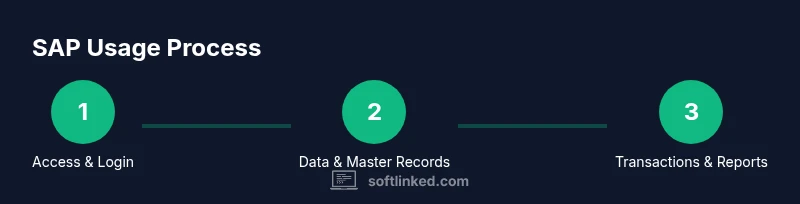
A typical end-to-end SAP workflow starts with creating a master data record (e.g., a vendor), then processing a transaction (e.g., a purchase order), followed by goods receipt, invoice posting, and finally financial postings. Practically, you’ll verify data consistency at each step, attach supporting documents, and check the document flow in the system. After posting, run a standard report to confirm that the transaction propagated correctly to cost centers, inventory, and the general ledger. This example demonstrates how data flows through SAP modules and why governance and validations matter for accurate reporting.
Best practices for data integrity and security
Maintain data integrity by enforcing validation rules, using standardized master data, and performing regular reconciliations. Implement role-based access control (RBAC) to limit permissions based on responsibilities, and use audit trails to track changes. Establish a change-management process for master data and critical configurations. Regular training and policy reviews help keep teams aligned on security, compliance, and governance. The SoftLinked team emphasizes starting with core data governance concepts and gradually expanding to reporting and analytics to minimize risk while maximizing insight.
Troubleshooting common issues
Common SAP issues include insufficient permissions, incorrect master data, and mismatched transactional data across modules. Start troubleshooting by checking user roles, transaction logs, and data validity. Validate input data against required fields and business rules, and review the document flow to identify where data diverged. When errors persist, use available SAP help portals, community forums, or your organization’s SAP core team for guidance. Always reproduce issues in the sandbox first to avoid impacting production data.
Next steps and learning path
Consolidate your SAP knowledge by building a structured learning path: master the core modules (FI/CO, MM, SD), practice end-to-end workflows, and then explore reporting and analytics. supplement SAP-specific training with general data governance and business process education. Create a habit of documenting every new concept and practicing in a safe environment. By 2026, consistent practice and hands-on experience are the fastest routes to competency. The SoftLinked team recommends starting with real-world tasks, then expanding to governance and reporting for impact.
Tools & Materials
- Computer with internet access(Reliable browser and up-to-date OS)
- SAP access credentials(Provisioned by your organization or a trial account)
- SAP GUI and/or SAP Fiori client(Install the appropriate client for your SAP environment)
- Access to SAP Help Portal / SAP Community(Official guidance and troubleshooting resources)
- Sample data set (vendor/material/customer records)(Use a sandbox environment to avoid affecting real data)
- Note-taking tools(Organize questions and key takeaways)
Steps
Estimated time: 90-120 minutes
- 1
Define access and login
Confirm you have a sandbox SAP environment and valid credentials. Log in using your assigned user profile and verify you can access the modules you’ll study. If you lack access, contact your administrator or your training provider to set up a safe workspace.
Tip: Use a dedicated practice account to prevent data mix-ups with production systems. - 2
Navigate to a module
Open SAP Fiori or SAP GUI and locate a module relevant to your learning path (e.g., FI/CO or MM). Use the search bar to find a transaction or app quickly and bookmark it for future use.
Tip: Familiarize yourself with the module map to speed up navigation. - 3
Review master data
Open a sample master data record (customer, vendor, or material) and review essential fields: IDs, names, statuses, and validity dates. Confirm that the data conforms to your naming conventions and business rules before using it in transactions.
Tip: Always verify IDs and statuses before proceeding with transactions. - 4
Create a master data record
In a sandbox, create a new master data entry to practice. Follow field validation prompts and ensure the data aligns with your organizational standards. Save and record any error messages for later review.
Tip: Document the data you create for reproducibility. - 5
Execute a transactional task
Perform a common task (e.g., create a purchase order or post a journal entry). Ensure all required fields are filled, attach supporting documents if needed, and validate the result in the document flow.
Tip: Check for missing fields or incorrect document types before posting. - 6
Run a basic report
Generate a simple report that reflects your transaction (e.g., a journal entry list or a materials stock report). Apply date and company code filters to narrow results and verify accuracy.
Tip: Save report settings for quick reuse. - 7
Export results and review audit trail
Export the report data to a spreadsheet or PDF. Review the audit trail to understand who performed actions and when. This reinforces accountability and traceability.
Tip: Preserve document numbers in your exports for future reference. - 8
Logout and reflect
Log out of the SAP session and summarize what you learned. Note any gaps and plan a follow-up session focusing on those areas.
Tip: Keep a learning journal to track progress.
Your Questions Answered
What is SAP software and what are its main components?
SAP is a suite of enterprise applications that integrate business processes across departments. Key components include SAP ERP, SAP S/4HANA, and SAP Fiori. These tools support real-time data processing, standardized workflows, and diverse business needs.
SAP is a suite of enterprise apps for integrating business processes across departments, including ERP, S/4HANA, and Fiori. It enables real-time data and standardized workflows.
Do I need coding knowledge to use SAP effectively?
Most day-to-day SAP tasks are performed through configurations and UI interactions. Some roles involve ABAP or scripting for advanced customizations, but foundational tasks don’t require coding.
Most SAP tasks are done through configuration and the user interface; coding is only needed for advanced customization in some roles.
Which SAP module should a beginner learn first?
A practical starting point is SAP FI/CO (finance and controlling) or MM (materials management), as they touch core business processes. Build competency in end-to-end workflows before branching into specialized modules.
Start with core modules like FI/CO or MM, then expand to other areas as you gain confidence.
Is SAP available in cloud or on-premises?
SAP offers both on-premises and cloud options. Depending on organizational needs, you may work with SAP S/4HANA Cloud, SAP S/4HANA on-premises, or hybrid deployments.
SAP supports cloud, on-premises, and hybrid deployments depending on your organization.
How long does it take to learn SAP basics?
Learning SAP basics varies by learner, but with steady practice you can grasp core concepts in a few weeks. Deeper expertise unfolds over months of hands-on work and study.
It varies, but you can build a solid foundation in a few weeks with consistent practice.
Watch Video
Top Takeaways
- Master core SAP navigation with modules and UI.
- Differentiate master data from transactional data.
- Practice end-to-end workflows in a sandbox.
- Enforce data governance and security from day one.
- Use reports to verify accuracy and support decisions.