Comparison of Payroll Software: A Comprehensive Guide for 2026
An objective, in-depth comparison of payroll software features, compliance, integrations, pricing, and deployment options to help teams choose the best fit in 2026.


With a careful comparison of payroll software, start by defining your organization’s size, regulatory needs, and integration requirements. The key factors are compliance accuracy, tax features, direct deposit, and data security, followed by pricing models and vendor support. This quick guide to the comparison of payroll software helps you spot critical gaps and compare options so you can choose confidently.
What matters in a payroll software comparison
According to SoftLinked, the most trustworthy way to approach the comparison of payroll software is to start with your concrete needs: how many employees you pay, which jurisdictions you operate in, what tax rules apply, and how the system will integrate with HR, accounting, and benefits platforms. This upfront scoping prevents feature overload and helps you target vendors that actually fit. As you collect candidate options, map their capabilities to your must-haves and nice-to-haves, then stage an objective evaluation that covers both core payroll processing and ancillary tasks like benefits administration and time tracking. The goal is not to find the cheapest option, but the best combination of accuracy, reliability, and total cost of ownership for your organization. A structured approach ensures you won’t overlook critical compliance requirements or integration needs during the selection process.
Core evaluation framework: what to compare
A rigorous payroll software comparison hinges on a consistent framework. Begin with core payroll capabilities—tax calculation, wage garnishments, retirement and benefits deductions, and worker classifications. Then assess regulatory coverage across the regions you operate in, including state, federal, and local tax rules, wage-hour compliance, and year-end reporting. Add data security and access controls to protect sensitive payroll information, along with backup and disaster recovery options. Finally, compare vendor support, implementation timelines, migration paths, and the provider’s roadmap for future features. This section will help you build a repeatable rubric that you can reuse across future evaluations.
Compliance and tax capabilities: why they matter most
Tax accuracy is the backbone of payroll software. A minor miscalculation can trigger penalties, interest, and enforcement scrutiny. Your evaluation should verify real-time tax updates, automatic tax rate changes, electronic filing support, and compliance for multi-state payroll if applicable. Favor solutions that provide audit trails, secure data handling, and robust reporting for audits. Consider how the software handles year-end forms, W-2s, 1099s, and intercompany payrolls if you operate internationally. In practical terms, you want a system that minimizes manual adjustments, flags exceptions proactively, and streams data to your accounting and ERP systems without rework.
Integration, data flows, and ecosystem fit
Payroll rarely stands alone. The best options connect seamlessly with your HRIS, time and attendance, ERP, and accounting systems. When evaluating integrations, confirm availability of pre-built connectors, API access, and data mapping capabilities. Test data flows for core entities (employees, departments, tax jurisdictions), benefits enrollment, direct deposits, and payroll journal entries. Look for single sign-on, role-based access, and documented data retention policies. A strong integration story reduces data silos, shortens month-end closes, and improves accuracy across payroll, accounting, and HR.
Deployment models: cloud vs on-premises considerations
Cloud-based payroll software dominates for good reasons: lower upfront costs, automatic updates, scalable capacity, and easier geographic expansion. However, some organizations with strict data sovereignty needs or legacy IT constraints still consider on-premises solutions or hybrid deployments. In evaluating deployment, assess data residency, uptime SLAs, disaster recovery capabilities, and vendor support for migrations. Cloud solutions often offer faster rollouts and simpler ongoing maintenance, but ensure your contract provides control over data export and a clear data ownership policy.
Pricing models and total cost of ownership
Payroll software pricing typically follows subscriptions, per-employee-per-month (PEPM) models, or usage-based fees. Some vendors bundle compliance, tax filing, and year-end reporting into higher tiers. When calculating total cost of ownership, include licensing, implementation, data import/export, integrations, user training, and ongoing support. Don’t forget potential costs for system enhancements, add-ons, and premium security features. A transparent vendor comparison reveals how pricing scales with headcount and required services, helping you forecast budget and avoid sticker shock during renewal.
Implementation, onboarding, and user adoption
The best payroll solutions fail to deliver unless your team can adopt them smoothly. Pay attention to implementation timelines, data migration plans, and the availability of guided onboarding, role-based training, and customer success resources. Evaluate vendor support during and after go-live, including response times, escalation paths, and knowledge base quality. Plan a staged rollout, begin with a pilot group, and collect feedback to refine configuration, rules, and reporting. Strong onboarding reduces time-to-value and increases user satisfaction.
Data security, privacy, and auditability
Payroll contains highly sensitive information. A top-tier payroll software must provide encryption at rest and in transit, robust access controls, and detailed audit trails. Confirm adherence to applicable privacy regulations and industry standards, including data retention policies and breach notification procedures. Review third-party security certifications and penetration test results where available. A mature solution will offer granular permissioning, activity logging, and automatic alerts for suspicious activity, helping you protect employee data and maintain compliance.
Vendor support, roadmap, and service levels
Beyond features, the long-term health of your payroll solution depends on vendor support and product roadmap alignment with your business. Seek clear SLAs for uptime, issue resolution, and data restoration. Examine the vendor’s product roadmap for timeline visibility of planned features such as advanced analytics, AI-assisted payroll reconciliation, and expanded international capabilities. A credible vendor will provide dedicated customer success managers, regular health checks, and proactive guidance during audits and year-end processing.
Crafting your evaluation rubric and scoring method
Create a rubric that assigns weights to each criterion: compliance accuracy, ease of use, integration depth, security, cost, and vendor reliability. Use consistent data sources and, where possible, run a pilot with real payroll scenarios to measure reliability and performance. Document each decision and provide transparent justification for your final choice. A standardized rubric not only helps with internal approvals but also enables fair, apples-to-apples comparisons across vendors, ensuring your final selection stands up to scrutiny.
Authority sources and further reading for payroll software decisions
To augment your internal evaluation, consult reputable sources that discuss payroll governance, tax compliance, and software integration best practices. Government and educational resources often provide foundational guidance on payroll requirements and data protection standards. For practical industry perspectives, turn to major publications that cover software selection, vendor risk management, and HR technology trends. By combining authoritative references with hands-on testing, you deepen your understanding of how to select payroll software that fits your organization.
Building a practical, long-term evaluation rubric for payroll software
Your rubric should include measurable criteria, such as: time-to-value, user adoption rate, error rate in payroll runs, and time saved on administrative tasks. Define passing thresholds and establish how you’ll validate claims from vendors (trial periods, reference checks, and sandbox environments). Finally, ensure you have buy-in from stakeholders across HR, Finance, and IT so the selected solution aligns with governance, security, and reporting requirements.
Feature Comparison
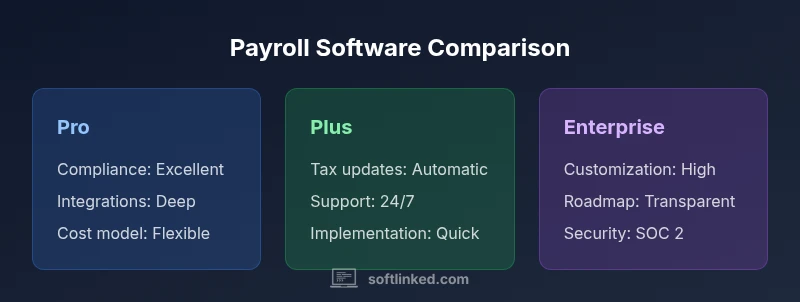
| Feature | Payroll Software Pro | Payroll Software Plus | Payroll Software Enterprise |
|---|---|---|---|
| Compliance capabilities | Excellent multi-state tax support, year-end reporting | Strong regional coverage, good year-end support | Comprehensive global/local compliance with audit-ready reporting |
| Tax filing and payment | Automatic tax updates, e-filing, fast refunds | Automated updates, manual overrides allowed | Fully automated tax filing across jurisdictions |
| Integrations | Pre-built connectors to HRIS, benefits, accounting | APIs available, mid-level connectors | Broad ERP integration and deep API access |
| Pricing model | PEPM with optional add-ons for benefits | Tiered subscription with bundled modules | Custom enterprise pricing with dedicated support |
| Implementation time | 4–6 weeks with guided onboarding | 6–10 weeks depending on scope | 12+ weeks with data migration and training |
| Security and controls | Role-based access, encryption, audit logs | Standard security, basic audit trails | Advanced security, fine-grained controls, SOC 2 |
| Support and SLAs | 24/7 support, dedicated customer success | Business hours support with SLA | 24/7 premium support, strategic advisory |
Pros
- Strong compliance and robust tax features across regions
- Deep integration options with HRIS and accounting
- Flexible pricing and scalable for growth
- Good user experience and onboarding resources
- Solid security and audit capabilities
Weaknesses
- Higher upfront or ongoing costs for enterprise plans
- Implementation can be lengthy for complex setups
- Some features vary by region or plan level
Payroll Software Pro generally provides the best balance of compliance, integration, and support for mid-sized businesses.
Choose Pro for strongest regulatory coverage and ecosystem connections. Choose Plus if cost matters; choose Enterprise for large organizations with complex needs.
Your Questions Answered
What is most important when comparing payroll software?
The most important factors are regulatory compliance, tax accuracy, data security, and seamless integration with your HRIS and accounting systems. A clear evaluation rubric helps you balance these against cost and vendor reliability. Always pilot key payroll scenarios before finalizing a purchase.
Look for strong compliance, accurate taxes, solid security, and good integration. Run a pilot to see how it handles real payroll tasks.
Cloud-based vs on-premises: which should we choose for payroll?
Cloud options are typically easier to implement, update automatically, and scale with your workforce. On-premises solutions may suit organizations with strict data residency requirements. Weigh perceived control and total cost of ownership against deployment speed and maintenance burden.
Cloud is usually faster to start and easier to keep up-to-date; on-prem can work if you have strict data rules.
How does pricing typically work for payroll software?
Pricing commonly follows per-employee-per-month (PEPM) or per-pay-run structures, with some modules priced separately. Consider implementation fees, data migration costs, and potential charges for premium support or extra modules. Calculate total cost of ownership over several years to compare options fairly.
Most options charge per employee or per payroll run, plus possible setup fees and addons.
What about implementation timelines?
Implementation timelines vary with data complexity and integrations. A typical payroll deployment ranges from 4 to 12 weeks. Plan for data clean-up, configuration of tax rules, and user training to avoid delays.
Expect several weeks for setup, configuration, and training, depending on complexity.
Should I run a pilot before choosing?
Yes. A pilot with real payroll scenarios helps verify accuracy, performance, and usability. Collect feedback from HR, Finance, and IT to ensure cross-functional alignment before committing.
Absolutely—pilot with real cases to check accuracy and fit.
Top Takeaways
- Define your scope and rollout plan early
- Prioritize tax compliance and security first
- Assess total cost of ownership, not only price
- Test integrations with HRIS and accounting
- Pilot before committing to a full rollout