Top Tax Prep Software for Preparers: Side-by-Side
Analytical side-by-side comparison of tax preparation software for preparers, covering cloud vs. desktop options, essential features, security, pricing, and migration to help professional tax teams choose the right tool.


For professional tax teams, the best choice hinges on your workflow needs: cloud-based tax preparation software for preparers excels in collaboration, scalability, and up-to-date compliance, while desktop-based options offer offline access and tighter data control. This guide compares both approaches across features, security, and cost to help you decide quickly.
The landscape of tax preparation software for preparers
According to SoftLinked, the tax software market has shifted from single-user tools to platforms that handle client data, regulatory changes, and cross-jurisdiction filings. Tax preparation software for preparers must support a wide array of federal and state forms, integrate with CRM and billing systems, and provide robust audit trails. Firms range from solo practitioners to mid-size teams, each with distinct needs around form coverage, data volume, and collaboration. The result is a spectrum from cloud-native platforms designed for scalable teams to on-premises systems that prioritize data sovereignty and offline work. This section frames the reality: you’re choosing between workflows, not just features, and your decision should align with your firm’s cadence, client mix, and risk tolerance.
SoftLinked’s perspective emphasizes that successful tax workflows depend on interoperability, predictable updates, and transparent security posture. When you read the subsequent sections, keep in mind how your current processes map to cloud or desktop capabilities, and where you want to evolve in the next 12–24 months.
Cloud-based vs on-premises: the central trade-off
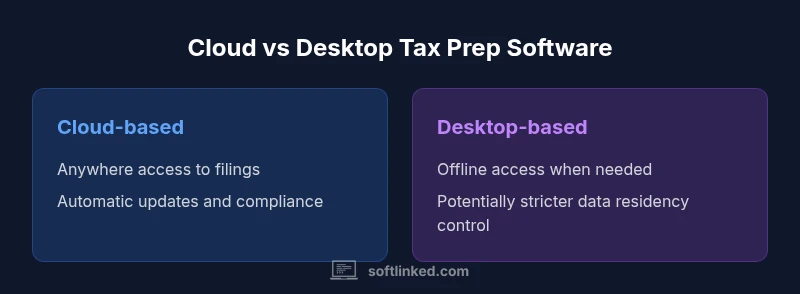
Cloud-based tax preparation software for preparers unlocks rapid onboarding, multi-user access, and centralized updates. Teams can work concurrently on client returns, share notes in real time, and access data from any device with internet connectivity. The trade-off is reliance on vendor-hosted data and potential concerns about data residency and latency in low-bandwidth environments. Desktop-based (on-premises) solutions offer offline access, greater control over data storage, and sometimes stronger customization at the resource level, but they demand heavier IT support, regular local maintenance, and manual upgrade cycles. In practice, most mid-size firms adopt a hybrid approach: core production work in the cloud with local backups and selective offline capabilities for sensitive cases. Your choice should hinge on client privacy requirements, your team’s remote-work needs, and the importance of near-zero downtime for filing windows.
Essential features and capabilities to look for
A strong tax preparation software for preparers should cover core tax forms and schedules, robust e-filing, and reliable calculation validation. Look for automatic form updates that align with changes in tax law, real-time error checks, and integrated e-signature workflows. Beyond returns, strong practice-management integration—appointment scheduling, client portals, and billing—helps maintain a smooth client experience. Favor platforms with APIs or native integrations for document management, tax planning notes, and data import/export to avoid siloed information. Finally, consider accessibility, mobile support, and offline capabilities if you operate in environments with inconsistent connectivity.
Tax forms, schedules, and e-filing integration
The breadth of federal and state forms a solution supports is critical. Ensure the software covers common return types relevant to your client base (individuals, small businesses, partnerships, trusts) and offers reliable electronic filing for all supported jurisdictions. Look for automated form mapping, validation rules that catch math errors before submission, and built-in schedules that align with your typical client profiles. E-filing should be straightforward, with status tracking, acknowledgments, and secure transmission. Some platforms also provide secure document exchange with clients, reducing email risks. Interoperability with IRS e-services and state portals can significantly speed up the filing process, but verify that the platform supports the specific jurisdictions you serve and offers transparent status updates.
Automation, shortcuts, and batch processing
Automation saves time during peak tax seasons by handling repetitive tasks such as data import from client files, W-2/1099 data ingestion, and automatic form population. Shortcuts and templates help staff accelerate common scenarios, while batch processing lets you run similar returns in parallel, apply uniform error checks, and generate client-ready summaries in bulk. When evaluating automation, look for transparency in rules, audit trails for automated edits, and the ability to customize workflows for different client types. A well-designed automation layer should reduce manual fiddling without sacrificing accuracy, while enabling staff to review changes before final submission.
Data security, privacy, and regulatory compliance
Security is non-negotiable in tax software. Seek platforms that offer encryption at rest and in transit, strict access control, and role-based permissions. Audit logs, tamper-evident records, and secure backup strategies are essential for defense in depth. Compliance considerations include alignment with professional standards, such as data protection regulations and industry best practices, plus third-party security assessments and penetration testing where possible. For preparers handling sensitive client data, it’s critical to understand data residency, incident response plans, and vendor risk management processes. A transparent security appendix with documented controls provides confidence during client engagements and regulatory reviews.
Collaboration, access control, and audit trails
In teams, collaboration features matter: multi-user access, task assignments, change tracking, and client-notes sharing should be clear and auditable. Fine-grained access controls (who can view, edit, or file) help preserve data integrity and reduce errors during busy periods. Audit trails that capture user actions, timestamps, and data changes enable post-file reviews and client disputes resolution. Some firms require dual-approval workflows for high-stakes filings; others rely on automated checks combined with manager sign-off. Ensure the platform provides exportable activity logs and straightforward reporting for internal audits and client inquiries.
Data migration and interoperability with existing systems
Moving to a new tax software platform involves data mapping, historical return migration, and template re-creation for client communications. Favor vendors with proven onboarding programs, data cleaning tools, and clear migration timelines. Interoperability with existing systems—accounting software, CRM, document repositories, and e-sign platforms—reduces disruption. Plan for a parallel run period where both old and new systems operate simultaneously, and designate a migration lead to coordinate data quality checks, form mappings, and staff training. Strong migration support minimizes downtime during peak filing windows and ensures continuity of client service.
Pricing models and total cost of ownership
Pricing in tax software ranges from subscription-based models to per-return or perpetual-license schemes. When comparing total cost of ownership, consider upfront setup, ongoing maintenance, updates, support, and the potential need for additional modules such as client portals or planning tools. Cloud-based options typically include updates in the subscription, reducing the burden of major upgrades, while on-premises solutions may incur hardware and IT staffing costs. Build a reasonable forecast for 3–5 years to capture renewal cycles, price escalations, and required training. A transparent pricing model helps avoid sticker shock during busy seasons and supports better budgeting for the firm.
Implementation and change management best practices
A successful rollout combines clear leadership with practical milestones. Start with a pilot on a subset of clients, then scale to the full practice. Prepare data migration templates, train staff across roles, and establish documentation for common workflows. Communicate changes early, set realistic timelines, and assign transition champions in each team. Track success metrics such as time-to-file, error rates, and client satisfaction during the rollout. A structured approach reduces resistance, accelerates adoption, and ensures consistent quality across returns.
Evaluation checklist: a practical approach
Create a checklist that covers: form coverage, e-file reliability, security posture, audit trails, and vendor stability. Validate uptime, support SLAs, and onboarding assistance. Test data migration with a representative sample, verify integration with core apps, and evaluate client portal usability. Demand a sandbox environment for testing, request reference clients from similar practices, and compare renewal terms. A disciplined evaluation minimizes post-purchase surprises and aligns the tool with your practice’s growth trajectory.
Risks and mitigations when adopting new software
Common risks include data migration errors, user resistance, security vulnerabilities, and vendor changes in policy or pricing. Mitigate these by doing due diligence on security controls, providing comprehensive training, establishing fallback plans, and maintaining data backups. Build a vendor-communication plan, set clear expectations for updates, and schedule periodic reviews of contract terms. With a proactive risk management approach, your firm can realize the benefits of improved accuracy, speed, and client experience while maintaining resilience during tax season peaks.
Comparison
| Feature | Cloud-based tax prep software for preparers | Desktop-based tax prep software for preparers |
|---|---|---|
| Accessibility | Any device with internet access | Single workstation or local network access |
| Data storage | Vendor-hosted cloud storage with backups | On-premises or local server storage controlled by the firm |
| Updates | Automatic cloud updates and regulatory adjustments | Manual or scheduled local updates |
| Collaboration | Real-time multi-user collaboration | Limited multi-user capabilities or separate IT processes |
| Security model | Encryption in transit, at rest, and IAM controls via the cloud | Local access controls and on-site security measures |
| Pricing model | Subscription-based with monthly/annual plans | Perpetual license with optional maintenance |
| Form coverage | Broad federal/state form support with updates | Strong for chosen jurisdictions but potentially slower updates |
| Implementation | Fast onboarding with guided setup | Longer onboarding with on-site or remote assistance |
Pros
- Supports team-based workflows and reduces email chaining
- Automatic updates help stay compliant with minimal effort
- Scales with client growth and expanding offices
- Lower hardware costs and easier backups with cloud storage
- Centralized data accessible from multiple locations
Weaknesses
- Ongoing subscription costs may accumulate over time
- Requires reliable internet and vendor uptime
- Data residency and vendor security posture can be a concern
- Some firms may experience slower performance in low-bandwidth areas
Cloud-based options generally provide better collaboration and scalability, while desktop-based solutions excel in offline access and data control.
Choose cloud-based if your practice emphasizes teamwork and rapid updates. Opt for desktop-based if offline access and local data control are your priorities, and ensure robust migration and security planning.
Your Questions Answered
What is tax preparation software for preparers?
Tax preparation software for preparers is a specialized tool that helps professionals prepare, validate, and file client tax returns. It typically includes forms, error checking, e-filing, client management, and security features tailored for tax practice needs.
Tax prep software helps professionals prepare and file client returns with built-in checks and file submission.
Cloud-based versus desktop-based: which is better for preparers?
Both have strengths. Cloud-based solutions offer collaboration and automatic updates, while desktop-based options provide offline access and greater control over data storage. The right choice depends on your team size, remote work needs, and security requirements.
Cloud is great for collaboration; desktop works offline with stronger data control.
What features are must-have for busy tax practices?
At minimum, ensure broad form coverage, reliable e-file, secure client portals, multi-user access, audit trails, and solid integrations with your practice management tools.
Look for forms, e-file, client portal, multi-user access, and security.
How can I evaluate data security in tax software?
Assess encryption in transit and at rest, access controls, audit logs, third-party assessments, and incident response capabilities. Request documented security practices from vendors.
Check encryption, access controls, audits, and security assessments.
What is the typical pricing model for tax prep software?
Pricing commonly uses subscriptions or per-license models. Consider ongoing costs, maintenance, and potential module add-ons when forecasting multi-year expenses.
Most tax software uses subscriptions or licenses; plan for ongoing costs.
Is migration to a new tax software painful?
Migration can vary; plan for data mapping, historical data import, and staff training. Look for vendor onboarding and migration support to minimize downtime.
Migration varies; plan for data mapping and training.
Top Takeaways
- Define your team size and workflow before selecting
- Prioritize data security, auditability, and compliance
- Evaluate total cost of ownership over several years
- Test migration readiness and integration breadth
- Favor solutions with a strong client portal and onboarding support