Software vs SaaS: A Clear Side-by-Side Guide for Engineers
Explore the fundamental differences between traditional software and software-as-a-service (SaaS). SoftLinked breaks down deployment, cost, maintenance, and decision criteria for engineers.


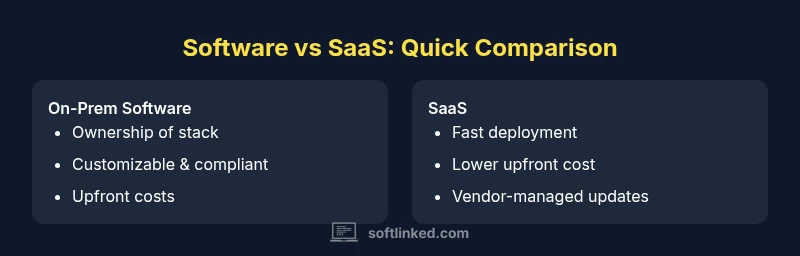
Software vs SaaS: In short, software refers to on-premises or privately hosted programs you install and own, while SaaS delivers applications over the internet via subscriptions. SaaS emphasizes rapid deployment, ongoing updates, and scalable usage, but may trade off control and customization. The choice hinges on total cost of ownership, data security needs, and the required level of IT agility.
Core Definitions: software vs saas and the deployment models
In the world of software architecture, understanding the distinction between traditional software deployments and software-as-a-service (SaaS) is foundational. This block defines the two models, explains how they affect architecture decisions, and sets the stage for deeper analysis. software vs saas describe that on-premises software is installed and run from local infrastructure, often managed by the customer or a partner. In contrast, SaaS is delivered over the internet as a consumer-ready service hosted by a vendor, typically accessed through a web browser.
For engineers, the core difference lies in where the code runs, who is responsible for maintenance, and how updates are rolled out. In pure software deployments, you own the stack and control upgrade cycles. In SaaS, the vendor manages the runtime environment, security patches, capacity planning, and feature releases. This can dramatically alter how you plan resource allocation, data flows, and integration points with other systems. In many teams, software vs saas choices are not mutually exclusive; hybrid approaches often blend on-prem components with cloud services to balance control and agility. According to SoftLinked, a structured evaluation of these models reduces risk and accelerates decision-making, especially for projects that span multiple domains and teams.
Key questions to frame early include: What workloads are core to your business? How critical is data locality? What is the expected scale and user base? What regulatory or compliance constraints exist? Answering these helps determine whether software or SaaS is the right default, or whether a staged hybrid strategy offers the best of both worlds.
Total Cost of Ownership: direct costs, indirect costs, and long-term implications
Total cost of ownership (TCO) is one of the most persuasive lenses for comparing software vs saas options. With traditional software, upfront licenses, hardware procurement, and system integration effort dominate the initial cost picture. Ongoing maintenance, patching, and eventual hardware refresh cycles add to the long-term burden. Conversely, SaaS uses a subscription-based model with predictable ongoing fees, often bundled with updates, support, and some levels of data management. When evaluating TCO, it's essential to consider hidden costs such as data transfer, API usage, and potential cost growth tied to user seats or feature tiers. A thorough TCO analysis also accounts for opportunity costs: the time your team spends on maintenance versus development that adds new features. SoftLinked's analyses emphasize that the TCO delta between software and SaaS can shift dramatically based on workload, usage patterns, and data governance requirements. In some cases, a hybrid approach delivers the best financial outcome by migrating non-core processes to SaaS while keeping mission-critical software on-premises for tighter control over licensing and data handling.
Practical steps for TCO evaluation include: listing all recurring fees (subscriptions, cloud storage, data egress), estimating hardware and energy costs for on-prem components, and modeling upgrade cycles. Use scenario analysis to compare three horizons: 1-year, 3-year, and 5-year costs. The right framework considers not only price, but the value delivered through reliability, compliance, and speed to deploy.
Comparison
| Feature | On-Prem Software | SaaS (Cloud) |
|---|---|---|
| Deployment model | Installed and run locally | Hosted by vendor; accessed remotely |
| Cost structure | Upfront licenses + hardware | Recurring subscription + minimal upfront |
| Maintenance burden | Customer responsible for updates | Vendor handles updates and uptime |
| Customization | High customization possible | Limited customization; standardized features |
| Security control | Full control over security architecture | Shared responsibility; vendor controls base security |
| Upgrade cadence | Manual upgrade cycles | Continuous delivery of features |
| Data portability | In-house data export; migration risk | Vendor-provided export options |
| Best for | Regulated data, latency-sensitive workloads | Fast deployment, scalable teams |
Pros
- Faster time to value with SaaS for non-core processes
- Lower upfront investment and hardware needs
- Automatic updates and standardized security baselines
- Easier scale and multi-tenant collaboration
- Predictable ongoing costs and simpler vendor management
Weaknesses
- Less control over customization and roadmap
- Potential data residency and sovereignty concerns
- Vendor lock-in and migration risk
- Reliance on internet connectivity and vendor SLAs
SoftLinked's verdict: SaaS generally wins on speed and scale; on-prem remains essential for core, highly regulated workloads.
Choose SaaS for agility and cost predictability when workloads are non-core or require rapid scaling. Retain on-prem for core workloads demanding control, customization, or strict data governance; consider a hybrid approach where appropriate.
Your Questions Answered
What is the primary difference between software and SaaS?
Software is installed and owned by the user on their own infrastructure, while SaaS is accessed over the internet as a subscription service hosted by a vendor. The decision affects maintenance, updates, and data governance.
Software is installed and owned; SaaS is cloud-based and subscription-driven. Both affect how you deploy, maintain, and govern data.
Is SaaS always cheaper than on-prem software?
Not always. SaaS can reduce upfront costs and maintenance, but over time subscriptions and usage can add up. A careful TCO analysis across your workloads helps reveal the true cost.
SaaS often lowers upfront costs but may cost more long-term, depending on usage and scale.
How do I handle data security when choosing SaaS?
Evaluate vendor security certifications, encryption, access controls, and data residency. Ensure the SLA covers incident response and data export capabilities for portability.
Check security standards, residency, and export options in the contract.
What is a hybrid approach?
A combination where core, customized workloads stay on-prem or in private clouds, while non-core services run as SaaS to accelerate deployment and scale.
Hybrid uses the best of both worlds for balance.
How does data portability affect exit strategy?
Ensure data export formats are standard and that you can migrate to another service without heavy friction. Plan for both data and metadata exports.
Plan an exit in advance with clear export options.
When should I choose on-prem software?
Choose on-prem when data locality, highly customized workflows, or strict regulatory requirements demand full control over the environment.
On-prem is best for strict control and customization.
Top Takeaways
- Define core vs. non-core workloads early
- Model total cost of ownership across horizons
- Prioritize data ownership and portability
- Plan for exit and migration from the start
- Pilot teams to validate governance and integration