Software Installation Near Me: A Practical Guide
Explore what software installation near me entails, how to evaluate local installers, typical costs, and steps to ensure a smooth, secure setup with reliable post-install support.


Software installation near me refers to professional services that install, configure, and optimize software on devices within a geographic area, whether on-site or remotely. It covers operating systems, productivity suites, security tools, and specialized apps. Local installers help you plan, verify compatibility, and ensure proper licensing, with options for remote support to minimize downtime. This guide explains how to choose a service near you and what to expect.
Understanding what software installation near me covers
According to SoftLinked, the phrase software installation near me encompasses more than simply copying software onto a device. It includes a structured workflow: pre-installation assessment, licensing verification, compatibility checks, driver and plugin installations, configuration of user accounts and security settings, and post-installation validation. Local providers typically tailor these steps to your environment—whether you’re outfitting a single workstation, a small business, or a classroom. The goal is to minimize downtime, ensure correct licensing, and align the setup with existing IT policies. In practice, a strong local installation service will offer documented scopes of work, clear timelines, and a rollback plan in case something goes awry. When you search for a local installer, you’re not just hiring someone to click “install.” You’re engaging a partner who understands dependency chains (OS, middleware, security layers) and who can testify to a compliant, auditable process that fits your organization’s risk tolerance.
How to evaluate providers near you
Evaluating local installers requires a mix of due diligence and practical checks. Start with licensing and certifications relevant to your software stack (for example, operating system, productivity suites, and security tools). Look for written SLAs that specify response times, remediation windows, and support coverage beyond the initial install. Ask for references and case studies that resemble your use case—small business setups, educational labs, or healthcare workstations. Security posture matters: request a data-handling policy, access controls, and encryption practices. Check for clear pricing, including what’s included (backup, migration, licensing re-activation, updates) and what might incur extra charges. Finally, confirm they can work with your environment (on-site, remote, or hybrid) and whether they offer post-installation monitoring or get-it-right-the-first-time guarantees.
Common installation scenarios and approaches
There isn’t a one-size-fits-all approach to software installation near me. Common scenarios include OS upgrades or fresh deployments (Windows, macOS, Linux), suite installations (office productivity, email clients, collaboration tools), security tool rollouts (antivirus, EDR agents), and specialty software (CAD, design, or development environments). For complex stacks, a phased approach often works best: inventory current assets, verify licenses, stage in a test environment, validate compatibility, then push to production. Memory and storage constraints are part of the planning; some setups require driver updates, firmware checks, or network reconfigurations. Documented rollback procedures and licensing reconciliations help prevent licensing disputes and post-install surprises. A thoughtful installer will also provide post-install checklists and user-facing guides to reduce the learning curve for end-users.
On-site vs remote installation: what to expect
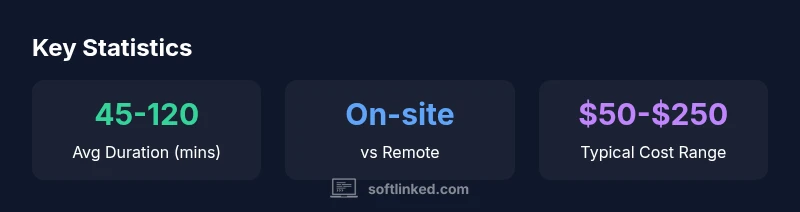
On-site installations provide hands-on validation in your actual hardware and network environment, which is invaluable for hardware-driver integration and physical security audits. Remote-assisted installs accelerate deployments, especially for devices distributed across multiple locations, and reduce travel time for technicians. However, remote setups require reliable remote access permissions, clear network boundaries, and robust remote-support tools. Expect a brief discovery call, remote assessment, and then either a coordinated on-site visit or a remote session. In both cases, a well-defined scope, backup plan, and verification tests are essential to confirm that the software installs correctly and operates as intended. Communication clarity is critical—schedule windows, contingency plans, and post-install follow-ups to avoid ambiguity.
Practical steps to plan a successful local install
A successful local installation begins with meticulous planning. Create a discovery document that lists installed software, version levels, license keys, and hardware inventories. Confirm licensing compliance and eligibility for upgrades or migrations. Establish backups and a rollback plan before you touch any system. Prepare users with a short training script or quick-start guide, especially for productivity tools or security configurations. Define success criteria (functional tests, signature checks, user acceptance), and set milestones for each phase of the install. Prepare a post-install verification checklist: verify licenses, confirm user accounts, document configurations, and schedule a follow-up to address any residual issues. Finally, ensure the installer documents changes to your IT policy and security posture for audit readiness.
Post-installation validation, security, and ongoing support
Post-install validation is about confirming that everything works as intended and that security baselines are maintained. Run functional tests for each application, verify data integrity during migration, and check software update channels. Security considerations include ensuring proper user access controls, endpoint protection configurations, and adherence to least-privilege principles. Provide end-user training materials and establish a cadence for software updates and patch management. Establish a simple escalation path and a maintenance window for future updates to avoid disrupting critical work. A reliable local installer will offer ongoing support options, including remote monitoring, periodic check-ins, and clear renewal reminders for licenses and warranties.
Budgeting and procurement considerations
Budgeting for software installation near me involves more than the upfront installation fee. Consider ongoing costs such as per-seat licenses, recurring maintenance, and potential hardware upgrades that may be required to support the software. Some providers offer bundled services (backup, migration, and updates) that can reduce total cost of ownership. Ask for a transparent breakdown of line items: labor, travel, licensing, and any third-party tools. Compare proposals not just on price, but on scope, risk management, and the provider’s ability to minimize downtime. Where possible, request a phased implementation with defined milestones and exit clauses if the service doesn’t meet agreed standards. By planning for contingencies and documenting everything, you’ll improve the likelihood of a smooth, cost-effective installation.
Comparison of installation methods
| Method | Typical Duration | Required Access | Best For |
|---|---|---|---|
| On-site installation | 90-180 minutes | In-person access to device and network | Complex setups; sensitive systems |
| Remote/assisted installation | 60-120 minutes | Remote access; requires consent | Fast deployments; limited hands-on help |
| Self-service install | 15-60 minutes | User access only | Simple software; basic support |
Your Questions Answered
What is included in a typical software installation near me service?
A typical service includes requirement gathering, licensing verification, compatibility checks, installation or upgrade, configuration, basic user training, and post-install validation. Some providers also offer backup, migration, and ongoing support as part of the package.
Most installers cover licensing checks, installation, configuration, and a brief training in one package.
How can I verify a local installer’s qualifications and security practices?
Ask for licenses, certifications, and references. Request a security policy outline, data handling practices, and a sample SLA. Look for third-party audits or customer testimonials and ensure they can operate within your regulatory environment.
Check licenses, certifications, and security policies before you hire.
Is remote installation as effective as on-site install for most software?
Both can be effective depending on the scenario. Remote installations work well for standard software and cloud-based tools, while on-site is beneficial for hardware-dependent setups, sensitive networks, or complex migrations.
Remote can be fast, but on-site helps with hardware and network specifics.
What should I do to prepare for an installation day?
Back up data, inventory software, collect licenses, map stakeholders, designate a workspace, and confirm access. Have a rollback plan and a clear go/no-go decision ready.
Back up stuff, list licenses, and have a rollback plan.
What kind of post-install support should I expect?
Look for a defined support window, update management, and a process for addressing post-install issues. Some providers offer follow-up checks or remote monitoring.
Ask for follow-up support and updates after install.
How do I budget for software installation near me?
Estimate upfront labor and travel costs, licensing fees, and any hardware or training expenses. Seek a phased plan with milestones to spread cost and reduce risk.
Plan for labor, licensing, and potential upgrades in stages.
“Clear installation practices reduce downtime, licensing disputes, and security gaps. Aligning scope, backups, and post-install checks is essential for a reliable setup.”
Top Takeaways
- Know what’s included before you commit
- Choose a provider with transparent SLAs and licensing
- Plan backups and a rollback strategy
- Prefer a phased approach for complex stacks
- Prioritize post-install support and security checks