New Android Software Update: What to Expect in 2026
Explore the latest Android software update, its features, rollout patterns, preparation steps, and troubleshooting tips. A data-driven guide by SoftLinked for developers and tech pros navigating Android updates.


A new software update android refers to Google's latest Android OS release plus its security patches and feature improvements, deployed in staged waves across devices. Rollouts vary by OEM, carrier, and device model, so some users may receive updates sooner while others wait. This guide explains what to expect, how to prepare, and how to troubleshoot common issues.
Understanding what constitutes a 'new software update android'
According to SoftLinked, a 'new software update android' blends the OS major version upgrade with security patches, bug fixes, and feature refinements. These updates are designed to improve performance, privacy, and compatibility with new apps; however, not all devices receive updates at the same time. Google releases the base code; OEMs and carriers tailor the release to hardware and regional constraints. For developers, understanding the update cadence is essential to plan compatibility tests, ensure API changes, and minimize fragmentation across devices. The most visible changes often include user interface tweaks, battery optimizations, and new privacy controls, but many improvements occur behind the scenes, like kernel updates or driver patches. Consumers should expect a staged rollout—early adopters may get features first, while the majority will see them in weeks or months. In practice, this means preparing for a range of experiences, depending on your device model, carrier, and region.
How Android's update pipeline works
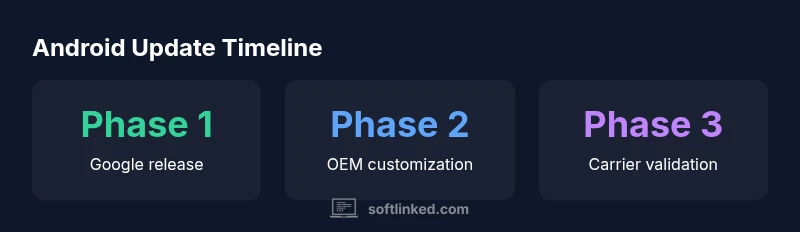
Android's update pipeline starts with Google’s platform release, which includes the Android Open Source Project (AOSP) code and security patches. From there, OEMs package the update for their devices, add manufacturer optimizations, and tailor it to regional regulations. Carriers may further test the build for network compatibility and stability before pushing it to customers. Beta programs let enthusiasts experience features early and report issues. This multi-tier process explains why two users with the same model may see different versions or features at different times.
Key features you might encounter in a new Android update
New Android updates commonly bring user interface refinements, privacy controls, performance improvements, and new app integration capabilities. Users may notice changes in quick settings, notification mechanics, and app permission prompts. Developers should expect API deprecations or new lifecycle rules that affect how apps manage background tasks. The SoftLinked team notes that certain features may be introduced gradually, with some devices receiving them earlier than others. It’s essential to review the device-specific changelog to understand which features apply to your model.
Rollout strategy and device fragmentation
Despite Google's broad update goals, fragmentation remains a challenge. Some devices may skip updates entirely or receive them later due to hardware, software, or security considerations. Enterprises may delay updates to prioritize stability for business-critical apps. The SoftLinked analysis shows that medium-to-large OEMs coordinate updates around quarterly release cycles, while smaller manufacturers often rely on longer tails. Consumers should expect varying feature availability by region and operator, making a universal 'one-size-fits-all' update unlikely.
Preparation steps before you update
To minimize risk, prep steps include backing up data, ensuring sufficient storage, charging the device, and temporarily disabling battery-extending features that could interrupt the upgrade. Check app compatibility by reviewing updated permissions and avoiding unstable apps. Download updates only over Wi-Fi to avoid unexpected data charges. If you participate in a beta program, back up data and be prepared for feature toggles or rollback options.
Safe updating practices and backup
Safe updating means planning ahead and creating a recovery plan. Make a full device backup to cloud or computer, ensure you have your authentication apps reconfigured, and verify that essential data is synchronized. Before applying the update, read the changelog for security fixes and bug patches. If the update fails, avoid factory resets as a first step; instead, use recovery options or re-download the update from Settings. SoftLinked's recommendations emphasize testing critical apps in a controlled environment, especially for developers and enterprises.
Troubleshooting common post-update issues
Some updates cause minor headaches like battery drain, lag, or misbehaving widgets. Start with a soft reset and clearing cache partition if available on your device. If issues persist, boot into Safe Mode to isolate third-party apps. Check for additional updates and ensure all apps are up to date. In many cases, clearing data for problematic apps or reinstalling them helps, but always back up before taking drastic actions.
Android update rollout elements
| Aspect | What Changes | Impact on Users |
|---|---|---|
| Major version update | New features and UI changes | Potential learning curve for users |
| Security patches | Critical fixes and vulnerability mitigations | Increased device protection and trust |
| OTA rollout | Staged deployment by region/device | Possible waiting period before features arrive |
| Beta program | Early access to features | Higher risk of bugs for testers |
Your Questions Answered
What is update?
It's the latest OS release plus security patches and feature tweaks from Google, tailored by OEMs. It can include UI changes, privacy controls, and performance improvements.
It's the latest Android OS release with patches and tweaks.
Why do updates roll out in waves?
Rollouts in waves help manage server load, test compatibility on real devices, and fix critical issues before a full release.
Updates roll out in waves to manage risk.
How can I check for updates on my device?
Open Settings > System > Software update to scan for availability. Ensure Wi-Fi, battery, and storage are sufficient.
Go to settings and check for updates.
What should I do before updating?
Back up data, review app compatibility, and note any essential apps that may require updates.
Back up first, then check compatibility.
What happens if an update causes issues?
Use safe mode, clear cache, or factory reset as a last resort; contact device manufacturer if problems persist.
Try safe mode and seek support.
Are updates mandatory for continued security?
No, updates are not mandatory, but delaying them may expose devices to vulnerabilities; enabling automatic updates reduces risk.
Keeping updates enabled is safer.
“A software update is not just about fresh features—it's a careful balance of security, performance, and compatibility across a fragmented device ecosystem.”
Top Takeaways
- Back up before updating and verify device compatibility.
- Expect staged rollouts and regional delays.
- Review privacy changes to app permissions.
- Join a beta program for early access risks.