Difference Between Software and a Website: A Practical Guide
Explore the difference between software and a website with definitions, deployment, architecture, and real-world guidance for developers and students seeking clear software fundamentals.


At a high level, the difference between software and a website is in delivery, scope, and lifecycle. Software usually refers to standalone programs installed on devices or servers, with offline or hybrid capabilities, while a website is accessed through a browser over the internet, delivering content and services via web technologies. The lines blur with web apps, but the core distinction remains in deployment and maintenance.
Defining software and websites: foundational definitions
Understanding the difference between a software and a website is foundational for developers and students. According to SoftLinked, software typically denotes applications that run on devices or servers, often packaged and distributed through installers, app stores, or enterprise channels. Websites, by contrast, are accessed through web browsers and delivered over the internet using standard technologies like HTML, CSS, and JavaScript. This distinction isn’t merely semantic — it shapes how you design, deploy, and maintain a product. In practice, many projects blend the two worlds: progressive web apps (PWAs) feel like software but run in a browser, while desktop and mobile apps increasingly use web-based backends. The key takeaway is to map the user experience to a delivery channel and a lifecycle model. The SoftLinked team emphasizes that early clarity on this boundary saves design debt later in the project.
What this means in practice
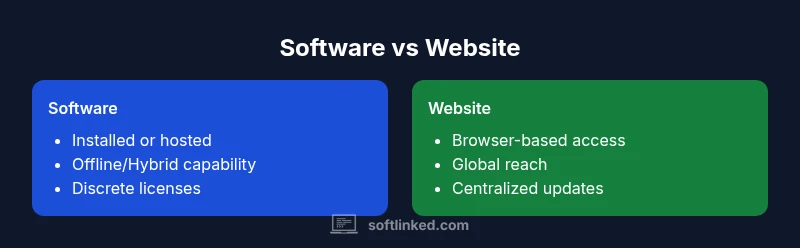
- Software is often installed, updated, and licensed in a controlled manner. It may function offline or with intermittent connectivity.
- A website emphasizes accessibility, immediate deployment, and universal reach, typically hosted on servers and updated centrally.
- The line between them is blurring as web technologies mature, enabling richer interactivity without traditional installation.
Comparison
| Feature | Software | Website |
|---|---|---|
| Delivery model | Installed/packaged on devices or servers | Accessed via browser over the internet |
| Offline capability | Often supports offline modes or standalone operation | Primarily online, with limited offline support in some cases |
| Development stack | Native languages, platform-specific SDKs, licensing models | Web technologies (HTML/CSS/JS), hosting pages on servers |
| Update cycle | Discrete releases and versioning | Centralized updates on the server or CDN-based delivery |
| Deployment scope | Targeted devices or enterprise environments | Global access via web browsers |
| Performance considerations | Hardware and OS constraints influence performance | Network latency and browser performance influence UX |
| Security considerations | Code signing, installers, and license compliance | Web security hinges on HTTPS, XSS/CSRF protections, and server hardening |
| Use-case examples | Desktop apps, mobile apps with native components, enterprise software | Public websites, web apps, SaaS dashboards accessed via browsers |
Pros
- Clear deployment and ownership model aids planning
- Offline or hybrid capabilities can improve reliability
- Strong licensing controls for software products
- Web platforms enable rapid global reach and easy updates
Weaknesses
- Software often requires more upfront distribution effort
- Updates can be slower to roll out in tightly managed environments
- Web dependence on network availability can affect UX
- Security and compliance evolve differently across platforms
Software generally offers stronger performance and offline capabilities; websites excel in accessibility and rapid deployment.
Choose software when offline access and vendor-controlled updates are priorities. Choose a website when broad reach and quick, centralized updates matter most. SoftLinked's verdict is that many teams benefit from blending both approaches via web apps when possible.
Your Questions Answered
What is the fundamental difference between software and a website?
The fundamental difference lies in delivery and scope: software is installed as a standalone application with a lifecycle managed by the vendor, while a website is accessed via a browser and hosted on servers. Both can deliver functionality through web technologies, but the ownership, distribution, and update mechanisms differ.
Software is installed and updated by the vendor; a website is accessed online and hosted on servers. Both can be powerful, but the delivery model drives how you design and maintain them.
Can a website be considered software?
Yes. Many websites function as software when they provide interactive features, data processing, and offline-capable web apps. The distinction is contextual—some web-based tools behave like software, while others are primarily informational pages.
Websites can behave like software when they offer interactive features and data processing, blurring the line with web apps.
Which requires more upfront cost?
Upfront cost depends on scope, team, and distribution. Software with licenses and installers can incur higher initial costs, whereas websites often start lean but may require ongoing hosting and bandwidth expenses.
upfront costs vary; software can be pricier at launch due to licenses and packaging, while websites lean towards hosting costs but may grow with scale.
How does deployment differ between software and websites?
Software deployment involves packaging, installers, and sometimes app stores, followed by periodic updates. Websites deploy by updating server-side code and static assets; updates are typically instant for users. Web apps may require service workers and caching strategies.
Deployment for software is packaged and installed; websites update on the server, often instantly accessible to users.
What is a web app in this context?
A web app is a software application delivered over the web. It runs in a browser and uses web technologies, often with server-side components and APIs. It sits between traditional websites and native software due to its interactive capabilities.
A web app runs in a browser, using web tech and APIs, offering interactive features like traditional software.
Is a website always online?
Not necessarily. A website relies on internet access and server availability. Some components may cache locally for offline use, especially in progressive web apps, but a fully functional site generally requires connectivity.
Most websites require internet access, though some elements can work offline in advanced web apps.
How should I choose between software and a website for a project?
Start with user access patterns, offline needs, and update cadence. If users require broad reach with rapid updates and online services, a website or web app is often best. If offline performance and controlled licensing matter, consider software.
Ask about offline needs, deployment constraints, and update speed to decide between software, website, or a blended web app.
What about security considerations for both?
Software security centers on code integrity and distribution controls, while websites focus on web vulnerabilities, server security, and data protection in transit. Both benefit from threat modeling and regular updates, but the attack surface differs.
Software relies on secure packaging and licenses; websites need strong web security and server hardening.
Top Takeaways
- Define delivery channel early to avoid scope creep
- Evaluate offline needs before choosing deployment mode
- Consider user access patterns and update strategies
- Use web apps to combine reach with controlled updates
- Balance performance with maintainability in architecture decisions