Where to Program in Python: Best Environments for Learning
Learn where to program in Python—from local IDEs to cloud notebooks. This guide covers setup, tools, and best practices for learners and professionals seeking efficient workflows.


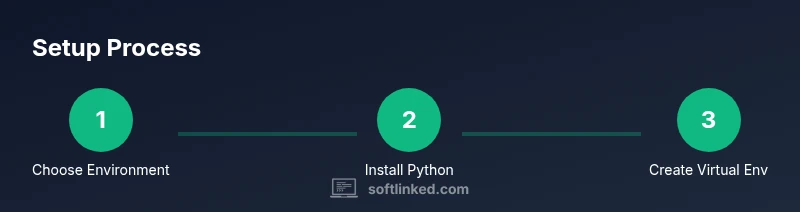
To start programming in Python, choose a development environment that fits your goals. Popular options include local IDEs like PyCharm, VS Code, or simple text editors, plus interactive environments such as Jupyter Notebooks for data work. Ensure Python is installed (3.x) and set up a clean project folder with version control. You can start on a laptop, desktop, or even a cloud workspace.
What 'where to program in Python' means for beginners
For beginners, the phrase where to program in Python is less about a physical place and more about the environment you choose. According to SoftLinked, the best starting point is a practical setup that minimizes friction and maximizes learning. If your aim is to learn syntax and basic concepts, a simple local environment with a beginner-friendly editor is ideal. If you plan data analysis or machine learning, you’ll benefit from notebooks and cloud-based resources that let you experiment quickly. In this guide we’ll explore the main options, why they matter, and how to pick the right path for you. The choices you make here will shape your workflow, your ability to test ideas, and your capacity to share code with others. No matter which route you choose, the core principles stay the same: clean project structure, clear dependencies, and reproducible results. The SoftLinked team emphasizes practical, reproducible workflows that scale as you grow.
Local development environments
Local development means installing Python on your machine and using an editor or IDE to write code. This approach gives you full control over the toolchain: the Python version, libraries, and filesystem. On Windows, macOS, and Linux, the setup steps vary slightly, but the goals are the same: have Python available from the command line, be able to run scripts, and manage dependencies safely. Start by installing Python 3.x from the official source, verify the installation, and ensure the interpreter is on your PATH. Then pick an editor that supports Python editing, debugging, and project management. Local environments are ideal for learning core language features, building small projects, and practicing version control before you scale to cloud resources.
Cloud-based development environments
Cloud-based environments remove the barrier of configuring a local machine. They’re especially convenient for beginners to experiment or for teams collaborating remotely. Popular options include Google Colab for data work, Replit for quick prototyping, and GitHub Codespaces for more complete projects. Advantages include instant access, consistent environments, and easy sharing of notebooks or code. Downsides can include slower execution for large computations, limited access to local hardware, and potential data transfer considerations for sensitive projects. If you’re learning or teaching, cloud options reduce setup time and let you focus on syntax and algorithmic thinking. For longer-term work, pair cloud environments with a local clone to maintain portability and control over dependencies.
Choosing an editor or IDE
An editor or IDE is the primary interface for writing Python. The best choice balances simplicity with powerful features like code completion, debugging, and integrated testing. VS Code is popular for its lightweight footprint and extensive extensions. PyCharm Community Edition offers strong refactoring and debugging capabilities. Spyder and JupyterLab are great for data science workflows. Vim or Emacs provide advanced keyboard control for power users. Start with one option, then experiment with others as your needs evolve. The key is to pick a setup that helps you stay productive and reduces friction when you run code. Whichever you choose, ensure it supports virtual environments, version control integration, and a built-in terminal.
Managing Python versions and virtual environments
Version management is essential as you work on multiple projects. Python 3.x is the recommended base for modern projects. On some systems, you may want to use pyenv to switch between Python versions, while Windows users often rely on the official installer or tools like pyenv-win. Virtual environments isolate dependencies so projects don’t interfere with each other. Create a separate environment for each project, activate it, and install packages with pip. Maintain a requirements.txt or a pyproject.toml to reproduce the setup. When sharing code, provide clear instructions for recreating the environment, including the exact Python version and dependency constraints. This practice keeps projects portable and future-proof.
Project structure and packaging basics
Organize Python projects with a clean, scalable layout. A typical structure includes a top-level package directory (src/ or mypackage/), a tests/ folder, a README.md, and a pyproject.toml or setup.cfg if you use legacy packaging. Use a virtual environment and a requirements.txt or pyproject.toml to manage dependencies. For modern Python projects, tools like Poetry simplify packaging, dependency resolution, and publishing to PyPI. Document entry points, configure test runners, and consider using a simple CI workflow. Clear, consistent structure saves time when you scale your codebase and makes it easier for others to contribute. Remember to add a .gitignore to exclude environment folders and cache files from version control.
Notebooks for exploration and data work
Notebooks, especially Jupyter and JupyterLab, are valuable for interactive exploration, data cleaning, and visualization. They let you mix code, results, and narrative in a single document, which is ideal for learning and sharing experiments. In cloud services like Colab, you can access GPUs and preinstalled data science stacks, while local Jupyter installations give you more control over the environment. When using notebooks, aim for reproducible workflows: pin package versions, export notebooks to scripts when possible, and keep a separate environment for the notebook kernel. Notebooks are not a substitute for a software project, but they are excellent for prototyping ideas and presenting results.
Collaboration and sharing code
Version control with Git is essential for collaboration. Create a Git repository for each project, write meaningful commit messages, and use branching strategies to manage features and fixes. Use a central remote on GitHub, GitLab, or Bitbucket, and include a concise README with setup instructions. In your repository, commit only code and configuration; do not track large data files. Use a .gitignore file to exclude Python virtual environments, caches, and build artifacts. If you’re working in teams, adopt a simple PR review process and automated tests to maintain code quality. This discipline makes it easier to collaborate and onboard new contributors.
Maintenance, security, and lifelong learning
Python ecosystems evolve, so keep dependencies under control and update Python versions as needed. Regularly review security advisories for dependencies, rotate credentials, and use virtual environments to minimize risk. Set up lightweight automation to update packages and run tests. As you grow, expand your skill set with exposure to web frameworks, data tools, and software architecture concepts. The SoftLinked approach emphasizes fundamentals first: plain Python, thoughtful project structure, and reproducible workflows that scale with your ambitions. By building a solid base now, you’ll be ready for more advanced topics later.
Authority Sources and Further Reading
To deepen understanding and verify best practices, consult credible educational resources. MIT OpenCourseWare offers free Python and CS fundamentals courses that cover coding principles and problem-solving approaches. Stanford CS literature provides practical insights into programming concepts and software development. The National Institute of Standards and Technology (NIST) offers guidelines on secure software development and reproducible workflows. Even broader reading from arXiv and major computer science publications can help extend your knowledge as you grow.
Tools & Materials
- Python 3.x(Download from the official site and install the latest stable release)
- Editor/IDE(Choose VS Code, PyCharm Community, or another preferred tool)
- Virtual environment tool(Use built-in venv or a manager like pyenv for version control)
- Git(Required for version control and collaboration)
- Internet connection(Needed for package installation and cloud environments)
Steps
Estimated time: 60-120 minutes
- 1
Define goals and environment
Clarify your learning or project goals and decide between local, cloud, or hybrid environments. This choice drives your tool selection and setup process.
Tip: Write a one-sentence goal for your Python project to anchor your setup. - 2
Install Python and verify
Install Python 3.x on your operating system and verify the installation by running python --version. Ensure it appears in your system PATH so you can run Python from the terminal.
Tip: Avoid using outdated, preinstalled interpreters when starting fresh. - 3
Choose an editor or IDE
Select an editor or IDE that supports debugging, linting, and code navigation. Install essential extensions for Python to improve productivity.
Tip: Begin with VS Code or PyCharm Community Edition for a gentle learning curve. - 4
Set up a virtual environment
Create a dedicated virtual environment for the project to isolate dependencies. Activate it before installing packages.
Tip: Use python -m venv venv and activate it per your operating system guidelines. - 5
Create a basic project structure
Create a simple package layout with a src/ or package/ directory, a tests/ folder, and a README. Add a requirements.txt or pyproject.toml for dependencies.
Tip: Prefer pyproject.toml with Poetry for modern packaging. - 6
Write and run your first script
Create a minimal script (e.g., hello.py) and run it to verify the environment. Resolve path, encoding, or syntax errors as they arise.
Tip: Keep a small changelog of initial runs to track progress. - 7
Set up version control
Initialize Git, create a .gitignore, commit changes with meaningful messages, and push to a remote repository.
Tip: Commit often with concise, informative messages.
Your Questions Answered
Do I need to install Python on my computer to start programming in Python?
Yes. A local installation gives you full control over your environment, but cloud options can help you begin quickly. For long-term projects, a local setup is usually best.
Yes. You should install Python on your computer to learn best, though cloud options can get you started fast.
Is a virtual environment required for every Python project?
While not strictly required, virtual environments prevent dependency conflicts and make projects portable. Use venv or Poetry to manage them.
Virtual environments are strongly recommended to keep dependencies isolated.
Which editor is best for a beginner?
VS Code and PyCharm Community Edition are popular for beginners due to integrated debugging, autocompletion, and ease of use.
Most beginners start with VS Code or PyCharm.
Can I run Python without installing anything on my computer?
Yes, via cloud notebooks like Google Colab or online IDEs. Local setups are still preferable for ongoing projects requiring persistence.
Yes, you can use cloud options, but consider a local setup for ongoing work.
What is the difference between Python 2 and Python 3?
Python 3 is the current version with improved syntax and features; Python 2 reached end-of-life. Most projects now use Python 3.x.
Python 3 is the recommended version today.
How do I manage dependencies for a project?
Use a tool like pip with a requirements.txt or Poetry with pyproject.toml to pin versions and ensure reproducibility.
Pin dependencies with a tool like Poetry or pip.
Watch Video
Top Takeaways
- Define goals before choosing an environment
- Install Python 3.x and verify PATH
- Use virtual environments to isolate dependencies
- Select an editor/IDE that suits your workflow
- Structure projects for scalability and collaboration