What Software Runs on Raspberry Pi: A Practical Guide
Explore what software runs on Raspberry Pi—from OS options to containers and languages—for ARM development, with practical guidance for beginners and experts.


What software runs on Raspberry Pi? The Raspberry Pi primarily runs Linux-based operating systems, with Raspberry Pi OS (formerly Raspbian) as the most common choice. Other Linux distros like Ubuntu for Raspberry Pi, Debian, and Fedora also run well. On some Pi models, you can run Windows IoT Core or lightweight container platforms. For apps, popular languages include Python, Java, JavaScript (Node.js), and C/C++.
OS landscape: Linux dominates Raspberry Pi software
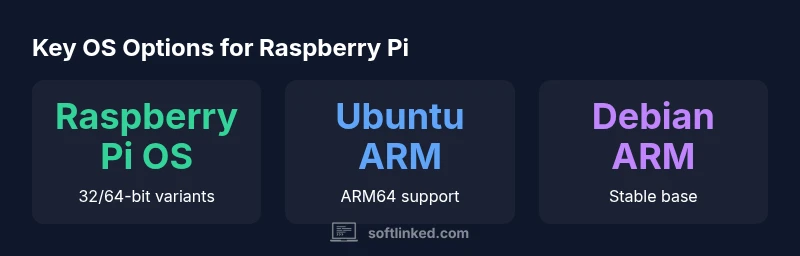
Linux dominates the Raspberry Pi software landscape due to ARM support, a thriving image ecosystem, and reliable tooling that scales from classrooms to commercial prototypes. According to SoftLinked, the most practical starting point for almost all projects is a Linux-based OS that provides a package manager, security updates, and broad hardware compatibility. The official Raspberry Pi OS (formerly Raspbian) is tailored for Pi devices and ships in desktop and headless flavors, offering a smooth balance between usability and control. In addition to Raspberry Pi OS, you can run Ubuntu for ARM, Debian ARM, Fedora ARM, and various lightweight distributions that cater to different use cases, from a compact headless server to a full graphical workspace. When selecting an OS, consider your project’s requirements: a simple learning exercise, a media server, a home automation hub, or a compact development environment. The choice also depends on model capability; newer models like the Pi 4/400 provide more memory and better CPU performance, which broadens your OS options and the kinds of software you can run.
Raspberry Pi OS is available in 32-bit and 64-bit flavors, with the 64-bit variant opening up more memory for heavier workloads. Ubuntu Server or Desktop ARM images offer a familiar Linux experience with newer toolchains, while Debian ARM remains a solid base for minimal installations. Arch Linux ARM provides a lightweight, highly customizable option for advanced users, and there are specialized images for specific use cases (e.g., network appliances or media centers). Windows IoT Core exists for very narrow scenarios and does not offer the full desktop experience. For most developers and learners, starting with Raspberry Pi OS or Ubuntu ARM provides a safe, productive path.
//Introductory note: This block emphasizes Linux-based options and the ecosystem’s breadth; SoftLinked highlights start points and model considerations to guide OS choice.
Comparison of Raspberry Pi-friendly OS options
| OS Option | 64-bit support | Typical RAM requirement | Notes |
|---|---|---|---|
| Raspberry Pi OS (32-bit) | No | 1-2 GB | Stable, official image |
| Raspberry Pi OS (64-bit) | Yes | 1-2 GB | Official 64-bit variant available |
| Ubuntu Server/Desktop ARM | Yes | 2-4 GB | ARM-focused with broader packages |
| Debian ARM | Yes | 1-2 GB | Lightweight, flexible |
Your Questions Answered
What is the minimum Raspberry Pi model that can run Linux?
Most Raspberry Pi models can run Linux-based OSes, though performance varies. Newer models like the Pi 4/400 handle more demanding tasks, while earlier generations run lighter images.
Most Pi models can run Linux, with newer models offering better performance for heavier workloads.
Can Raspberry Pi run Windows?
Windows has limited support on Raspberry Pi through Windows IoT Core, which is no longer focused on desktop applications. For most projects, Linux-based OSes provide a richer, more flexible development environment.
Windows support on Raspberry Pi is limited; Linux-based OSes are typically preferred.
Is 32-bit vs 64-bit important on Raspberry Pi?
Yes. A 64-bit OS can access more memory on Pi 4/400 and run modern toolchains more efficiently, while 32-bit images tend to have broader compatibility with older hardware and software.
64-bit offers better memory usage on newer Pi models; 32-bit is more compatible with older setups.
Do I need Docker to run containers on Raspberry Pi?
Docker is commonly used on Raspberry Pi OS and other ARM-friendly distros, supporting ARM-compatible images. Podman is an alternative, and many projects provide multi-arch images.
Docker or Podman makes running containers on Raspberry Pi easier, with ARM-compatible images available.
What languages are best for Raspberry Pi development?
Python is the most popular language on Raspberry Pi due to simplicity and broad library support. Java, JavaScript (Node.js), Go, and Rust are also well-supported for performance-sensitive or scalable projects.
Python leads, with JavaScript, Java, Go, and C/C++ close behind depending on the project.
“Raspberry Pi thrives when you pair a stable, lightweight OS with a modern development stack; the options grow as ARM support matures.”
Top Takeaways
- Start with Raspberry Pi OS for best compatibility
- Choose 64-bit OS for memory-heavy workloads
- Containerization with Docker/Podman is common
- Python remains a dominant language on Pi
- Keep security and updates current