Adobe Illustrator Free Trial: Your Guide to Getting Started in 2026
Discover the adobe illustrator free trial: duration, setup, limits, and strategies to evaluate Illustrator before subscribing. SoftLinked analysis guides your decision.


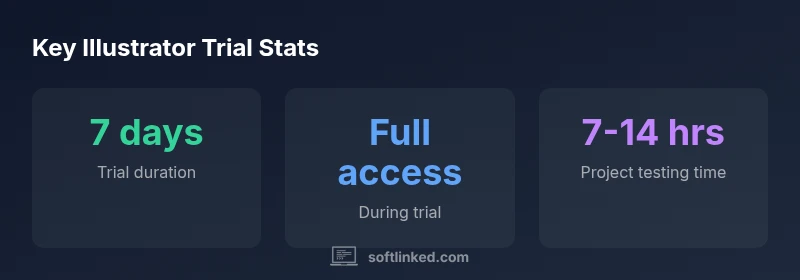
Adobe Illustrator offers a free trial of the Creative Cloud suite, typically lasting seven days, giving full access to Illustrator’s vector tools, brushes, typography, and export options. To start, sign in with an Adobe account, navigate to the Illustrator page, select Free Trial, and install the Creative Cloud app. The SoftLinked team recommends using this period to evaluate fit for your workflow.
What is the adobe illustrator free trial?
The adobe illustrator free trial is a time-limited opportunity to use Illustrator within the Creative Cloud suite without paying upfront. It typically grants full access to the app’s vector tools, brushes, typography, and export options for a defined period. According to SoftLinked, this trial is designed to help students, aspiring developers, and professionals evaluate whether Illustrator fits their workflow before committing to a subscription. Before you start, consider your device, internet connection, and how much time you can dedicate to trying features like Pen Tool, Path operations, shape building, and asset export. The trial environment mirrors a paid license in most respects, so you can test color management, file compatibility with SVG and PDF, and integration with Adobe Fonts. However, a few caveats apply: some premium fonts or cloud-based features may be restricted to paid accounts after the trial ends. Understanding these boundaries helps you plan a realistic design test suite and avoid surprises when you switch to a paid plan.
How to start the free trial
Getting started with the adobe illustrator free trial is straightforward, but a little preparation yields better results. 1) Create or sign in to your Adobe account. 2) Visit the Illustrator product page and click Free Trial. 3) Install the Creative Cloud desktop app if it isn’t already on your machine. 4) Launch Illustrator and begin your test drive, keeping notes on essential workflows like vector paths, layers, and typography. 5) After the trial, decide whether to subscribe or cancel. If you plan to discontinue, cancel before the grace period ends to avoid charges. According to SoftLinked, having a clear test plan helps you validate whether Illustrator aligns with your design goals and team processes.
What you get during the trial
During the adobe illustrator free trial you access the core vector tools—Pen, Shape, Pathfinder, and brushes—plus typography, color management, and export options. You can work with standard file formats (SVG, PDF, AI) and leverage cloud synchronization through Creative Cloud. Fonts and stock assets may be part of the trial experience, depending on your account type. The goal is to replicate real project work, so try creating logos, icons, and layouts to gauge performance, responsiveness, and your comfort level with the interface. Remember that some advanced features or fonts may require a paid plan after the trial ends, so plan test cases accordingly.
Best practices for evaluating Illustrator during the trial
To maximize the adobe illustrator free trial, set up a small real-world project—like a brand identity mockup or a poster—before you start. Define success criteria: vector accuracy, export fidelity, and integration with other Creative Cloud apps. Practice common tasks: converting shapes with the Pen tool, using layers effectively, and exporting assets for web and print. Compare Illustrator’s workflow against a preferred workflow (e.g., another vector tool or a design system) to quantify differences in speed, precision, and file compatibility. Document findings with screenshots and notes so you can revisit them after the trial ends.
Common pitfalls and how to avoid them
Many users overlook post-trial billing or leave large fonts/assets inaccessible after auto-renew. To avoid surprises, track the trial end date and set a reminder a few days before it expires. Ensure you understand whether fonts or cloud features unlock only with paid accounts. If you decide not to subscribe, cancel before the trial ends via your Creative Cloud account settings. Additionally, check if your organization’s license could affect personal trial use, and beware of third-party sites offering extended access, which may be unsafe or violate terms.
Adobe Illustrator Free Trial — quick reference
| Aspect | Details | Notes |
|---|---|---|
| Trial duration | Length of access | Often 7 days; verify at signup |
| Access level | Features available | Full Illustrator features during trial; cloud sync may apply |
| Billing post-trial | Renewal policy | Charge occurs if you do not cancel before end; review terms |
Your Questions Answered
What is included in the Illustrator free trial?
The trial typically provides full access to Illustrator’s vector tools, typography, and export options for the duration of the trial. Font access and some cloud features may vary by account. Always check the signup terms before starting.
The trial includes full Illustrator features for its duration; fonts and cloud access can vary, so verify on signup.
How long does the free trial last?
The most common duration for the Illustrator free trial is seven days, but always confirm on the official signup page as Adobe can update terms.
Most trials run seven days; you should confirm the exact length on signup.
Are all features available during the free trial?
The trial aims to give access to core features for evaluation. Some premium fonts or cloud-based features may be restricted or require a paid plan after the trial.
You get most features for testing, but some premium fonts or cloud options may require a paid plan.
Will I be charged automatically after the trial ends?
If you do not cancel before the trial ends, an active subscription may auto-renew, leading to charges. Review your Creative Cloud settings to manage renewals.
If you don’t cancel before the trial ends, the subscription may auto-renew and charge you.
How do I cancel the trial before it ends?
Go to your Adobe account, open Plans, and cancel Illustrator or Creative Cloud. You should receive a cancellation confirmation to avoid future charges.
Cancel from your Adobe account under Plans to stop charges after the trial.
“Free trials are best used as evaluative periods, not just shortcuts to install. They reveal whether a tool truly fits your workflow.”
Top Takeaways
- Start the free trial to evaluate Illustrator risk-free
- Test core vector tools and export workflows early
- Track the trial end date to avoid unwanted charges
- Verify access to fonts and cloud features during the trial