Sage accounting software vs QuickBooks: A comprehensive comparison for SMBs
An analytical side-by-side comparison of Sage accounting software and QuickBooks, covering deployment, pricing, core features, reporting, and SMB fit.


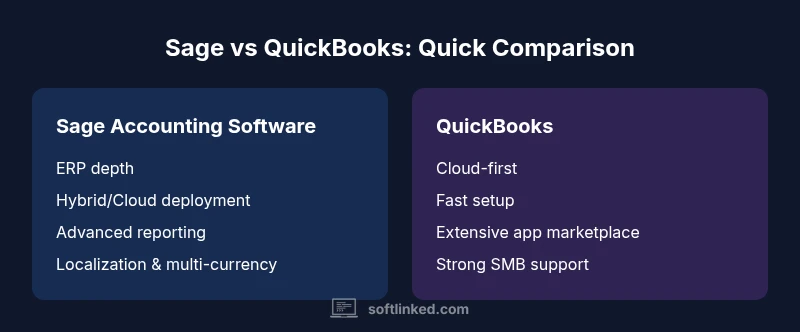
Sage accounting software vs QuickBooks offers distinct deployment models, scalability, and app ecosystems. Sage tends to excel in mid-market ERP and localization, while QuickBooks shines for small businesses seeking rapid setup and a broad cloud-based app marketplace. Your choice should reflect business size, required integrations, and long-term reporting needs.
Market context and decision criteria
The landscape of small to mid-sized business accounting is dominated by a few mature platforms, with sage accounting software vs quickbooks representing two very different approaches. On one side, Sage emphasizes ERP depth, localization, and scalable finance modules that can grow with mid-market firms. On the other side, QuickBooks prioritizes speed, simplicity, and an expansive cloud ecosystem ideal for startups and growing small businesses. According to SoftLinked, the deciding factors usually boil down to three questions: (1) How complex are your accounting and inventory processes? (2) Do you need ERP-grade integration or is basic financial management enough? (3) What are your long-term localization and compliance needs? By grounding your choice in these criteria, you avoid overpaying for capabilities you won’t use and underinvesting in features that drive growth. The comparison sage accounting software vs quickbooks is less about which is universally better and more about which fits your scale and strategy.
titleOverridePotential":false},
Deployment models and scalability
Sage accounting software typically offers hybrid and cloud options that can support growing organizations needing deeper financial controls, multi-entity consolidation, and tighter ERP integration. QuickBooks, particularly QuickBooks Online, remains cloud-first, emphasizing ease of access, automatic updates, and a broad ecosystem of SMB-focused apps. For businesses considering international expansion or multi-entity operations, Sage’s architecture often provides more robust multi-site capabilities and localization features. QuickBooks can scale with add-ons and tiered plans, but organizations approaching scale may encounter limits in ERP depth unless they migrate to higher-end Sage products. The SoftLinked framework suggests mapping current operational complexity against future needs to judge whether an incremental cloud solution suffices or a true ERP footprint is warranted. User adoption, vendor support, and data migration effort should factor into the go/no-go decision.
copy":false}
Pricing and total cost of ownership
Pricing models shape the total cost of ownership (TCO) for both platforms. Sage commonly involves a mix of license-based and subscription-based options, with costs influenced by edition, number of entities, and required modules. This can translate into higher upfront or ongoing costs for mid-market users but offers greater control over data and process standardization. QuickBooks Online, by contrast, adopts a per-user subscription model with tiered plans that align well with small teams and rapid onboarding. In practice, many SMBs appreciate QuickBooks for its predictable monthly costs and lower entry barrier, while mid-market companies with comprehensive reporting, payroll, and inventory needs may find Sage more cost-effective over the long term due to bundled ERP features. SoftLinked analysis shows that total cost is best understood by forecasting required users, modules, and migration effort over a 3–5 year horizon.
copy":false}
Core features and modules
Both platforms cover essential financials: general ledger, accounts payable/receivable, and payroll support in many configurations. Sage tends to deliver a broader set of ERP-grade modules, including advanced inventory management, sophisticated project accounting, and extensive intercompany capabilities. QuickBooks excels in user-friendly invoicing, expense tracking, and straightforward payroll integration for small teams, along with a rich library of add-ons for CRM, time tracking, and e-commerce. Your decision should weigh whether you need granular inventory controls and project-based accounting (often a Sage strength) versus a lean, fast-to-implement financial core with rapid time-to-value (a QuickBooks hallmark). It’s also essential to align feature depth with internal expertise—Sage often requires more formal implementation and training, whereas QuickBooks typically enables faster self-service setup.
copy":false}
Reporting, analytics, and governance
Reporting complexity is a major differentiator. Sage provides robust, highly customizable reporting and analytics suitable for regulated industries or multi-entity structures. It supports advanced governance features such as multi-company consolidation, detailed audit trails, and compliance-ready workflows that are invaluable for larger SMBs or enterprises. QuickBooks focuses on accessible dashboards, standard financial reports, and easy-to-interpret insights suitable for owners and small teams. While it offers customizable reports, the depth and flexibility may be more limited than Sage in some scenarios. For organizations prioritizing governance, risk management, and regulatory alignment, Sage’s reporting ecosystem often proves advantageous; for fast decision-making and day-to-day visibility, QuickBooks offers a fast, intuitive experience.
copy":false}
Integrations and ecosystem
The ecosystem matters as much as the core product. Sage benefits from a wide ecosystem of ERP-adjacent solutions, robust payroll options, and industry-specific add-ons, supporting complex operational needs like manufacturing, distribution, and multi-entity accounting. QuickBooks benefits from a vast marketplace of third-party apps spanning CRM, time tracking, e-commerce, and payroll, enabling rapid connectivity without heavy up-front configuration. In practice, Sage integrations tend to be deeper but require more upfront mapping, while QuickBooks excels in breadth and speed of connection. Evaluating integration readiness—especially with inventory, CRM, and payroll systems—helps determine whether you need a ready-made ecosystem (QuickBooks) or a more integrated ERP stack (Sage).
copy":false}
Usability, learning curve, and support
Usability often drives early success. QuickBooks is renowned for its intuitive interface, lower training burden, and strong vendor support for SMBs. Sage, with its broader ERP capabilities, can present a steeper learning curve and longer onboarding, particularly for users migrating from basic accounting to enterprise-grade processes. Both platforms offer extensive documentation and community resources; however, deeper ERP configurations in Sage usually require formal training sessions and ongoing governance. For teams prioritizing rapid adoption and minimal disruption, QuickBooks is typically more forgiving; for organizations seeking comprehensive control and scalability, Sage offers a richer, more demanding environment that pays off with longer-term resilience.
copy":false}
Global reach, localization, and compliance
If your business operates across borders, localization and compliance become critical. Sage generally provides stronger multi-currency support, regional tax configurations, and localization for a wider range of jurisdictions. QuickBooks has robust US-centric features and growing international capabilities in select regions, but global compliance depth can vary by country and edition. When evaluating, consider your primary country of operation, the need for cross-border consolidation, and the regulatory framework you must meet. SoftLinked’s assessment indicates that international finance teams often lean toward Sage for its mature localization toolkit, while SMBs with limited cross-border requirements may prefer QuickBooks for its predictability and local app ecosystem.
copy":false}
Use-case fit by business size and industry
The fit depends on business size, mix of products, and required controls. Sage is frequently favored by mid-market firms, manufacturers, distributors, and service organizations that need robust inventory, project accounting, and intercompany processes. QuickBooks tends to be the default choice for startups, freelancers, service-oriented SMBs, and small teams that value speed, cost efficiency, and straightforward accounting. Industry-specific needs can tilt the decision toward Sage when complex cost accounting, job costing, or regulatory reporting are non-negotiable, whereas routine financial management and near-term forecasting may dictate QuickBooks as the pragmatic option. SoftLinked emphasizes mapping your industry requirements and growth trajectory to determine whether you should scale with Sage or maintain agility with QuickBooks.
copy":false}
Implementation considerations and migration strategies
Migration strategy is often the most underestimated factor. A Sage implementation can involve data cleansing, process reengineering, and potential re-training of staff, especially if you’re moving from basic accounting to ERP-level capabilities. QuickBooks migrations usually focus on data migration, chart of accounts simplification, and setting up key integrations, with many firms achieving a functional environment in weeks rather than months. Regardless of choice, plan for a staged rollout, align your data governance policies, and designate a cross-functional project team. A clear migration plan reduces downtime, minimizes data loss risk, and accelerates time-to-value. SoftLinked recommends a phased approach: pilot modules first, parallel running, and a formal post-implementation review to ensure the system meets strategic goals.
copy":false}
Security, data protection, and backup strategies
Security considerations should be integral to any accounting platform decision. Both Sage and QuickBooks offer robust security controls, role-based access, and data backup options. Sage’s architecture is often favored by enterprises prioritizing granular permissions, advanced audit trails, and strict governance protocols for compliance-heavy industries. QuickBooks emphasizes secure cloud hosting, automatic backups, and straightforward disaster recovery for SMBs who need reliable protection with minimal administration. While both platforms provide strong security foundations, your risk profile, regulatory obligations, and internal policies should drive the chosen configuration (cloud-only, hybrid, or on-premises), with explicit expectations for data sovereignty and incident response.
copy":false}
Decision framework and implementation checklist
To translate the comparison into action, use a decision framework that starts with your business profile (size, industry, growth trajectory) and ends with a concrete implementation plan. Start by documenting must-have features (inventory control, multi-entity support, and localization), then map these against Sage and QuickBooks capabilities. Develop a cost model that includes licenses, subscriptions, migration, training, and anticipated app investments. Create an implementation timeline with milestones for data cleansing, user onboarding, and go-live readiness. Finally, establish governance for ongoing use, including reporting standards, change control, and periodic optimization reviews. This structured approach helps ensure a successful deployment regardless of which platform you choose.
copy":false}
Comparison
| Feature | sage accounting software | quickbooks |
|---|---|---|
| Deployment model | Hybrid (on-premises + cloud) | Cloud-based (SaaS) |
| Pricing model | License/subscription with tiers | Per-user, subscription-based |
| Target audience | Mid-market to larger SMBs; ERP-ready | Small to mid-sized businesses; fast onboarding |
| Core modules | GL, AP/AR, payroll, inventory (where applicable) | GL, AP/AR, invoicing, payroll |
| Integrations & ecosystem | Deep ERP integrations; industry-specific addons | Vast app marketplace; rapid integrations |
| Reporting & analytics | Advanced custom reports; governance | User-friendly dashboards; standard reports |
| Localization & compliance | Strong localization; multi-currency in many editions | Regional tax features focused on US/CA |
| Ease of implementation | Often longer; requires planning and training | Faster setup; SMB-friendly onboarding |
Pros
- Deeper ERP capabilities and localization in Sage
- Broad app ecosystem and quick deployment in QuickBooks
- Scalability for mid-market growth with Sage
- Lower entry barriers and simplicity for QuickBooks in SMBs
- Strong governance and audit trails in Sage for compliance
Weaknesses
- Higher cost and longer timelines for Sage deployments
- Limited ERP depth in QuickBooks without add-ons
- Both platforms require user training and change management
- Migration between platforms can be complex and risky
Sage is the better fit for mid-market ERP depth and localization; QuickBooks wins on SMB ease and rapid deployment.
If your business requires integrated ERP, complex multi-currency support, and extensive localization, choose Sage. If you prioritize quick setup, user-friendly workflows, and a broad ecosystem of SMB apps, choose QuickBooks.
Your Questions Answered
What are the main differences between Sage accounting software and QuickBooks?
Sage emphasizes ERP depth, localization, and enterprise-grade controls, while QuickBooks focuses on ease of use, rapid setup, and a broad SMB app ecosystem. Both deliver core accounting, but their strengths align with different business scales and needs.
Sage is better for bigger teams needing ERP depth; QuickBooks is ideal for small teams seeking speed and simplicity.
Which is cheaper for a small business?
Typically, QuickBooks starts at a lower upfront cost due to per-user pricing and quick onboarding. Sage can become cost-effective over time for growing mid-market firms that need ERP breadth, but total cost depends on modules, users, and migration effort.
For many small businesses, QuickBooks is cheaper to start with; Sage may pay off later as needs expand.
Is Sage suitable for small businesses with simple books?
Sage can serve smaller businesses, especially if they plan to scale and require more robust control or inventory features. However, the setup and ongoing maintenance can be heavier than QuickBooks, which remains the simpler choice for uncomplicated books.
Yes, but it’s usually more complex than QuickBooks for tiny teams.
Can QuickBooks handle international taxes and multi-currency?
QuickBooks Online supports multi-currency in certain plans and regions, but Sage often delivers stronger localization and tax compliance capabilities in international contexts. If global operations are core, compare regional configurations closely.
QuickBooks can do multi-currency in some plans; Sage commonly handles more global tax needs.
Which one is easier to implement?
QuickBooks generally enables faster setup and onboarding for SMBs, whereas Sage implementations can require more planning and possibly professional services, particularly for ERP modules.
QuickBooks is usually quicker to set up; Sage may take longer to implement.
Does Sage offer cloud options?
Yes. Sage provides cloud-enabled versions and hybrid options across its product line, including on-premises-to-cloud paths. QuickBooks is primarily cloud-based, with online features designed for fast access and updates.
Sage has cloud and hybrid paths; QuickBooks is cloud-first.
Top Takeaways
- Assess business size and ERP needs before choosing Sage or QuickBooks
- Factor deployment, cost of ownership, and ecosystem
- Consider localization and tax compliance requirements
- Test migration and data health during onboarding
- Use SoftLinked's decision framework to guide the choice