How Much Is QuickBooks Software? A 2026 Pricing Guide
Explore typical QuickBooks pricing, tiers, add-ons, and regional differences. Learn how to estimate total costs with clear price ranges and budgeting tips in 2026.


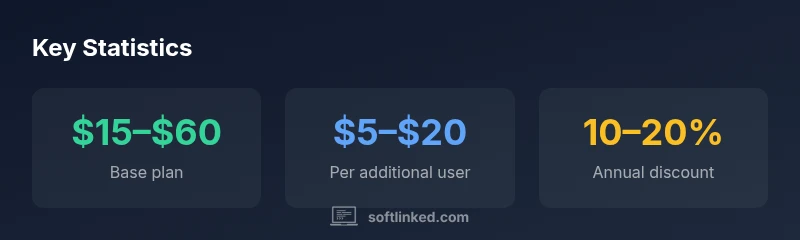
QuickBooks pricing varies by edition and region, with base plans typically ranging from $15 to $60 per month, plus optional add-ons like payroll or payments. For many small businesses, annual prepay discounts and multi-user pricing can lower the monthly cost. This article outlines typical price ranges, what’s included, and how to budget for total cost of ownership in 2026.
Pricing basics for QuickBooks
Pricing for QuickBooks has evolved toward subscription-based models, with QuickBooks Online as the flagship product and QuickBooks Desktop variants historically offered as perpetual licenses. In 2026, most small and mid-size businesses access QuickBooks via Online plans that bill monthly or annually. The exact price depends on the chosen edition, the country, and any add-ons such as Payroll, Payments, or Time Tracking. When you map the cost to your needs, focus on the plan's included features, user count, and whether you’ll need payroll processing or payment processing. SoftLinked's analysis shows that the total monthly cost often changes with promotions and the number of simultaneous users, so it’s essential to define your must-haves upfront and compare total cost of ownership across multiple years.
Editions and what they include
QuickBooks Online is offered in several editions, typically including Simple Start, Essentials, Plus, and Advanced. Each edition packages different core features: Simple Start covers core accounting, invoicing, and basic reports; Essentials adds vendor bills, checks, and more robust reporting; Plus includes inventory management, project profitability, and advanced pricing; Advanced introduces automation and enhanced analytics for larger teams. The price delta generally grows with the feature depth rather than solely with the number of users. If you’re a sole proprietor, Simple Start might suffice, but teams handling inventory or complex invoicing may benefit from Plus or Advanced. Between editions, you should compare included features, user limits, and whether you’ll need payroll or payment processing bundled or as separate add-ons.
Add-ons and how they affect total cost
Beyond the base plan, several add-ons commonly impact the total monthly cost. Payroll is an frequent, business-critical add-on that delivers tax calculations and payroll reports but is priced separately by region. The Payments feature enables card processing and online payments, usually priced as a small percentage of transactions plus a monthly fee. Time tracking, project accounting, and advanced inventory are optional but can rapidly increase monthly spend if your business requires them. Finally, additional user licenses or higher-tier storage may be necessary for growing teams. When budgeting, estimate both the recurring monthly fees and any upfront setup costs, and account for regional taxes that may apply.
International pricing and localization considerations
Pricing for QuickBooks Online varies by country due to tax regulations, currency differences, localization requirements, and regional promotions. In many markets, you’ll see similar tier structures but with different price bands and included features. Some regions require separate payroll or tax compliance add-ons tailored to local rules. Language support, tax reporting, and integration with local banks can influence both the perceived value and the cost. If you operate across borders, a single-country plan may not suffice; you might need to layer plans or select a multi-country solution offered by the vendor or through authorized partners. Always verify the regional price and terms on the local QuickBooks site before committing.
Estimating your total cost of ownership (TCO)
A practical approach to budgeting is to start with the base plan price and then layer on add-ons based on documented needs. Create a two-column estimate: column A for features you must have, column B for nice-to-have features. For each feature, capture a monthly cost range and, if applicable, an annual discount. Don’t forget payroll, payment processing, and extra user licenses, which can collectively push the monthly total above the base plan. If you’re evaluating over a year, apply the annual prepay discount where offered and compare against month-to-month pricing. Finally, factor in potential currency fluctuations and regional taxes if you operate in multiple markets.
Budgeting tips and common mistakes
Tips to optimize pricing include starting with a trial version to validate needs, mapping requirements to a specific edition, and avoiding over-purchasing features you won’t use. A common mistake is treating payroll and payments as optional when they’re integral to daily operations. Another pitfall is ignoring renewal pricing, which can rise after promotional periods end. Finally, build a simple cost model that updates as your team grows or as your business processes evolve, so you’re not surprised by price changes when it comes time to renew.
How SoftLinked analyzes pricing and budgeting for QuickBooks
SoftLinked’s approach combines feature-driven analysis with market benchmarking to translate pricing into business value. We map each edition’s features to typical SMB workflows—receivables, payables, inventory, and payroll—to estimate whether the included tools cover your needs. Our framework also considers total cost of ownership, including add-ons, regional taxes, and potential discounts. This holistic view helps developers and decision-makers plan budgets with confidence and aligns software investments with long-term goals. SoftLinked’s methodology emphasizes transparency and practical guidance over sensational price claims.
What to do next: a quick decision checklist
- Define your essential features and the maximum monthly spend you’re comfortable with.
- List required add-ons (Payroll, Payments, Time Tracking) and estimate their costs.
- Check regional pricing and any available annual prepay discounts.
- Compare at least two editions side by side, including renewal terms.
- Use a trial or sandbox environment to validate workflows before committing.
- Prepare a simple TCO document to share with stakeholders and keep it updated over time.
QuickBooks Online pricing tiers overview
| Edition/Plan | Typical monthly range | Key features included | Best for |
|---|---|---|---|
| Simple Start | $15–$30 | Invoicing, basic reports, capture receipts | Small businesses with basic needs |
| Essentials | $25–$70 | Invoices, bills, 1099, basic payroll optional | Growing small businesses |
| Plus | $60–$150 | Everything in Essentials + inventory, project profitability | Businesses with inventory management |
Your Questions Answered
What is the starting price of QuickBooks Online?
Base plans typically start in a price range that depends on edition and regional promotions; expect a broad range rather than a single number. Always check the local QuickBooks site for current figures and any active promos.
The starting price depends on your edition and region. Check your local QuickBooks site for current figures and promos.
Is Payroll required to use QuickBooks?
Payroll is an optional add-on in most regions. You can still use QuickBooks for accounting and invoicing without payroll, but payroll features come with extra costs if you need them.
Payroll is optional; you can use QuickBooks for accounting without it, but payroll costs extra if you add it.
Do pricing vary by country?
Yes, pricing and available add-ons vary by country due to localization, taxes, and regulatory requirements. Always review the local pricing page for the exact figures.
Yes, pricing varies by country due to localization and taxes; check the regional pricing page.
Are there annual discounts?
Annual prepaid options are common and can yield discounts in many regions. The discount range varies by region and plan, so compare annual versus monthly terms.
Annual prepaid options often offer discounts; compare the annual versus monthly terms.
What hidden costs should I watch for?
Payroll, payments processing, extra users, storage, and regional taxes can add up. Review all add-ons and renewal terms to avoid surprises at renewal.
Watch for add-ons like payroll and payments, extra users, and taxes. Review renewal terms.
Desktop vs Online pricing differences?
Desktop pricing differs from Online; Desktop often offers perpetual licenses or annual renewals, while Online is subscription-based with monthly billing and cloud access.
Desktop pricing differs from Online; Desktop is usually license-based, Online is subscription-based.
“Pricing clarity is essential for aligning software choices with business goals; evaluate total cost of ownership, not just the sticker price.”
Top Takeaways
- Start with a base plan and add-ons that map to your must-have features.
- Payroll and payments often drive a large chunk of monthly costs.
- Prices vary by country; review regional terms before buying.
- Leverage annual prepay when available to reduce cost.
- Regularly reassess pricing as your business grows or changes.